Every trip's weather at once, a cache that is an actor, and an actor of your own
Structured concurrency · Actors and @MainActor
You will buildA strip on the Overview with the weather in every city the trips go to — asked one after another first, then all at once in a task group — and a cache, written as an actor, that the strip and the trip screen share, so that a city asked about once is not asked again. Then a copy on disk, and a global actor of your own that the cache and the disk share — given a serial queue of its own, because the disk blocks. Part 11 begins.
TimeAbout 100 minutes
WhyPart 11 is Swift concurrency: the part of the language that replaced Grand Central Dispatch. Lesson 34 used its first half — async, await, a task. This lesson brings the two ideas the rest stands on. Structured concurrency lets several pieces of work run at once while still belonging to the code that started them, so that they finish, fail and are cancelled together; it replaces DispatchGroup. Actors protect state that several tasks share, without locks; they replace serial queues. The compiler checks both.
Open your project
Open your
Tripsproject as lesson 36 left it: double-clickTrips.xcodeprojin Finder, or use File ▸ Open… (⌘O) in Xcode.If you did not finish lesson 36, or would rather start from a known state, download Trips-lesson-36.zip instead. It is the project exactly as it stood at the end of lesson 36. Unzip it and open
Trips.xcodeproj.Run it (⌘R) to check that it builds. You should see where lesson 36 ended:
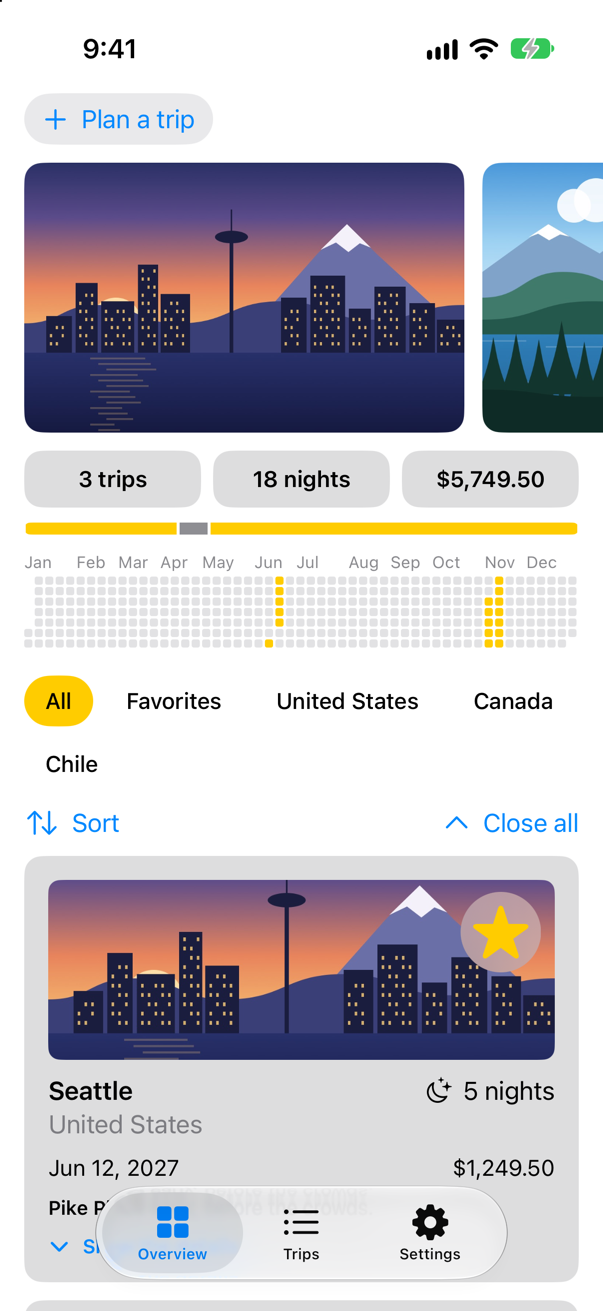
Trips, as it stood at the end of lesson 36Screenshot · iPhone 17, iOS 27.0
One after another
The Overview gets a strip with the weather in every city the trips go to. A first version asks the way lesson 34 did, one await at a time, in a loop. Each question and answer goes to the console with the time since the strip began, so you can see the order. Make a new SwiftUI View named WeatherStrip, and replace everything in it:
import SwiftUI

/// The weather in every city the trips go to.
struct WeatherStrip: View {
    let cities: [String]
    @State private var weather: [String: Weather] = [:]

    var body: some View {
        ScrollView(.horizontal) {
            HStack {
                ForEach(cities, id: \.self) { city in
                    if let now = weather[city] {
                        Label("\(city) \(now.temperature, format: .number.precision(.fractionLength(0)))°", systemImage: now.sky.symbol)
                    } else {
                        Label("\(city) …", systemImage: "cloud")
                    }
                }
                .padding(.horizontal, 12)
                .padding(.vertical, 8)
                .background(.thinMaterial, in: .capsule)
            }
            .padding(.horizontal)
        }
        .scrollIndicators(.hidden)
        .task {
            let start = ContinuousClock.now
            /// How long since the strip began asking, such as "0.42 sec".
            func elapsed() -> String {
                start.duration(to: .now).formatted(.units(allowed: [.seconds], fractionalPart: .show(length: 2)))
            }
            for city in cities {
                print("asked about \(city) at \(elapsed())")
                weather[city] = try? await Weather.now(in: city)
                print("answered about \(city) at \(elapsed())")
            }
        }
    }
}
The local function elapsed() captures start, and prints a Duration with a format style; formatted(_:) works on durations as it does on numbers and dates. The Overview shows the strip under the summary. In ContentView.swift:
struct ContentView: View { @Environment(TripStore.self) private var store @AppStorage(Settings.showsYearKey) private var showsYear = true @State private var filter = TripFilter.all @State private var closings = 0 var body: some View { @Bindable var store = store ScrollView { LazyVStack(spacing: 12) { TripPlanner() .environment(\.highlight, .mint) PhotoStrip(trips: store.trips) TripSummary(trips: store.trips) WeatherStrip(cities: store.trips.map(\.city)) if showsYear { YearGrid(trips: store.trips) } FilterBar(filters: filters, selection: $filter) { trips in store.makeFavorites(trips) } .frame(maxWidth: .infinity, alignment: .leading) .padding(.horizontal) HStack { Menu("Sort", systemImage: "arrow.up.arrow.down") { Button("By date") { store.trips.sort { $0.start < $1.start } } Button("By price") { store.trips.sort { $0.price < $1.price } } } Spacer() Button("Close all", systemImage: "chevron.up") { closings += 1 } } .padding(.horizontal) LazyVGrid(columns: [GridItem(.adaptive(minimum: 300))], spacing: 12) { ForEach($store.trips.filter { filter.includes($0.wrappedValue) }) { $trip in TripCard(trip: $trip) } .reorderable() } .reorderContainer(for: Trip.self, isEnabled: filter == .all) { difference in switch difference.destination.position { case .before(let id): store.move(difference.sources, before: id) case .end: store.move(difference.sources, before: nil) } } .id(closings) } } .sensoryFeedback(.success, trigger: store.trips.filter(\.isFavorite).count) } /// All, Favorites, and then a filter for each country that has a trip. private var filters: [TripFilter] { var countries: [String] = [] for trip in store.trips where !countries.contains(trip.country) { countries.append(trip.country) } return [.all, .favorites] + countries.map { TripFilter.country($0) } }}struct ContentView: View {
@Environment(TripStore.self) private var store
@AppStorage(Settings.showsYearKey) private var showsYear = true
@State private var filter = TripFilter.all
@State private var closings = 0
var body: some View {
@Bindable var store = store
ScrollView {
LazyVStack(spacing: 12) {
TripPlanner()
.environment(\.highlight, .mint)
PhotoStrip(trips: store.trips)
TripSummary(trips: store.trips)
WeatherStrip(cities: store.trips.map(\.city))
if showsYear {
YearGrid(trips: store.trips)
}
FilterBar(filters: filters, selection: $filter) { trips in
store.makeFavorites(trips)
}
.frame(maxWidth: .infinity, alignment: .leading)
.padding(.horizontal)
HStack {
Menu("Sort", systemImage: "arrow.up.arrow.down") {
Button("By date") { store.trips.sort { $0.start < $1.start } }
Button("By price") { store.trips.sort { $0.price < $1.price } }
}
Spacer()
Button("Close all", systemImage: "chevron.up") { closings += 1 }
}
.padding(.horizontal)
LazyVGrid(columns: [GridItem(.adaptive(minimum: 300))], spacing: 12) {
ForEach($store.trips.filter { filter.includes($0.wrappedValue) }) { $trip in
TripCard(trip: $trip)
}
.reorderable()
}
.reorderContainer(for: Trip.self, isEnabled: filter == .all) { difference in
switch difference.destination.position {
case .before(let id): store.move(difference.sources, before: id)
case .end: store.move(difference.sources, before: nil)
}
}
.id(closings)
}
}
.sensoryFeedback(.success, trigger: store.trips.filter(\.isFavorite).count)
}
/// All, Favorites, and then a filter for each country that has a trip.
private var filters: [TripFilter] {
var countries: [String] = []
for trip in store.trips where !countries.contains(trip.country) {
countries.append(trip.country)
}
return [.all, .favorites] + countries.map { TripFilter.country($0) }
}
}Run the app. The strip fills in under the summary:
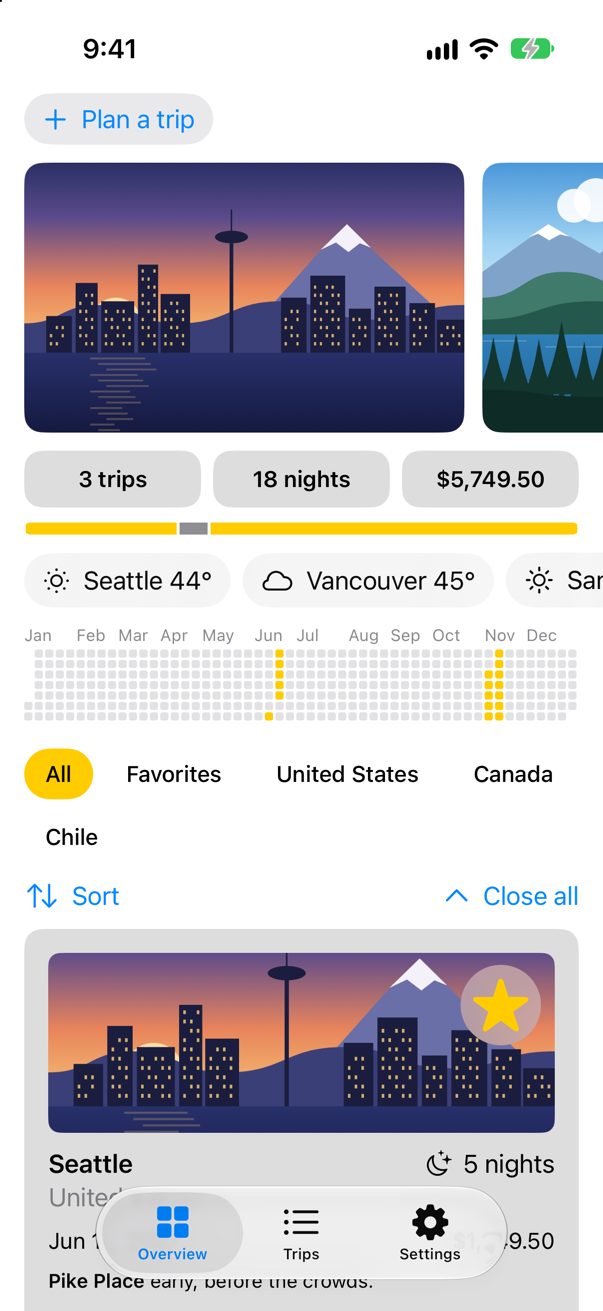
And the console:
Saved 3 trips: 798 bytes
asked about Seattle at 0.00 sec
Asking Open-Meteo about Seattle
answered about Seattle at 0.67 sec
asked about Vancouver at 0.68 sec
Asking Open-Meteo about Vancouver
answered about Vancouver at 0.82 sec
asked about San Pedro de Atacama at 0.82 sec
Asking Open-Meteo about San Pedro de Atacama
answered about San Pedro de Atacama at 0.96 sec
Each question waited for the answer before it: Vancouver was asked only when Seattle had answered. Nothing about the three cities needs that order. (The times are one run's; yours will differ, and the order is what matters.)
All at once
For a fixed number of things, async let starts each as a child of the current task, and try await collects them. For a number known only when the code runs — the cities of however many trips there are — there is the task group. withTaskGroup "Starts a new scope that can contain a dynamic number of child tasks": addTask starts a child for each city, and for await takes the results in the order they finish. The children belong to the group, and the group to the .task that started it: Apple, again, "A group always waits for all of its child tasks to complete before it returns," and if the strip goes away while they run, the cancellation reaches every child. Each child returns its city with the answer, so the order they finish in does not matter. In WeatherStrip.swift:
import SwiftUI/// The weather in every city the trips go to.struct WeatherStrip: View { let cities: [String] @State private var weather: [String: Weather] = [:] var body: some View { ScrollView(.horizontal) { HStack { ForEach(cities, id: \.self) { city in if let now = weather[city] { Label("\(city) \(now.temperature, format: .number.precision(.fractionLength(0)))°", systemImage: now.sky.symbol) } else { Label("\(city) …", systemImage: "cloud") } } .padding(.horizontal, 12) .padding(.vertical, 8) .background(.thinMaterial, in: .capsule) } .padding(.horizontal) } .scrollIndicators(.hidden) .task { let start = ContinuousClock.now /// How long since the strip began asking, such as "0.42 sec". func elapsed() -> String { start.duration(to: .now).formatted(.units(allowed: [.seconds], fractionalPart: .show(length: 2))) } for city in cities { print("asked about \(city) at \(elapsed())") weather[city] = try? await Weather.now(in: city) print("answered about \(city) at \(elapsed())") await withTaskGroup(of: (String, Weather?).self) { group in for city in cities { group.addTask { print("asked about \(city) at \(elapsed())") return (city, try? await Weather.now(in: city)) } } for await (city, answer) in group { print("answered about \(city) at \(elapsed())") weather[city] = answer } } } }}import SwiftUI
/// The weather in every city the trips go to.
struct WeatherStrip: View {
let cities: [String]
@State private var weather: [String: Weather] = [:]
var body: some View {
ScrollView(.horizontal) {
HStack {
ForEach(cities, id: \.self) { city in
if let now = weather[city] {
Label("\(city) \(now.temperature, format: .number.precision(.fractionLength(0)))°", systemImage: now.sky.symbol)
} else {
Label("\(city) …", systemImage: "cloud")
}
}
.padding(.horizontal, 12)
.padding(.vertical, 8)
.background(.thinMaterial, in: .capsule)
}
.padding(.horizontal)
}
.scrollIndicators(.hidden)
.task {
let start = ContinuousClock.now
/// How long since the strip began asking, such as "0.42 sec".
func elapsed() -> String {
start.duration(to: .now).formatted(.units(allowed: [.seconds], fractionalPart: .show(length: 2)))
}
await withTaskGroup(of: (String, Weather?).self) { group in
for city in cities {
group.addTask {
print("asked about \(city) at \(elapsed())")
return (city, try? await Weather.now(in: city))
}
}
for await (city, answer) in group {
print("answered about \(city) at \(elapsed())")
weather[city] = answer
}
}
}
}
}Run the app again, and read the console:
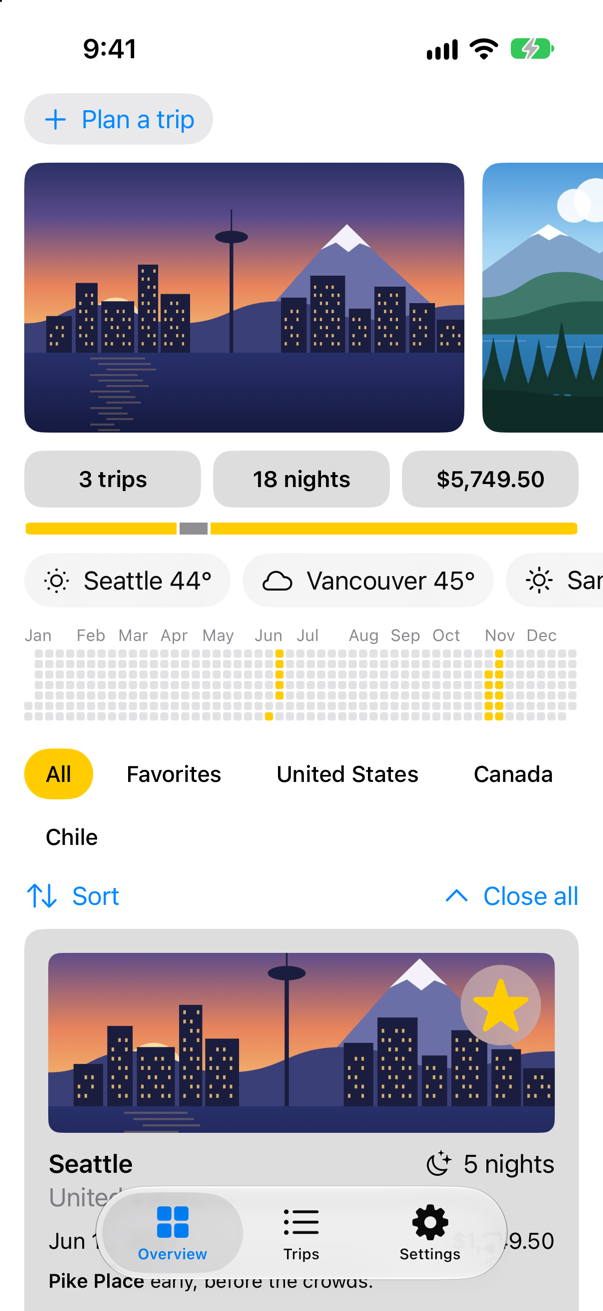
Saved 3 trips: 798 bytes
asked about Seattle at 0.00 sec
Asking Open-Meteo about Seattle
asked about San Pedro de Atacama at 0.00 sec
Asking Open-Meteo about San Pedro de Atacama
asked about Vancouver at 0.00 sec
Asking Open-Meteo about Vancouver
answered about San Pedro de Atacama at 0.93 sec
answered about Vancouver at 1.26 sec
answered about Seattle at 1.26 sec
All three questions were asked before the first answer came, and the answers came in the order the network finished them. Each child task starts at once — even the order of the "asked" lines is not guaranteed. Coming from GCD, this is a DispatchGroup with enter, leave and notify, except that the results come back with the tasks, errors are thrown to the code that waits, and nothing can forget to call leave.
A cache that is an actor
The strip has just asked about Seattle. Open Seattle's screen, and lesson 34's model asks again. A cache would let every screen share one answer — but the strip's child tasks and the trip screen may all reach it at once, from different threads. In UIKit that was a dictionary behind a lock or a serial queue. In Swift it is an actor: a reference type whose state only one task at a time can touch. Code outside calls its methods with await, and the compiler refuses anything else — an edge case shows the error.
The cache keeps a Task for each city rather than a Weather: a question that is on its way, or answered. That matters at the await in the middle of weather(in:). While one caller waits there, the actor is free to start another call — this is called reentrancy — and if it kept only answers, a second caller arriving in that moment would find nothing and ask Open-Meteo a second time (an edge case catches it). Storing the question first means the second caller awaits the same one. A question that fails is forgotten, so that the next caller asks again. Make a new Swift File named WeatherCache, and replace everything in it:
import Foundation

/// The weather already asked for, shared by every screen — with the questions still on their way.
actor WeatherCache {
    static let shared = WeatherCache()

    private var answers: [String: Task<Weather, any Error>] = [:]

    /// The weather in a city: an answer already given, a question already asked, or a new question.
    func weather(in city: String) async throws -> Weather {
        if let asked = answers[city] {
            return try await asked.value
        }
        let question = Task { try await Weather.now(in: city) }
        answers[city] = question
        do {
            return try await question.value
        } catch {
            answers[city] = nil         // a failure is not kept: the next question asks again
            throw error
        }
    }

    /// Forgets a city's weather, so that the next question asks Open-Meteo again.
    func forget(_ city: String) {
        answers[city] = nil
    }
}
The strip asks the cache instead of Open-Meteo. In WeatherStrip.swift:
import SwiftUI/// The weather in every city the trips go to.struct WeatherStrip: View { let cities: [String] @State private var weather: [String: Weather] = [:] var body: some View { ScrollView(.horizontal) { HStack { ForEach(cities, id: \.self) { city in if let now = weather[city] { Label("\(city) \(now.temperature, format: .number.precision(.fractionLength(0)))°", systemImage: now.sky.symbol) } else { Label("\(city) …", systemImage: "cloud") } } .padding(.horizontal, 12) .padding(.vertical, 8) .background(.thinMaterial, in: .capsule) } .padding(.horizontal) } .scrollIndicators(.hidden) .task { let start = ContinuousClock.now /// How long since the strip began asking, such as "0.42 sec". func elapsed() -> String { start.duration(to: .now).formatted(.units(allowed: [.seconds], fractionalPart: .show(length: 2))) } await withTaskGroup(of: (String, Weather?).self) { group in for city in cities { group.addTask { print("asked about \(city) at \(elapsed())") return (city, try? await Weather.now(in: city)) return (city, try? await WeatherCache.shared.weather(in: city)) } } for await (city, answer) in group { print("answered about \(city) at \(elapsed())") weather[city] = answer } } } }}import SwiftUI
/// The weather in every city the trips go to.
struct WeatherStrip: View {
let cities: [String]
@State private var weather: [String: Weather] = [:]
var body: some View {
ScrollView(.horizontal) {
HStack {
ForEach(cities, id: \.self) { city in
if let now = weather[city] {
Label("\(city) \(now.temperature, format: .number.precision(.fractionLength(0)))°", systemImage: now.sky.symbol)
} else {
Label("\(city) …", systemImage: "cloud")
}
}
.padding(.horizontal, 12)
.padding(.vertical, 8)
.background(.thinMaterial, in: .capsule)
}
.padding(.horizontal)
}
.scrollIndicators(.hidden)
.task {
let start = ContinuousClock.now
/// How long since the strip began asking, such as "0.42 sec".
func elapsed() -> String {
start.duration(to: .now).formatted(.units(allowed: [.seconds], fractionalPart: .show(length: 2)))
}
await withTaskGroup(of: (String, Weather?).self) { group in
for city in cities {
group.addTask {
print("asked about \(city) at \(elapsed())")
return (city, try? await WeatherCache.shared.weather(in: city))
}
}
for await (city, answer) in group {
print("answered about \(city) at \(elapsed())")
weather[city] = answer
}
}
}
}
}And so does the trip screen's model: load(for:) takes what the cache has, and pull-to-refresh tells the cache to forget the city first, so that it really asks again. In WeatherModel.swift:
import Foundation/// The weather where a trip goes, as its screen shows it: on its way, here, or not to be had./// `@MainActor`: the screen reads it.@MainActor@Observablefinal class WeatherModel { /// `Sendable`: plain data — and a type nested in the class does not take the class's actor. enum Phase: Sendable { case loading case loaded(Weather) case failed(String) } private(set) var phase = Phase.loading /// Starts from nothing: the screen says the weather is on its way. func load(for city: String) async { phase = .loading await refresh(for: city) await show(city) } /// Asks again, and keeps what the screen shows until the answer comes. /// Asks Open-Meteo again, and keeps what the screen shows until the answer comes. func refresh(for city: String) async { await WeatherCache.shared.forget(city) await show(city) } /// The city's weather from the cache, which asks Open-Meteo only if nobody has yet. private func show(_ city: String) async { let next: Phase do { next = .loaded(try await Weather.now(in: city)) next = .loaded(try await WeatherCache.shared.weather(in: city)) } catch { next = .failed(error.localizedDescription) } // the screen went away, or the city changed: nobody is waiting for this answer now if !Task.isCancelled { phase = next } }}import Foundation
/// The weather where a trip goes, as its screen shows it: on its way, here, or not to be had.
/// `@MainActor`: the screen reads it.
@MainActor
@Observable
final class WeatherModel {
/// `Sendable`: plain data — and a type nested in the class does not take the class's actor.
enum Phase: Sendable {
case loading
case loaded(Weather)
case failed(String)
}
private(set) var phase = Phase.loading
/// Starts from nothing: the screen says the weather is on its way.
func load(for city: String) async {
phase = .loading
await show(city)
}
/// Asks Open-Meteo again, and keeps what the screen shows until the answer comes.
func refresh(for city: String) async {
await WeatherCache.shared.forget(city)
await show(city)
}
/// The city's weather from the cache, which asks Open-Meteo only if nobody has yet.
private func show(_ city: String) async {
let next: Phase
do {
next = .loaded(try await WeatherCache.shared.weather(in: city))
} catch {
next = .failed(error.localizedDescription)
}
// the screen went away, or the city changed: nobody is waiting for this answer now
if !Task.isCancelled {
phase = next
}
}
}Run the app, wait for the strip, then open Seattle in the Trips tab:
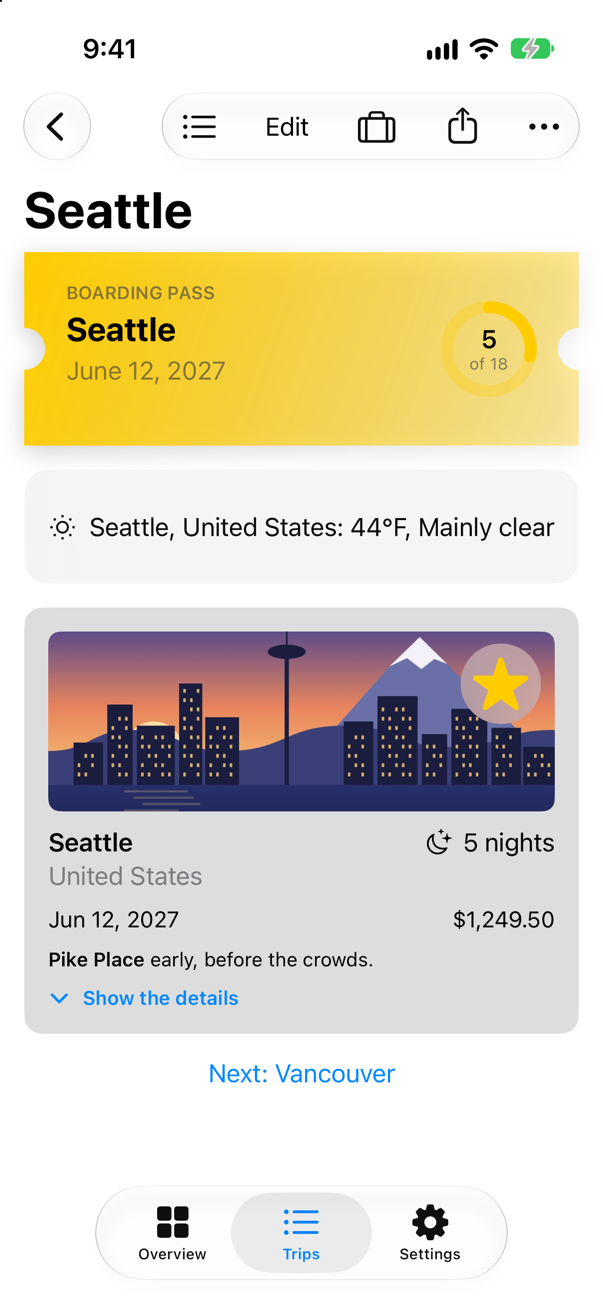
The console at launch shows Open-Meteo asked once for each city:
Saved 3 trips: 798 bytes
asked about San Pedro de Atacama at 0.00 sec
Asking Open-Meteo about San Pedro de Atacama
asked about Vancouver at 0.00 sec
Asking Open-Meteo about Vancouver
asked about Seattle at 0.00 sec
Asking Open-Meteo about Seattle
answered about San Pedro de Atacama at 0.71 sec
answered about Vancouver at 0.91 sec
answered about Seattle at 1.02 sec
And opening Seattle asked nothing at all — the screen shows the weather the strip already had. Two kinds of isolation are at work. The strip and the model are on the main actor — the strip is a view, and the model says @MainActor — and so is Weather.now(in:) when they call it, because it runs where it is called; the cache is an actor of its own, and each await on it is a hop from one to the other. The task group's children are on neither — a flash card shows that they start on the shared pool of threads. Where the code runs is decided by those annotations, not by queues you dispatch to.
One actor for all of the weather
Trips forgets the weather when it quits, and asks Open-Meteo about every city at every launch. A copy on disk would let a launch soon after the last one show the weather at once, without asking. The cache would look on disk after memory and before the network — and that look must come with no await between it and storing the question, for the reason step 4 gave: at an await the actor takes the next call, which finds nothing yet and asks again. An edge case shows exactly that, with the disk as an actor of its own. So the cache and the disk must be on one actor — not an actor each, but one actor that both types belong to. That is a global actor. @MainActor is one, and you can make your own. Make a new Swift File named WeatherActor, and replace everything in it:
import Foundation

/// The actor the weather's types share: the cache in memory and the copy on disk. On one actor they use each other
/// directly, with no `await` — so a look at one and a change to the other happen in one step.
@globalActor
actor WeatherActor {
    static let shared = WeatherActor()
}
@globalActor on an actor with a static let shared — the one instance — is all it takes: @WeatherActor can now be written on a type, a function or a closure, as @MainActor is, and everything marked with it takes turns on that one actor. The disk is a class on it. It keeps each city's weather with the time Open-Meteo gave it, and answers only for the last ten minutes. Its reads and writes are synchronous — Data(contentsOf:) and write(to:) hold their thread until the disk is done — and each save prints the dispatch queue that ran it, which the next step is about. Its init is nonisolated: it touches nothing but the disk's own properties, so any code may make one. Make a new Swift File named WeatherDisk, and replace everything in it:
import Foundation

/// The weather as it was last answered, kept in a file, so that the next launch has it at once. Its reads and writes
/// are synchronous: each holds its thread until the disk is done.
@WeatherActor
final class WeatherDisk {
    /// One city's weather, and when Open-Meteo gave it.
    private struct Saved: Codable {
        let place: String
        let temperature: Double
        let code: Int
        let at: Date
    }

    private let file = URL.cachesDirectory.appending(path: "weather.json")
    private var saved: [String: Saved]

    /// Reads the file. `nonisolated`, so that a cache can be made with a disk from any code.
    nonisolated init() {
        let data = try? Data(contentsOf: file)
        saved = data.flatMap { try? JSONDecoder().decode([String: Saved].self, from: $0) } ?? [:]
    }

    /// A city's weather, if it was answered in the last ten minutes.
    func recent(in city: String) -> Weather? {
        guard let kept = saved[city], kept.at > .now - 600 else {
            return nil
        }
        return Weather(place: kept.place, temperature: kept.temperature, code: kept.code)
    }

    /// Keeps a city's new weather, and writes the file.
    func save(_ weather: Weather, for city: String) {
        saved[city] = Saved(place: weather.place, temperature: weather.temperature, code: weather.code, at: .now)
        write()
        print("Saved \(city) to disk, on \(queueName())")
    }

    /// Forgets a city's weather, so that the next question asks Open-Meteo.
    func forget(_ city: String) {
        saved[city] = nil
        write()
    }

    private func write() {
        try? JSONEncoder().encode(saved).write(to: file, options: .atomic)
    }
}

/// The dispatch queue running this code, such as "com.apple.root.user-initiated-qos.cooperative". On no actor:
/// it answers for whoever calls it.
func queueName() -> String {
    String(cString: __dispatch_queue_get_label(nil))
}
The cache moves onto the same actor: actor WeatherCache becomes @WeatherActor final class WeatherCache. It looks on disk between memory and the network — an ordinary call, because the disk is on its actor — saves each new answer, and forgets a city in both places when the screen refreshes, so that a refresh really asks. Only the cache every screen shares has a disk; a cache made anywhere else keeps nothing between launches. And two things say nonisolated, so that any code can still reach the cache and make one with no await, as when it was an actor: shared and init. Its methods are WeatherActor's, so callers still await them. In WeatherCache.swift:
import Foundation/// The weather already asked for, shared by every screen — with the questions still on their way.actor WeatherCache { static let shared = WeatherCache()/// The weather already asked for, shared by every screen — with the questions still on their way, and, for the cache/// every screen shares, a copy on disk.@WeatherActorfinal class WeatherCache { /// The cache every screen shares, with a copy on disk. `nonisolated`: any code may reach it with no `await`, as it /// could when the cache was an actor; its methods are WeatherActor's. nonisolated static let shared = WeatherCache(disk: WeatherDisk()) private var answers: [String: Task<Weather, any Error>] = [:] private let disk: WeatherDisk? /// The weather in a city: an answer already given, a question already asked, or a new question. /// `disk`: where answers are kept between launches — nowhere, unless the cache is given one. `nonisolated`, so that /// any code may make a cache. nonisolated init(disk: WeatherDisk? = nil) { self.disk = disk } /// The weather in a city: an answer already given, a question already asked, an answer on disk from the last ten /// minutes, or a new question. func weather(in city: String) async throws -> Weather { if let asked = answers[city] { return try await asked.value } // the disk is on WeatherActor too: no await, so no gap if let recent = disk?.recent(in: city) { print("Found \(city) on disk") return recent } let question = Task { try await Weather.now(in: city) } answers[city] = question do { return try await question.value let answer = try await question.value disk?.save(answer, for: city) return answer } catch { answers[city] = nil // a failure is not kept: the next question asks again throw error } } /// Forgets a city's weather, so that the next question asks Open-Meteo again. /// Forgets a city's weather — in memory and on disk — so that the next question asks Open-Meteo again. func forget(_ city: String) { answers[city] = nil disk?.forget(city) }}import Foundation
/// The weather already asked for, shared by every screen — with the questions still on their way, and, for the cache
/// every screen shares, a copy on disk.
@WeatherActor
final class WeatherCache {
/// The cache every screen shares, with a copy on disk. `nonisolated`: any code may reach it with no `await`, as it
/// could when the cache was an actor; its methods are WeatherActor's.
nonisolated static let shared = WeatherCache(disk: WeatherDisk())
private var answers: [String: Task<Weather, any Error>] = [:]
private let disk: WeatherDisk?
/// `disk`: where answers are kept between launches — nowhere, unless the cache is given one. `nonisolated`, so that
/// any code may make a cache.
nonisolated init(disk: WeatherDisk? = nil) {
self.disk = disk
}
/// The weather in a city: an answer already given, a question already asked, an answer on disk from the last ten
/// minutes, or a new question.
func weather(in city: String) async throws -> Weather {
if let asked = answers[city] {
return try await asked.value
}
// the disk is on WeatherActor too: no await, so no gap
if let recent = disk?.recent(in: city) {
print("Found \(city) on disk")
return recent
}
let question = Task { try await Weather.now(in: city) }
answers[city] = question
do {
let answer = try await question.value
disk?.save(answer, for: city)
return answer
} catch {
answers[city] = nil // a failure is not kept: the next question asks again
throw error
}
}
/// Forgets a city's weather — in memory and on disk — so that the next question asks Open-Meteo again.
func forget(_ city: String) {
answers[city] = nil
disk?.forget(city)
}
}Run the app and wait for the strip. Then stop it (Product ▸ Stop, ⌘.) and run it again:
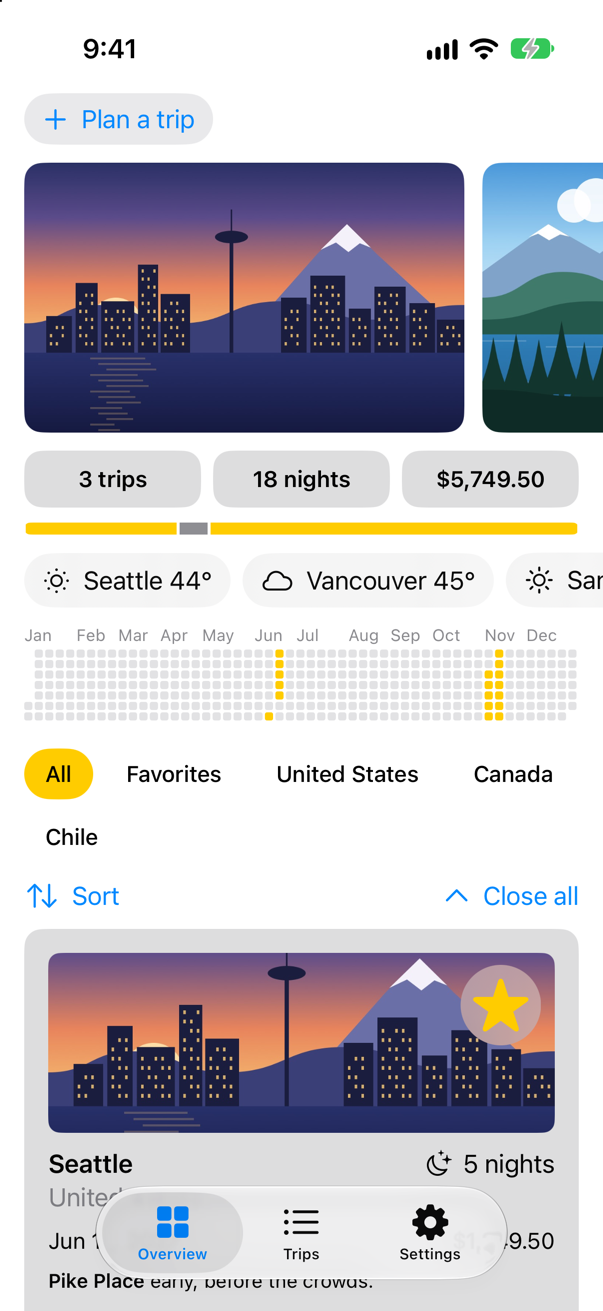
The first launch asked Open-Meteo about each city, and saved each answer:
Saved 3 trips: 798 bytes
asked about Vancouver at 0.00 sec
asked about Seattle at 0.00 sec
asked about San Pedro de Atacama at 0.00 sec
Asking Open-Meteo about Vancouver
Asking Open-Meteo about Seattle
Asking Open-Meteo about San Pedro de Atacama
Saved San Pedro de Atacama to disk, on com.apple.root.user-initiated-qos.cooperative
answered about San Pedro de Atacama at 0.65 sec
Saved Vancouver to disk, on com.apple.root.user-initiated-qos.cooperative
answered about Vancouver at 0.85 sec
Saved Seattle to disk, on com.apple.root.user-initiated-qos.cooperative
answered about Seattle at 0.96 sec
The second asked nothing:
Saved 3 trips: 798 bytes
asked about Vancouver at 0.00 sec
asked about San Pedro de Atacama at 0.00 sec
asked about Seattle at 0.00 sec
Found Vancouver on disk
Found San Pedro de Atacama on disk
Found Seattle on disk
answered about Vancouver at 0.06 sec
answered about San Pedro de Atacama at 0.06 sec
answered about Seattle at 0.06 sec
Outside, nothing changed: the strip and the trip screen still await the cache, because they are on other actors. Inside, the cache and the disk are one: the cache uses the disk's state as directly as its own, and no other call can come between a look at the disk and a change to the cache. That is the reason to make a global actor — several types whose state must change in one step. It is not a reason to put everything on one: a global actor is one line, and work that has nothing to do with the rest still waits its turn. An edge case measures it.
A queue of its own: the disk blocks
Read where the saves ran: com.apple.root.user-initiated-qos.cooperative. That is the shared pool of threads that every task and every actor uses unless it says otherwise — one thread for each core, as lesson 37 found under it all. The pool is built on a promise: its threads give way at every await, and never wait in place. The disk breaks it, because each read and write holds its thread until the disk is done. With three cities on a fast disk nobody notices; with many writes, or a slow disk, every blocked thread is one fewer for the rest of the app — an edge case measures thirty of them. What runs an actor's code is its executor, and an actor may choose its own. A serial dispatch queue is one already. In WeatherActor.swift:
import Foundation/// The actor the weather's types share: the cache in memory and the copy on disk. On one actor they use each other/// directly, with no `await` — so a look at one and a change to the other happen in one step.@globalActoractor WeatherActor { static let shared = WeatherActor() /// The disk's reads and writes block their thread, and the shared pool's threads must never block: so the /// weather runs on a serial queue of its own. private let queue = DispatchSerialQueue(label: "trips.weather") nonisolated var unownedExecutor: UnownedSerialExecutor { queue.asUnownedSerialExecutor() }}import Foundation
/// The actor the weather's types share: the cache in memory and the copy on disk. On one actor they use each other
/// directly, with no `await` — so a look at one and a change to the other happen in one step.
@globalActor
actor WeatherActor {
static let shared = WeatherActor()
/// The disk's reads and writes block their thread, and the shared pool's threads must never block: so the
/// weather runs on a serial queue of its own.
private let queue = DispatchSerialQueue(label: "trips.weather")
nonisolated var unownedExecutor: UnownedSerialExecutor {
queue.asUnownedSerialExecutor()
}
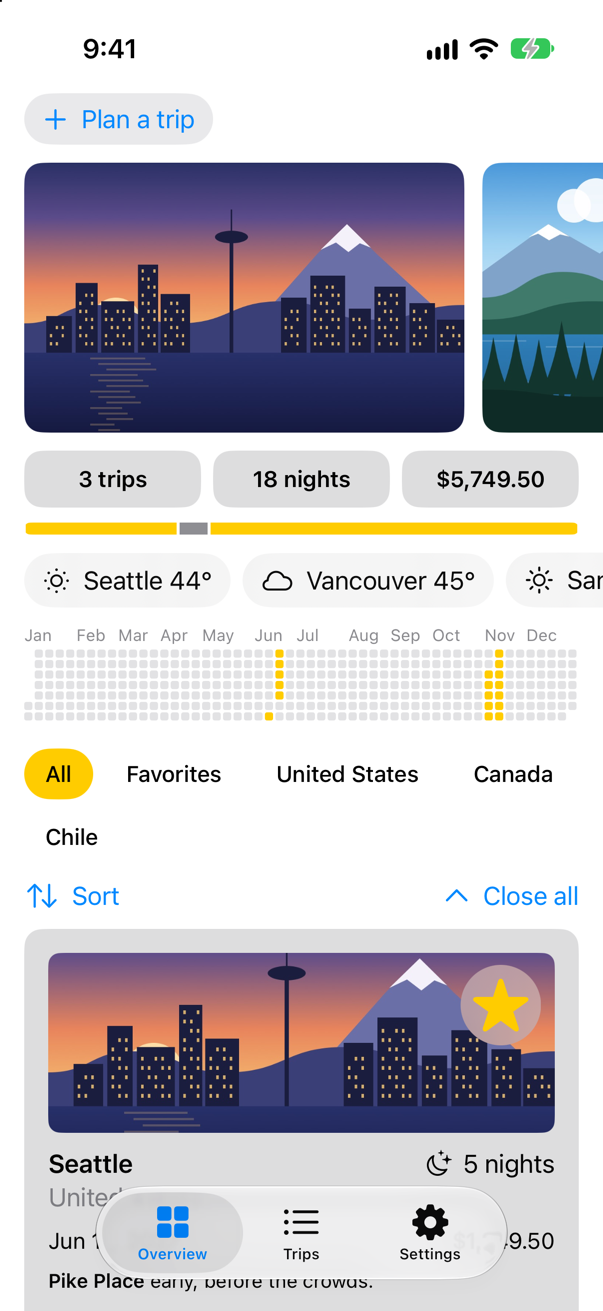
}Run the app, wait for the strip, then stop it and run it again:
Saved 3 trips: 798 bytes
asked about Seattle at 0.00 sec
asked about San Pedro de Atacama at 0.00 sec
asked about Vancouver at 0.00 sec
Asking Open-Meteo about Seattle
Asking Open-Meteo about San Pedro de Atacama
Asking Open-Meteo about Vancouver
Saved Vancouver to disk, on trips.weather
answered about Vancouver at 1.03 sec
Saved Seattle to disk, on trips.weather
answered about Seattle at 1.35 sec
Saved San Pedro de Atacama to disk, on trips.weather
answered about San Pedro de Atacama at 1.36 sec
Every save ran on trips.weather. The disk now blocks a thread that Grand Central Dispatch lends to the queue — and replaces, when one is blocked — and the shared pool keeps all its threads. Nothing else changed, which is the point: @WeatherActor still means one call at a time, and await still frees the actor for the next call. Only where its code runs is different. That is the reason to give an actor its own executor: its code blocks — or it must share a queue with older code that already protects its state with one. It is not a reason to give one to every actor: each hop onto an actor with its own queue is a hand-off to another thread, many times slower than a hop between actors on the pool, and the queue does nothing about reentrancy. The last two edge cases show both.
What you built
- A weather strip on the Overview that asks for every city at once in a task group, and takes the answers as they come.
- An actor,
WeatherCache, that the strip and the trip screen share: each city is asked about once, even when two screens ask at the same moment. - Pull-to-refresh that tells the cache to forget, so that it asks again.
- A global actor,
WeatherActor, that the cache and a newWeatherDiskshare, so that a launch within ten minutes of the last shows the weather it saved, without asking. - An executor for
WeatherActor: a serial queue of its own, so that the disk's blocking reads and writes never hold a thread of the shared pool.
Guide: what await does, from one cut function to for await, AsyncStream and an actor of your own, each with a program that runs, is in await, in full.
Guide: when an @Observable model leaks and when it is freed — a stored closure, an endless Observations loop, a reference that leads back — is taken apart and run, with a project of twelve leaks to open, in Retain cycles in SwiftUI.
Next, Sendable and Swift 6's strict concurrency checking — what the compiler means when it says a value cannot cross from one actor to another, and how to move a project to Swift 6 mode.
The finished project
Stuck, or want to compare with your own? This is the project as it stands at the end of this lesson, built and run before it was put here.
- Trips-lesson-38.zip — unzip it, then open
Trips.xcodeprojin Xcode.
Flash cards
20 cards for this lesson, each labelled with its topic. 11 ask how you would write something; the other 9 are trick questions, written to catch a misunderstanding. Answer in your head first, then tap the card.
Syntax · async letStart three pieces of work at once, and wait for all three.
async let starts each one at once, as a child of the current task; try await collects them. Three half-second waits took half a second: "3 answers in about 0.5 sec".
Syntax · Task groupsStart one child task for each item of a list, and collect the results as they finish.
withThrowingTaskGroup (or withTaskGroup, for children that cannot fail), addTask for each, and for try await over the group. The results come in the order they finish, not the order they were added: ["Vancouver: fine", "Bergen: fine", "Seattle: fine"].
Syntax · CancellationStop a long loop early when its task is cancelled.
try Task.checkCancellation() throws CancellationError once the task is cancelled; Task.isCancelled asks without throwing. Cancelling only sets a flag — code that never looks runs on. Here: "stopped: CancellationError()".
Syntax · ActorsProtect a dictionary that many tasks use, without a lock.
An actor: one task at a time runs its code, so its state needs no lock. Callers outside await its methods. A thousand tasks at once, and not one count lost: 1000.
Syntax · ActorsGive an actor a method that callers need not await, because it touches none of the actor's state.
nonisolated. It may read let properties, which never change, but not the actor's variables — an edge case shows the error. Called with no await: "A cache of answers from Open-Meteo".
Syntax · MainActorFrom code that is not on the main actor, run a few lines on it.
await MainActor.run { … }. @concurrent makes rename run away from the main actor, so touching the @MainActor class needs the hop. It printed Weather.
Syntax · MainActorSend an async function's work off the main actor (Swift 6.2 and later).
@concurrent. Without it, in a new Xcode project, a plain async function runs on the actor of whoever calls it — usually the main actor (an edge case shows it). In Trips, with Approachable Concurrency off, it would go to the pool anyway; the word says so in the code, whatever the settings. It printed ran off the main thread: true.
Syntax · ActorsWrite a function that does several things to an actor in one go, without an await for each.
Mark the parameter isolated: the whole function runs on that actor, so inside it the actor's state is used directly. One await at the call. It printed 2.
Syntax · ActorsMake an actor conform to a protocol whose requirement is synchronous, such as CustomStringConvertible.
Implement the requirement nonisolated: it can then be used from anywhere, without await — and it may read only what cannot change, such as a let. It printed "a cache of Open-Meteo's answers".
Syntax · Global actorsMake an actor that several types share, the way they all share @MainActor.
@globalActor on an actor with a static let shared — the one instance. Its name is then an attribute: @WeatherActor on a class, a function or a closure puts it on that actor, so code on it uses the others' state with no await. It printed ["Seattle": "fine"] ["Seattle": "fine"].
Syntax · ExecutorsMake an actor run its code on a serial dispatch queue of its own, instead of the shared pool of threads.
Implement unownedExecutor — the executor is what runs an actor's code — and hand it a DispatchSerialQueue, which is a serial executor already. The actor's code then runs on that queue: "trips.disk". For a global actor, the same lines go in the actor that shared is.
Trick question · async letWhen does the work of an async let start — at the declaration, or at the await?
At the declaration. "started Seattle" came before "about to await": the child task starts at once, and the await only collects its result.
Trick question · Task groupsA child of a throwing task group throws, and the group's body never reads the results. Does the group throw?
No — "the body returned", and the error is lost. Apple: "An individual task throws its error in the corresponding call to Group.next()" — and nothing called it. The compiler even says so: "no calls to throwing functions occur within 'try' expression". withThrowingTaskGroup is rethrows: it throws only what its body throws. Read the results with for try await, or call try await group.waitForAll().
Trick question · CancellationA loop waits five times with try? await Task.sleep(for: .seconds(1)). Its task is cancelled after a tenth of a second. What happens?
It races to the end: "5 one-second laps, all done after 0.1 sec". In a cancelled task Task.sleep throws CancellationError at once, and try? threw the error away — so every later sleep ended at once too. Write try, so that the error ends the loop, or check Task.isCancelled.
Trick question · Unstructured tasksA method starts a Task { } that uses self, and then the last reference to the object goes away. When is the object freed?
When the task ends: "the last reference is gone", then "the loader's task finished", then "the loader freed". The task holds self until it is done. Apple: "any references that a task holds are released after the task completes. Consequently, tasks rarely need to capture weak references to values." That is also why Task lets you leave out self. — SE-0304: "the explicit self. isn't communicating useful information". A task that never ends, such as a loop over notifications, keeps its object alive for ever.
Trick question · ActorsDoes an actor finish one call before it starts the next?
Not across an await: ["first begins", "second begins", "first ends", "second ends"]. One task at a time runs between suspension points, but at each await the actor may take the next call. This is reentrancy: whatever was true before an await inside an actor may not be after it.
Trick question · ActorsCan an actor conform to CustomStringConvertible with an ordinary var description?
No: "conformance of 'Cache' to protocol 'CustomStringConvertible' crosses into actor-isolated code and can cause data races" The protocol's requirement can be used from any thread, with no await; the actor's property cannot. Mark it nonisolated (a card shows it), which is allowed because it touches none of the actor's state.
Trick question · ActorsCan code outside an actor change one of its properties directly — counter.value += 1?
No: "actor-isolated property 'value' can not be mutated from the main actor" Outside the actor its state can be changed only by calling its methods, with await. The compiler enforces it.
Trick question · MainActorCan @concurrent send a synchronous function off the main actor?
No: "cannot use @concurrent on non-async global function 'work()'" @concurrent is for async functions: it says where they run once called. A synchronous function runs wherever its caller is — so make it nonisolated, and call it from a @concurrent async function, as the card on @concurrent does.
Trick question · Task groupsstrip() says @MainActor. Are the child tasks of the task group it starts on the main actor too?
No: "a child on the main thread: false", three times. A group's children start on the shared pool of threads, whatever the code around them, while a Task { } made in the same place takes the main actor (an edge case shows it). So the strip's children reach the cache from other threads.
Edge cases and tricky questions
24 questions of the kind an interviewer uses to find out whether you really know this — the corners, the traps, and the things that changed recently. Each has its source. Wherever the answer is what some code does, that code was compiled and run, and what you see under “Show the answer” is what it really did. Say your answer aloud before you open it.
Structured concurrency
Two async let children: one throws after a tenth of a second, the other is busy for a second and never checks for cancellation. When does the error reach the code that awaits them?
Show the answer
After a second, not a tenth: "the error reached the caller after 1.0 sec"
When b threw, Swift cancelled a — and then waited for it, because a child never outlives its scope. a was cancelled but did not look, so the error waited for it to finish. Structured concurrency guarantees the waiting; how soon it ends is up to the children. Long loops should call try Task.checkCancellation().
Where this comes from: SE-0304: Structured concurrency · The Swift book: Concurrency — Measured in the iOS 27 simulator.
A scope declares async let result = child() and ends without awaiting it. What happens to the child?
Show the answer
It is cancelled, and waited for, before the scope ends:
What it printed
leaving the scope without awaiting
child stopped by CancellationError()
after the scope
The child began at once, as every async let does; at the closing brace Swift cancelled it and awaited it, so "after the scope" came last. The compiler noticed too: "initialization of immutable value 'result' was never used; consider replacing with assignment to '_' or removing it"
Where this comes from: SE-0317: async let bindings · The Swift book: Concurrency — Measured in the iOS 27 simulator.
A task group asks two cities, and returns as soon as the first answers. How long does the group take, if the second would take two seconds?
Show the answer
Two seconds: "first: Seattle after 2.0 sec" Returning from the body does not cancel the children; Apple: "A group always waits for all of its child tasks to complete before it returns." Say you are done:
It printed
Bergen was cancelled
first: Seattle after 0.2 sec
Where this comes from: withTaskGroup(of:returning:isolation:body:) · TaskGroup — Measured in the iOS 27 simulator.
In a throwing task group, one child fails after a tenth of a second while another sleeps for two. The group is read with for try await. What happens to the sleeper?
Show the answer
It is cancelled, and the error comes out of the group:
What it printed
Bergen was cancelled
the group threw Offline()
The for try await rethrew Seattle's error; leaving the group's body with an error cancels the children that are left, and the group waits for them before it throws. One failure ends the whole group — which is right for "all of these or nothing", and wrong when partial results are fine: then catch inside each child, as this lesson's strip does with try?.
Where this comes from: TaskGroup · SE-0304: Structured concurrency — Measured in the iOS 27 simulator.
A task running a loop that never checks for cancellation is cancelled after a tenth of a second. The loop would take a second. When does the task end?
Show the answer
After the whole second: "cancelled at 0.1 s; it returned at 1.0 sec"
cancel() sets a flag. Nothing stops a task from outside; it stops when its code looks — try Task.checkCancellation() in the loop, or a call such as Task.sleep or URLSession's that looks for it. That is what cooperative means.
Where this comes from: Task.checkCancellation() · Task.isCancelled · The Swift book: Concurrency — Measured in the iOS 27 simulator.
A task creates a Task { } and an async let child, then is cancelled. Which of the two notices?
Show the answer
Only the child:
What it printed
the async let child: cancelled? true
the Task { } inside: cancelled? false
Task { } is unstructured: it takes its parent's priority and actor, but not its place in the tree, so the parent's cancellation does not reach it. Inside a SwiftUI view that matters: work started with Task { } in a button outlives the screen (lesson 34), while .task and the children of a task group do not.
Where this comes from: SE-0304: Structured concurrency · Task — Measured in the iOS 27 simulator.
A task is cancelled, but one step of its work — writing a file, say — must not be interrupted. Swift 6.4 has withTaskCancellationShield. What does code inside it see?
Show the answer
A task that is not cancelled:
What it printed
outside the shield: true
inside the shield: false
Inside the shield Task.isCancelled is false, so code that checks it carries on; outside, the cancellation is still there. Apple's page for isCancelled puts it this way: cancellation "may be suppressed by an active task cancellation shield". Use it for short clean-up that must complete, not to ignore cancellation in general.
Where this comes from: SE-0504: Task cancellation shields · Task.isCancelled — Measured in the iOS 27 simulator (Swift 6.4).
A task group's task has been cancelled. What do addTaskUnlessCancelled and addTask do now?
Show the answer
One refuses; the other starts a child that is already cancelled:
What it printed
added after cancellation? false
addTask started a child anyway; cancelled? true
In a loop that adds work, addTaskUnlessCancelled saves starting what nobody wants; a child added with addTask begins cancelled, and stops only if it looks.
Where this comes from: TaskGroup addTaskUnlessCancelled(name:priority:operation:) · TaskGroup — Measured in the iOS 27 simulator.
To await an async let later, a closure captures it: let later = { await seattle }. Does it compile?
Show the answer
It does not compile. Xcode reports
capturing 'async let' variables is not supportedNo: "capturing 'async let' variables is not supported"
An async let is tied to the scope that declares it: the scope awaits it, or cancels and awaits it, before it ends. A closure could carry it beyond that, so Swift refuses. When work must outlive its scope, it is not structured: that is what a Task — or a task group returned as a value — is for.
Where this comes from: SE-0317: async let bindings — Compiled with Xcode 27.
Inside an async function, code waits with Thread.sleep(forTimeInterval:), as it might have in GCD code. What does Xcode say?
Show the answer
It compiles, with a warning
class method 'sleep' is unavailable from asynchronous contexts; Use Task.sleep(until:clock:) instead.; this is an error in the Swift 6 language modeIn a new Xcode project, a warning: "class method 'sleep' is unavailable from asynchronous contexts; Use Task.sleep(until:clock:) instead.; this is an error in the Swift 6 language mode" — and in Swift 6 mode, as in Trips, the same words are an error.
Thread.sleep blocks the thread it is on, and an async function shares a few threads with every other task — blocking one holds up work that has nothing to do with it. try await Task.sleep(for:) suspends the task instead, and gives the thread back.
Where this comes from: Task · WWDC25: Embracing Swift concurrency — Compiled with Xcode 27, in a new app project's Swift 5 language mode, and in Swift 6's.
Actors and @MainActor
A cache actor checks its dictionary, and if the city is not there, awaits the request and stores the answer. Two screens ask for Seattle at the same moment. How many requests are made?
Show the answer
Two: "two screens asked for Seattle at once; requests made: 2"
No data race — the actor saw to that — but a race in the logic all the same. The first call found nothing and suspended at its await; while it waited, the actor took the second call, which found nothing either. Anything checked before an await inside an actor may have changed after it: that is reentrancy. The cure is to remember the question, not just the answer — store the Task before awaiting it, so that the second caller awaits the same one:
"two screens asked for Seattle at once; requests made: 1". This lesson's WeatherCache works this way.
Where this comes from: WWDC21: Protect mutable state with Swift actors (2021 — fundamentals unchanged) · The Swift book: Concurrency — Measured in the iOS 27 simulator.
A cache keeps each city's Task, so that a second caller awaits the first one's request. The first request fails — the network was down for a moment. What does the next caller get?
Show the answer
The same failure, for ever:
What it printed
ask 1: failed with Offline()
ask 2: failed with Offline()
requests made: 1
The failed Task stayed in the dictionary, and awaiting it again rethrows its error without asking anyone. A cache of questions must forget a question that failed — which is the catch in this lesson's WeatherCache, which removes the entry before it rethrows.
Where this comes from: Task · The Swift book: Concurrency — Measured in the iOS 27 simulator.
An actor's nonisolated method reads the actor's dictionary, to save callers an await. Does it compile?
Show the answer
It does not compile. Xcode reports
actor-isolated property 'answers' can not be referenced from a nonisolated contextNo: "actor-isolated property 'answers' can not be referenced from a nonisolated context"
nonisolated means not protected by the actor, so such a method may touch only what cannot change — let properties of Sendable types — and its arguments. Anything that reads the actor's variables has to be isolated, and its callers have to await.
Where this comes from: SE-0313: Improved control over actor isolation · The Swift book: Concurrency — Compiled with Xcode 27.
Inside an actor method, Task { value += 1 } and Task.detached { self.value += 1 }. Do both compile?
Show the answer
It does not compile. Xcode reports
actor-isolated property 'value' can not be mutated from a nonisolated contextOnly the first. The error is on the second line: "actor-isolated property 'value' can not be mutated from a nonisolated context"
Task { } takes the actor of the code that creates it — here the counter — so its closure is part of the actor and may change value without await. Task.detached takes nothing: its closure runs on no actor, and must await to touch one. The same holds for the main actor:
It printed
Task { }: true
Task.detached: false
This is why a Task { } started in a SwiftUI view or a @MainActor model can update its state directly.
Where this comes from: Task · The Swift book: Concurrency — Measured in the iOS 27 simulator.
Does an actor's method run on the main thread?
Show the answer
No: "an actor's method, on the main thread: false"
An actor is not a thread: its work runs on the shared pool of threads that all tasks use — Apple: "By default, actors execute tasks on a shared global concurrency thread pool" — one call at a time. The main actor is the exception, tied to the main thread, because that is where the screen must be changed.
Where this comes from: Actor · MainActor — Measured in the iOS 27 simulator.
@MainActor final class Screen { var title }. A nonisolated function sets screen.title. Does it compile?
Show the answer
It does not compile. Xcode reports
main actor-isolated property 'title' can not be mutated from a nonisolated contextNo: "main actor-isolated property 'title' can not be mutated from a nonisolated context"
@MainActor on a class puts every property and method on the main actor; code elsewhere must await — hop with await MainActor.run { … }, or make the function @MainActor itself. In UIKit this mistake compiled and failed at run time, sometimes; here it does not compile.
Where this comes from: MainActor · The Swift book: Concurrency — Compiled with Xcode 27.
In a new Xcode project, a nonisolated async function checks that it is on the main actor, and is called from the main actor. Does the check pass? And under the rules before Swift 6.2?
Show the answer
Today, it passes: "on the main actor". Since Swift 6.2, with a setting a new Xcode project turns on (NonisolatedNonsendingByDefault), a nonisolated async function runs on the actor of whoever called it — SE-0461 calls this nonisolated(nonsending). (In a new Xcode project a function with no annotation at all is on the main actor in any case: the main actor is the default.)
Compiled the old way — without that setting — the same program stops at the assertion, because the function left the main actor as soon as it was called:
What the simulator reported
Child process terminated with signal 5: Trace/BPT trapSo code written before Swift 6.2 may hop away from the main actor in places where code written today stays. To send work away on purpose, mark it @concurrent.
Trips is set up the old way on purpose — Approachable Concurrency off, and no default actor — so that nothing about where code runs is left to a setting: a function there says nonisolated(nonsending) to stay with its caller, @concurrent to leave, @MainActor to be on the main actor.
Where this comes from: SE-0461: nonisolated(nonsending) and @concurrent · SE-0466: Default actor isolation — Measured in the iOS 27 simulator, with a new Xcode 27 project's settings and without them.
A UIKit habit: in a callback, wrap UI work in MainActor.assumeIsolated { … }. What happens if the code is not on the main actor?
Show the answer
The program stops — and the compiler had warned, in a new Xcode project's Swift 5 mode: "static method 'assumeIsolated' is unavailable from asynchronous contexts; await the call to the @MainActor closure directly; this is an error in the Swift 6 language mode" In Swift 6 mode, as in Trips, those words are an error, and it does not build.
What the simulator reported
Child process terminated with signal 5: Trace/BPT trapassumeIsolated does not move anything to the main actor: it checks that the code already is there, and traps if not. It is for synchronous callbacks you know arrive on the main thread, such as a delegate method UIKit calls there. In async code, await a @MainActor function — or MainActor.run — instead.
Where this comes from: MainActor · SE-0461: nonisolated(nonsending) and @concurrent — Measured in the iOS 27 simulator.
A view should redraw when a cache changes, so the cache actor is marked @Observable. Does it compile?
Show the answer
It does not compile. Xcode reports
'@Observable' cannot be applied to actor type 'WeatherCache' (from macro 'Observable')
expansion of macro 'ObservationTracked()' did not produce a non-observing accessor (such as 'get') as expected
No: "'@Observable' cannot be applied to actor type 'WeatherCache' (from macro 'Observable')"
Observation reads properties synchronously, from the view that draws them; an actor's properties can be read only with await. Keep the shared state in the actor, and the state a screen draws in an @Observable class on the main actor — as Trips does, with WeatherModel asking WeatherCache.
Where this comes from: Observable() macro · Actor — Compiled with Xcode 27.
Code written for GCD sends work to DispatchQueue.main.async. Is that work on the main actor?
Show the answer
Yes: "inside DispatchQueue.main.async: on the main actor" — assumeIsolated would have stopped the program otherwise.
Apple describes MainActor as "A singleton actor whose executor is equivalent to the main dispatch queue." So old code that dispatches to the main queue and new code on the main actor take turns on the same thread, and a closure on the main queue may use MainActor.assumeIsolated to touch main-actor state synchronously — the case it exists for.
Where this comes from: MainActor — Measured in the iOS 27 simulator.
A cache actor looks for a city in memory, then asks a second actor — the disk — for an answer saved by an earlier launch, and only then asks the network. Two screens ask for Seattle at the same moment. How many requests are made? And with the cache and the disk on one global actor?
Show the answer
Two: "two screens asked for Seattle at once; requests made: 2"
The cache stores the question before it awaits it — the cure for the first of these questions — and still asks twice. The await on the disk opened the gap again: while the first call waited for the disk, the cache was free, and the second call found nothing in memory either. What matters is that the check and the store happen with no await between them, and the disk is now between them. Put both types on one global actor, and the call to the disk is an ordinary call:
It printed
two screens asked for Seattle at once; requests made: 1That is what a global actor is for: several types whose state must change in one step. A plain actor protects one object; a global actor protects everything marked with its name, so those types use each other directly — as everything marked @MainActor does. (The disk's read blocks its thread while the actor is held; the question after next is about that.)
Where this comes from: SE-0316: Global actors (`@MainActor`) · GlobalActor · WWDC21: Protect mutable state with Swift actors (2021 — fundamentals unchanged) — Measured in the iOS 27 simulator.
Every trip has a cache, and updating one is a tenth of a second of work. Four update at once. How long does that take with each cache an actor of its own — and with all of them on one global actor?
Show the answer
Several times as long on the one global actor:
What it printed
four actors of their own: 0.1 sec
four on one global actor: 0.4 sec
A global actor is one line for everything marked with its name, so work that has nothing to do with the rest still waits its turn. Four actors of their own ran on four threads at once. So when each object's state stands alone — one cache per trip — make each an actor; keep a global actor for state that several types must change together.
Where this comes from: SE-0316: Global actors (`@MainActor`) · Actor — Measured in the iOS 27 simulator.
Thirty actors save to a slow disk at once: a synchronous write that holds its thread for a tenth of a second. Meanwhile other work on the shared pool wants a turn every 10 ms. How many turns does it get — with the actors on the pool, and with each on a serial queue of its own?
Show the answer
Almost none on the pool; most of them with queues of their own:
What it printed
on the pool:      30 saves took 312 ms; other work got 1 of the 31 turns it wanted
on its own queue: 30 saves took 105 ms; other work got 9 of the 10 turns it wanted
The pool has one thread for each core, and it does not add a thread when one blocks: its threads are meant to give way at every await, never to wait in place. Thirty blocking saves took every thread, so the other work could not run — and the saves themselves had to wait for threads. On queues of their own, the saves block threads that Grand Central Dispatch lends, and adds to, and the pool stays free. So give an actor its own queue when its code blocks: synchronous file or network I/O, or an older library that waits. (usleep stands in for the slow disk.)
Where this comes from: WWDC21: Swift concurrency: Behind the scenes (2021 — the thread model is unchanged) · SE-0392: Custom actor executors — Measured in the iOS 27 simulator.
Should every actor get a serial queue of its own, just to be safe?
Show the answer
No. A task going back and forth between two actors, a hundred thousand times:
What it printed
two plain actors:            144 ns a turn
two on queues of their own:  5367 ns a turn
Between two actors on the shared pool, a hop is a switch on the same thread. To an actor with a queue of its own, every hop is a hand-off to another thread — more than ten times slower here. And the queue changes nothing else. One bag left, two buyers, and an await between the check and the sale — on an actor with its own serial queue:
It printed
sold: 2 - bags left: -1The queue runs one piece at a time, as every actor does, and an await still ends a piece and lets the next call in. SE-0392, which added custom executors, says it plainly: the design "does not support non-reentrant actors". So keep the default unless the actor blocks — or must share a queue with older code that already protects its state with one, which is the other case the proposal names.
Where this comes from: SE-0392: Custom actor executors · WWDC21: Swift concurrency: Behind the scenes (2021 — the thread model is unchanged) · WWDC21: Protect mutable state with Swift actors (2021 — fundamentals unchanged) — Measured in the iOS 27 simulator.
Further reading
- The Swift book: Concurrency
- WWDC25: Embracing Swift concurrency
- WWDC21: Explore structured concurrency in Swift (2021 — fundamentals unchanged)
- Task
- WWDC25: Embracing Swift concurrency
- MainActor
- SE-0466: Default actor isolation
- SE-0461: nonisolated(nonsending) and @concurrent
- WWDC21: Protect mutable state with Swift actors (2021 — fundamentals unchanged)