Retain cycles in SwiftUI
When an @Observable model is never freed, and when it is. A SwiftUI view is a struct whose body is a getter, and SwiftUI keeps the closures it writes, so a screen that only names its model never traps it; the model it owns can, through a closure it stores, a task or timer that never ends, or a reference that leads back. Every case is run — the screens in a real window, shown and popped — and shown freed or still alive
A retain cycle is the one way automatic reference counting lets you down: two objects that hold each other, so neither is ever freed. In SwiftUI the surprising part is who can and cannot make one. A view is a struct and its body is a getter, so a screen that only names its model — in body, in a Button, in .onAppear, in a .task — never traps it: those closures belong to SwiftUI, and go when the screen goes. The cycle starts the moment the model you own stores something that leads back: a closure, a Task or Timer that never ends, a child that points at its parent. This guide takes each one apart and runs it — the screens in a real window, shown and then popped — and ends with how to find a cycle, and with RetainCycleLab.zip, twelve leaks to open on a simulator and watch not go away.
- The one rule, and why the screen is exempt · lesson 7
- The model holds a closure that names itself · lesson 18
- A task or timer that never ends · lesson 16
- Cycles with no closure of yours · lesson 22
- weak, unowned, and what deinit can reach · lesson 38
- How to find one · lesson 38
- The lab: twelve leaks to open · lesson 18
The one rule, and why the screen is exempt
An object is freed when nothing holds it any more. It gets stuck in one of two ways: something it holds leads back to it (a retain cycle), or something that never ends holds it (a running Task, a repeating Timer). Everything in this guide is one of those two.
A SwiftUI view is not an object and cannot be the owner in a cycle. It is a struct, and its body is a computed property — a getter that runs, returns a value, and keeps nothing:
// From the SDK's View protocol, shortened — not code to type
public protocol View {
    @ViewBuilder @MainActor @preconcurrency var body: Self.Body { get }
}
So reading your model in body holds it only for the length of that one call. The closures a view hands to Button, .onAppear or .task are kept — but SwiftUI keeps them, and releases them when the screen leaves. None of them belongs to your model. Here is a screen that names its model in every one of those places, with a weak probe on the model; the run puts it in a real window, shows it, and pops it the way a NavigationStack pops a screen:
import SwiftUI

@MainActor
@Observable
final class Model {
    var count = 0
    init() {
        probe.object = self
    }
}

/// body, a Button, .onAppear and a .task all name the model, and nothing writes [weak …]
struct CounterScreen: View {
    @State private var model = Model()
    @State private var note = ""

    var body: some View {
        VStack {
            Text("\(model.count) \(note)")
            Button("Add") {
                model.count += 1
            }
        }
        .onAppear {
            note = "shown"
        }
        .task {
            model.count += 1
        }
    }
}
Shown, popped, and asked
after the screen is popped, the model is freedNow the same screen hands the model a closure. The closure never mentions the model — it sets the screen's own rareBird:
import SwiftUI

@MainActor
@Observable
final class Model {
    @ObservationIgnored var onRareBird: ((String) -> Void)?
    init() {
        probe.object = self
    }
}

struct SightingScreen: View {
    @State private var model = Model()
    @State private var rareBird = "none yet"

    var body: some View {
        Text("Rare bird: \(rareBird)")
            .onAppear {
                model.onRareBird = { name in
                    // really self.rareBird: the closure keeps a copy of the whole screen
                    rareBird = name
                }
            }
    }
}
Shown, popped, and asked
after the screen is popped, the model is still aliveInside a view, rareBird means self.rareBird, so the closure captures self: a copy of the whole screen struct, and in that copy the @State box that holds the model. The model stores the closure, and that is the whole difference. model → closure → a copy of the screen → the model. Nothing SwiftUI keeps can be freed, because the model is not SwiftUI's to free.
How these runs are made
Every screen on this page is proven the same way, as a macOS program with the course's strict settings: the screen goes into an NSHostingView in a real window, a flag shows it and then takes it off the screen, and a weak reference to its model says whether anything still holds it. This is the rig behind each shownThenPopped, folded here in full — not code to type, but the whole of what the cards run:
The rig, in full — a real window, a screen shown and popped, and a weak probe on its model (not code to type)
So the rule, and the question to ask about any leak: start at the model and follow its stored properties. A view cannot even try to hold itself weakly — the compiler refuses [weak self] in a struct, and a card below shows the message. The rest of this guide is the ways a model ends up holding something that leads back to itself.
@Observable, in fullReading a property signs the view up to be told when it changes — the list on the thread, observableObject's registrar, and the closure that holds the view's node number — without trapping the model.Open the guide →
The model holds a closure that names itself
The commonest cycle: a model keeps a closure, and the closure names something that leads back to the model. It need not name the model directly — the callback above never did. With @Observable the fix is usually to delete the callback. Make the answer a property of the model and read it in body; there is no closure to hold, and Observation keeps the screen current on its own:
import SwiftUI

@MainActor
@Observable
final class Model {
    var rareBird = "none yet"                    // a property, not a callback: nothing to store
    init() {
        probe.object = self
    }
    func spotRareBird() {
        rareBird = "Waxwing"
    }
}

struct SightingScreen: View {
    @State private var model = Model()

    var body: some View {
        VStack {
            // body reads it; Observation updates the screen
            Text("Rare bird: \(model.rareBird)")
            Button("Spot a rare bird") {
                model.spotRareBird()
            }
        }
        .onAppear {
            model.spotRareBird()
        }
    }
}
Shown, popped, and asked
after the screen is popped, the model is freedWhen the model really must keep a closure, the cycle is the classic one and has nothing SwiftUI about it. A helper the model owns — a camera, a location manager, a network client — calls back through a closure that names self:
import Observation

@MainActor
final class BirdCamera {
    var onSighting: (() -> Void)?
}

@MainActor
@Observable
final class Model {
    let camera = BirdCamera()
    var robins = 0
    init() {
        probe.object = self
    }
    func start() {
        camera.onSighting = {
            // the camera keeps this closure, the closure names self, self owns the camera
            self.robins += 1
        }
    }
}
The model owns the camera, the camera keeps the closure, the closure names self. The helper never has to know about the model; the closure carries the reference for it. The fix is [weak self] on that closure — the owner must not be owned back — and the cards run both versions. The loop can also run through more than one object: a list that builds rows, each row keeping an onTap closure that names the list, is list → rows → row → closure → list, and a card runs that too. Follow the stored properties all the way along, not just the first hop.
Three things that confuse the picture, each with a card: @ObservationIgnored keeps a property out of Observation and changes nothing about who holds whom; the compiler makes you write self. in an escaping closure on a class precisely so that you notice the capture; and a closure that does not escape — map, filter, forEach — needs neither self. nor [weak self], because it is gone when the call returns.
A task or timer that never ends
The second kind of leak holds the model without a cycle at all: work that never finishes. A running Task stays alive on its own and holds everything it names until it ends — and cancelling is a request the loop has to notice, which Task.sleep and Observations do. Written as Task { } in .onAppear and never cancelled, or stored on the model and "cancelled in deinit", a loop that never ends keeps the model for the life of the app.
The loop in the model, and the [weak self] trap
This matters most for the Observations loop — the iOS 26 way (lesson 18) to react to every change of what a closure reads. A model that starts one, names self in it, stores the handle and cancels it in deinit has written the leak in its most careful-looking form: deinit runs only once nothing holds the model, and the task does. The next step everyone takes is [weak self] — unwrapped once at the top, because an optional self is annoying inside a loop:
import Observation

@MainActor
@Observable
final class Model {
    var count = 0
    @ObservationIgnored var task: Task<Void, Never>?
    init() {
        probe.object = self
    }
    func listen() {
        task = Task { [weak self] in
            guard let self else {
                return
            }
            // this strong self lives until the closure ends — never
            for await _ in Observations({ self.count }) {
                self.heard()
            }
        }
    }
    func heard() {}
    deinit {
        task?.cancel()
    }
}
The loop starts, the owner lets go
the model is still alive[weak self] only makes the capture weak. guard let self makes a new, strong self that lasts until the closure ends, and the closure ends when the loop ends, which is never. The strong reference moved down two lines. The fix is to keep self weak the whole way through — in the Observations closure too, or it holds the model between changes — and to unwrap inside the loop, for one pass:
import Observation

@MainActor
@Observable
final class Model {
    var count = 0
    @ObservationIgnored var task: Task<Void, Never>?
    init() {
        probe.object = self
    }
    func listen() {
        task = Task { [weak self] in
            for await _ in Observations({ [weak self] in self?.count }) {
                guard let self else {
                    return
                }
                // this strong self lives for one pass of the loop
                self.heard()
            }
        }
    }
    func heard() {}
    // and now it runs, and ends the loop
    deinit {
        task?.cancel()
    }
}
The loop starts, the owner lets go
the model is freedNow nothing holds the model while the loop waits, deinit runs, cancels the task, and the loop ends. The question to ask about any [weak self] is not whether you wrote it but how long the unwrapped self lives.
A timer
A repeating Timer has the same shape: the run loop keeps the timer until it is invalidated, the timer keeps its closure, and the closure names the model. Invalidating is the only way out — a deinit that would invalidate it is waiting for exactly the thing it is meant to stop:
import Foundation

@MainActor
@Observable
final class Model {
    var ticks = 0
    @ObservationIgnored var timer: Timer?
    init() {
        probe.object = self
    }
    func start() {
        timer = Timer.scheduledTimer(withTimeInterval: 0.03, repeats: true) { _ in
            MainActor.assumeIsolated {
                // names self: the run loop keeps the timer, the timer keeps this closure
                self.ticks += 1
            }
        }
    }
}
Let the timer tick, then invalidate it
with the timer running, the model is still alive after 3 ticks
after the timer is invalidated, the model is freed
On a view: .task, and the Task nobody keeps
On a screen, .task is simpler than any of this. SwiftUI cancels it when the view leaves, Task.sleep throws on cancellation, and a loop that checks Task.isCancelled ends — so even a loop that would run forever lets go of the model with the screen. Write the same loop as Task { } inside .onAppear and nobody owns it: it is not a cycle, and it leaks just the same. Two cards run both, in a window. The one cost of .task is that it runs once per window — on a Mac or iPad with two windows open, the work runs twice.
Two more shapes, each with a card: a task that names the model and finishes is not a leak but a lifetime stretched — the model goes when the task ends; and a NotificationCenter block observer is an owner that never dies, so the token cannot be removed in a deinit that the block itself prevents — [weak self] in the block first, then an isolated deinit to remove the token in, or an Observations-style loop over notifications(named:) in a .task.
@Observable, in fullThe Observations loop — its iterator, the type from the SDK, and where it should live — is written out in the @Observable guide.Open the guide →
Cycles with no closure of yours
A closure is one way for a model to hold something that leads back, but not the only one. Two strong stored references are enough. The classic is a child that points at its parent:
import Observation

@MainActor
@Observable
final class Feeder {
    var birds: [Bird] = []
    init() {
        probe.object = self
    }
    func add() {
        birds = [Bird(feeder: self)]
    }
}

@MainActor
@Observable
final class Bird {
    var feeder: Feeder                  // strong, back to the parent that owns it
    init(feeder: Feeder) {
        self.feeder = feeder
    }
}
The parent owns the children, so the back-reference is the one to make weak: weak var feeder: Feeder?, nil on its own once the feeder is gone. Make both strong and neither is ever freed — a card proves it, and the next card fixes it. The same trap hides in a router that stores the next screen as a view: an AnyView holds the view struct, and a view struct is a value that can hold a reference — the router. Store which screen, as a value, and build the view in body when it is needed:
import SwiftUI

@MainActor
@Observable
final class Router {
    var next: AnyView?                  // a view, and the view holds the router
    init() {
        probe.object = self
    }
}

struct DetailsScreen: View {
    let router: Router
    var body: some View {
        Text("Details")
    }
}

enum Destination {
    case details
}

@MainActor
@Observable
final class ValueRouter {
    var next: Destination?              // which screen: a value that holds nothing
    init() {
        probe.object = self
    }
}
Both routers, with the probe
a router that stores the screen is still alive
a router that stores which screen is freed
Some of these are set by frameworks, not by you. URLSession keeps its delegate strongly until the session is invalidated — unlike almost every UIKit delegate, which is weak:
// URLSession keeps its delegate — from the SDK, shortened
open class URLSession {
    // strong, until the session is invalidated
    open var delegate: (any URLSessionDelegate)? { get }

    open func finishTasksAndInvalidate()
    open func invalidateAndCancel()
}

// UIKit's delegates are weak — from the SDK
@property(nullable, nonatomic, weak) id<UITextViewDelegate> delegate;
And one is set by Observation itself. Every @Observable object has a registrar of its own, and observableObject's registrar keeps the onChange closures that are waiting for a change. Call withObservationTracking on a model from the model, with an onChange that names self, and you have stored a closure on the model without writing a property for it — model → observableObject's registrar → closure → model. The closure is one-shot, so the first change fires it, removes it, and breaks the loop; until then the model is stuck:
import Observation

@MainActor
@Observable
final class Model {
    var count = 0
    init() {
        probe.object = self
    }
    func watchMyself() {
        withObservationTracking {
            // the read files a closure in this object's own registrar…
            _ = self.count
        } onChange: {
            print("  onChange fired, and the model's registrar let the closure go")
            _ = self                        // …and the closure names self
        }
    }
}
Before and after one change
before any change, the model is still alive
  onChange fired, and the model's registrar let the closure go
after one change, the model is freed
SwiftUI's own tracking of a body goes through this same registrar and does not leak, because the closure it files holds a node number, not the view. You would not write this one on purpose; it is here because it is the only cycle whose middle link is Observation's own bookkeeping, and because it shows exactly where observableObject's registrar keeps its closures.
@Observable, in fullWhat observableObject's registrar is — an ObservationRegistrar, its context, and the closures filed in it by key path — is written out in the @Observable guide.Open the guide →
weak, unowned, and what deinit can reach
Two ways to break a cycle, and they are not the same. weak is an optional that becomes nil when the referent goes. unowned is not optional and does not become nil: it promises the referent outlives the reference. Read an unowned reference after its object is gone and the program stops — a card shows the exact message:
final class Bird {
    // never nil in a correct program; a crash if the feeder is gone
    unowned let feeder: Feeder
}

final class Bird {
    // nil once the feeder is gone; an optional you check
    weak var feeder: Feeder?
}
Use unowned only where the lifetimes truly nest and the reference is read while both are alive — a child that cannot exist without its parent. Everywhere else, weak. The cost of weak is an optional you unwrap; the cost of a wrong unowned is a crash.
And deinit is not the cleanup hook it looks like. It runs only once nothing holds the object — so if a task, a timer or a notification block is holding it, the deinit that would cancel, invalidate or remove them can never run. On top of that, under Swift 6 a deinit is not on any actor, so it cannot call a main-actor method, and it may not touch a non-Sendable stored property either:
import Foundation

@MainActor
@Observable
final class Model {
    @ObservationIgnored var timer: Timer?

    // runs on the main actor, so it may touch main-actor state
    isolated deinit {
        timer?.invalidate()
    }
}
Mark it isolated deinit and it runs on the main actor, free to touch main-actor state — the lab's models use it for exactly this. But it changes where a deinit runs, not whether it runs: a card gives the endless-task model an isolated deinit and it is still never freed. Do not rely on deinit to break a cycle. Break it where the work starts — cancel the task, invalidate the timer, remove the observer — in .onDisappear, or by letting the view's .task own the work.
How to find one
The cheapest instrument is a print in deinit, which is how every screen of the lab reports: go back, and either a line prints or it does not. For a real app, Xcode's Memory Graph Debugger (the button in the debug bar while the app runs) draws every object that is alive and what holds it; turn on Malloc Stack Logging in the scheme's Diagnostics and it also marks the objects that nothing reaches, with the line that allocated each. Instruments' Leaks template watches the same thing over time.
From the command line, leaks does the same for any process, and the shape of its report is worth knowing. This program makes the callback cycle from the first section with two plain classes, in a function that returns, and is run under leaks --atExit:
final class Model {
    var onDone: (() -> Void)?
}

final class Owner {
    let model = Model()
    var text = ""
    func start() {
        model.onDone = {
            // the model keeps a closure that keeps the owner that keeps the model
            self.text = "done"
        }
    }
}

func makeTheCycle() {
    let owner = Owner()
    owner.start()
}
What leaks --atExit -- ./program reported as it ended
A ROOT CYCLE is a group of objects that only hold each other, and each __strong line is one stored reference: the owner's model, then the closure context the model stores in onDone, back to the owner. That is the loop drawn link by link, with the types named. (leaks scans the stack too, so a cycle made in the very function it is called from can hide behind a stale pointer — make it in a function that has returned.)
The lab: twelve leaks to open
Reading about a leak is one thing; watching a model not go away is another. RetainCycleLab.zip is a small iOS app: a control screen that leaks nothing, then twelve leaks from this guide, each with a leaking screen and a fixed screen next to it in the list. Open a screen, go back, and watch the console: a line beginning with a check mark means the model was freed; nothing means it is stuck.
Each file in Leaks/ holds one mistake — the callback, the timer, the stored task, the task nobody keeps, children that point back, a router that stores a view, Observation's own registrar, the list's rows, a helper's callback, the model's own stream, the [weak self] trap, and URLSession's delegate — with a comment that says why you would write it, draws the loop one link per line, and gives you something to try. A breakpoint is set on the check-mark line in every model's deinit, so Xcode stops there when a fixed screen frees its model and never when a leaking one does. StartHere.swift is the map.
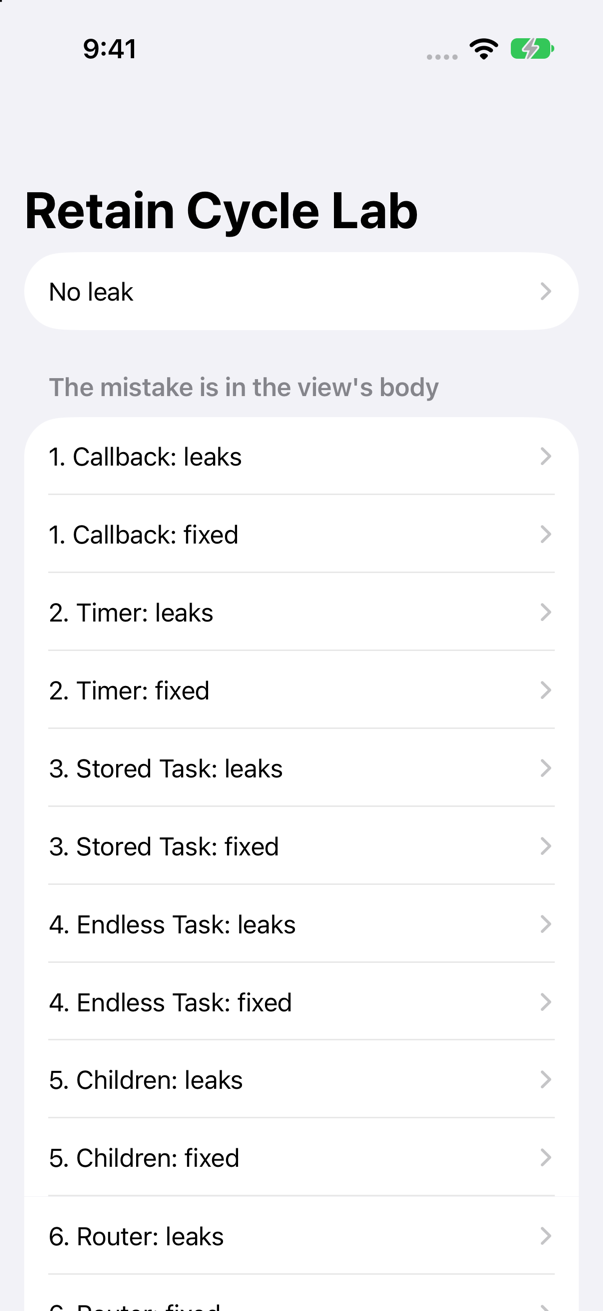
The screens are the cards of this guide as an app: the same models, the same loops, the same fixes. Download it, open it in Xcode, and run it on any iPhone simulator.
Flash cards
28 trick questions, the kind an interviewer asks: read the code, decide whether the model is freed, then tap the card. Each answer is a real run — the screens in a real window, shown and popped.
Trick question · Retain cyclesA screen names its model in body, in a Button, in .onAppear and in a .task, and never writes [weak …]. It is shown in a window and popped. Is the model freed?
Yes. body is a getter: it reads the model and keeps nothing. The closures are kept by SwiftUI, not by the model, and SwiftUI lets go of them when the screen is popped. Nothing leads back to the model, so it goes with the screen. The run prints after the screen is popped, the model is freed. (shownThenPopped puts the screen in a real window, shows it, pops it and asks a weak probe — the rig is in the first section.)
Trick question · Retain cyclesThe same screen hands its model a closure in .onAppear. The closure never writes the word model — it only sets rareBird. Freed when the screen is popped?
No, it leaks. Inside a view, rareBird means self.rareBird, so the closure captures self — a copy of the whole screen struct, and the @State box in it that holds the model. The model stores the closure: model → closure → a copy of the screen → the model. The run prints after the screen is popped, the model is still alive. This is the retain cycle people miss most, because nothing in the closure looks like it touches the model.
Syntax · Retain cyclesRewrite the rare-bird screen so that nothing can leak.
Delete the callback. Make the answer a property of the model and read it in body: there is no closure to store, and Observation updates the screen on its own. The run prints after the screen is popped, the model is freed. With @Observable a callback from the model to the screen is nearly always a property in disguise.
Trick question · Retain cyclesA screen's .task loops forever, naming the model on every pass. The screen is popped. Is the model freed?
Yes. SwiftUI cancels the .task when the view leaves, Task.sleep throws on cancellation, the loop sees Task.isCancelled and ends, and a task that has ended holds nothing. The run prints after the screen is popped, the model is freed. The one cost: a .task runs once per window, so on a Mac or iPad with two windows open the work runs twice.
Trick question · Retain cyclesThe same loop, but written Task { … } inside .onAppear instead of .task. The screen is popped. Freed?
No — and it is not a cycle. Nobody keeps the task and nobody cancels it; a running task stays alive on its own and holds what it names, so the copy of the screen in it, and the model, live as long as the loop. The run prints after the screen is popped, the model is still alive. Work started from a view that may never end belongs in .task, where SwiftUI owns it.
Trick question · Retain cyclesYou suspect a cycle in a view, so you write Button("Add") { [weak self] in … }. What does the compiler say?
It will not compile: 'weak' may only be applied to class and class-bound protocol types, not 'CounterView'. A view is a struct, not a class, so there is nothing to hold weakly. If you reach for [weak self] in a view, stop — the thing you are worried about is not there. The closures a view writes are kept by SwiftUI and released with the view; what can leak is the model, and only through what the model stores.
Trick question · Retain cyclesA model owns a camera helper and gives it a closure to call: camera.onSighting = { self.robins += 1 }. The helper knows nothing about the model. Is the model freed?
No. The classic cycle, with nothing SwiftUI about it: the model owns the camera, the camera keeps the closure, the closure names self. model → camera → closure → model. The run prints the model is still alive. The helper never has to know about the model — the closure carries the reference for it.
Syntax · Retain cyclesFix the camera's callback so the model is freed.
{ [weak self] in self?.robins += 1 }. The model owns the camera, so the camera's closure must not own the model back. The run prints the model is freed. When the model goes, it takes the camera and the closure with it.
Trick question · Retain cyclesA list model builds its rows, and gives each row an onTap closure that sets self.selected. The model never stores a closure itself — only rows. Freed?
No. A loop can run through any number of objects: list → rows → row → closure → list. The run prints the list is still alive. When you hunt for a cycle, follow the stored properties all the way along, not just the first hop. The fix is the same [weak self] on the row's closure — the list owns its rows, so the rows must not own the list.
Trick question · Retain cyclesA model stores @ObservationIgnored var onChange and sets it in init to { self.count += 1 }. @ObservationIgnored keeps the property out of Observation, so there is no cycle — true or false?
False. @ObservationIgnored tells only the Observation macro to leave the property alone; it changes nothing about reference counting. The stored closure still names self, so model → onChange → self, and the model is never freed. The run prints the model is still alive. Whether a property is observed has nothing to do with whether it traps the object.
Syntax · Retain cyclesIn a class, this escaping closure writes count += 1 with no self.. Why does the compiler make you add self.?
reference to property 'count' in closure requires explicit use of 'self' to make capture semantics explicit. The rule exists to make you notice the capture: an escaping closure on a class keeps self alive, and that is how a cycle starts. Writing self. is you acknowledging it. A struct is captured by copy and cannot be in a cycle, so since Swift 5.3 it is not asked there — which is why view code never writes self..
Trick question · Retain cyclesA class method writes [1, 2, 3].map { count + $0 } — no self., no [weak self]. Does it compile, and can it leak?
It compiles, and it cannot leak. map's closure does not escape: it runs during the call and is gone when map returns, so there is nothing to store and the compiler does not ask for self.. The run prints totals: [11, 12, 13], then the counter is freed. [weak self] is for closures that outlive the call — the ones a model, a timer or a task keeps.
Trick question · Retain cyclesA model starts a Task that loops over its own changes with Observations, names self, stores the handle, and cancels it in deinit. That looks careful. Is the model freed?
No. The deinit would cancel the task, but the task names self and never ends, so it holds the model, and deinit can never run to cancel it. model → task → self. The run prints the model is still alive. The thing meant to stop the loop is waiting for the loop to stop.
Trick question · Retain cyclesSo you add [weak self] to that task, and unwrap it once at the top with guard let self. The loop starts, and the owner lets go. Freed now?
No. [weak self] only makes the capture weak. guard let self makes a new, strong self that lasts until the closure ends — and the closure ends when the loop ends, which is never. You moved the strong reference down two lines. The run prints the model is still alive. The question is never "did I write [weak self]?" but "how long does the unwrapped self live?"
Syntax · Retain cyclesFix that loop so the model is freed, keeping [weak self].
Unwrap inside the loop, so the strong self lives for one pass and nothing holds the model while the loop waits — and make the Observations closure capture self weakly too, or it holds the model between changes. The run prints the model is freed. Now deinit runs, cancels the task, and the loop ends. Simpler still: put the loop in a .task on the view, where SwiftUI cancels it.
Trick question · Retain cyclesA model starts a repeating Timer whose closure does self.ticks += 1, and stores it. The owner lets go. Is the model freed, and what frees it?
Not while the timer runs. The run loop keeps a repeating timer until it is invalidated, the timer keeps its closure, and the closure names self — so the model lives, and ticks: with the timer running, the model is still alive after 3 ticks. Invalidate the timer and the closure is released: after the timer is invalidated, the model is freed. Invalidating is the only way out; a deinit that would invalidate it never runs, for the same reason as the task.
Trick question · Retain cyclesA Task.detached closure names the model and runs for 50 ms. The model's owner goes away at once. Is this a retain cycle?
No, and it is not a leak either — it is a lifetime stretched. Nothing holds the task, yet a running task stays alive on its own and holds what it names, so the model lives until the task ends. The run shows it: before the task runs, the model is still alive, then after the task finishes, after the task finishes, the model is freed. A cycle would never free; this frees late. The trouble starts only with a task that never ends.
Trick question · Retain cyclesAn object registers a NotificationCenter block observer whose block names self, stores the token, and never removes it. Freed?
No. The center keeps the block until the token is removed, and the block names self: center → block → self. The run prints the listener is still alive. It is not a cycle — the center is simply an owner that never dies. And the obvious fix, removing the token in deinit, cannot work: deinit runs only once nothing holds the object, and the block does. (The selector form, addObserver(_:selector:…), holds its target weakly; the block form does not.)
Syntax · Retain cyclesFix the observer so the listener is freed, and so the token is removed.
Two things. [weak self] in the block, so the center no longer holds the listener — now deinit can run. And isolated deinit to remove the token in, because under Swift 6 a plain deinit of a main-actor class may not touch a non-Sendable property like the token. The run prints deinit ran and removed the observer, then the listener is freed. Or skip tokens altogether: loop over NotificationCenter.default.notifications(named:) in a .task, which SwiftUI cancels.
Trick question · Retain cyclesA Feeder holds its Birds; each Bird has var feeder: Feeder back. No closure anywhere. Is the feeder freed?
No. A cycle needs no closure — two strong stored references are enough: feeder → birds → bird → feeder. The run prints the feeder is still alive. This is the shape of half the data models ever written: an order and its items, a trip and its stops.
Syntax · Retain cyclesMake the child-to-parent reference safe, so the feeder is freed.
weak var feeder: Feeder?. The parent owns the child, so the back-reference is the one to make weak. It becomes nil on its own if the feeder goes first. The run prints the feeder is freed.
Trick question · Retain cyclesA router object stores the next screen as AnyView(DetailsScreen(router: self)). DetailsScreen is a struct. No closure, no task. Is the router freed?
No. A view struct is a value, but a value can hold a reference: the router keeps the AnyView, the AnyView keeps the struct, the struct keeps the router. a router that stores the screen is still alive. Store which screen, as a value, and build the view in body when it is needed: a router that stores which screen is freed.
Trick question · Retain cyclesA model makes URLSession(configuration:delegate: self, delegateQueue:) and stores it. Delegates are weak, so this is fine — true or false?
False. Most delegates are weak; URLSession's is not. It keeps its delegate strongly until you call invalidateAndCancel() or finishTasksAndInvalidate(), so model → session → self. The run prints the downloader is still alive. Compare UIKit, whose delegate is declared weak — knowing which is which is the whole question.
Trick question · Retain cyclesA model calls withObservationTracking { _ = self.count } onChange: { … self … } on itself, and stores nothing. The owner lets go. Freed?
Not until count changes. Something was stored, just not by you: the read files the onChange closure in observableObject's registrar, and the closure names self. model → its registrar → closure → model. before any change, the model is still alive. The closure is one-shot — the first change calls it and removes it, and the loop is gone: after one change, the model is freed. SwiftUI's own tracking of a body uses this same registrar and does not leak, because its closure holds a node number, not the view.
Trick question · Retain cyclesA Bird holds its Feeder unowned. The feeder is freed, then the bird reads feeder. What happens?
It crashes. unowned promises the referent outlives the reference; read it after the referent is gone and the program stops. It ended with:
Fatal error: Attempted to read an unowned reference but object 0x102c7c8c0 was already destroyed
Use unowned only when the lifetimes truly nest — a child that cannot exist without its parent. When in doubt, weak and an optional you check.
Trick question · Retain cyclesA @MainActor model cancels its timer in deinit by calling its own stop() method. Does it compile?
No: call to main actor-isolated instance method 'stop()' in a synchronous nonisolated context. A deinit is not on the actor, so it cannot call a main-actor method. Mark it isolated deinit (it then runs on the main actor), or touch the stored timer directly rather than through a method. This is the Swift-6 face of an old rule: keep deinit to the few things it can safely reach.
Trick question · Retain cyclesThe model with the endless task gets an isolated deinit { task?.cancel() }, so the cancel is on the main actor now. The loop starts, the owner lets go. Freed?
No. isolated changes where a deinit runs, not whether it runs — and it still runs only once nothing holds the model, which the task does. The run prints the model is still alive. isolated deinit is for cleanup that must touch main-actor state; it is not a way to break a cycle. Break the cycle where the work starts: cancel the task when the screen goes.
Syntax · Retain cyclesNothing prints from a deinit and you want proof of the cycle, not a hunch. From the command line, what does leaks tell you about this program?
Run it under leaks --atExit -- ./program and it draws the loop, link by link:
{leaks}
A ROOT CYCLE is a group of objects that only hold each other, and each __strong line is one stored reference — here the owner's model, then the closure context the model stores, back to the owner. Xcode's Memory Graph Debugger shows the same graph as a picture. One thing to know: leaks also scans the stack, so a cycle made in the function it is called from can hide behind a stale pointer — make it in a function that has returned, as this program does.
Further reading
- The Swift Programming Language: Automatic Reference Counting
- SE-0269: Increase availability of implicit self in @escaping closures
- SE-0365: Allow implicit self for weak self captures, after self is unwrapped
- SE-0371: Isolated synchronous deinit
- SE-0475: Transactional Observation of Values (`Observations`)
- Observations (iOS 26)
- withObservationTracking(_:onChange:)
- task(name:priority:file:line:_:)
- onAppear(perform:)
- Timer scheduledTimer(withTimeInterval:repeats:block:)
- NotificationCenter addObserver(forName:object:queue:using:)
- URLSession delegate — strong until the session is invalidated
- Xcode: Gathering information about memory use (the Memory Graph Debugger)