Kitty: how tests run, and what they can see
Testing in SwiftUI
You will buildKitty, the shared kitty of three friends on a long weekend in Lisbon: what each of them paid, and where each of them stands. You give it a test target and find out what ⌘U really does — the app starts, and the tests run inside it. A first test finds a cent the screen was hiding. @Test and #expect, as the compiler expands them, show how a test is found and how a failure knows its values. Then tests of the model the screen reads, tests of a view, and what a unit test cannot see of a view; and the same test written for XCTest, beside Swift Testing.
TimeAbout 75 minutes
WhyEvery SwiftUI interview gets to testing, and the question is rarely "write a test". It is "how do you test a SwiftUI view?" The honest answer starts with what a view is: a value that describes a screen, which SwiftUI draws. A unit test can make that value, but it cannot look at the screen. So the logic goes where a test can reach it — a model, a function, a plain property — and the drawing is checked another way. This lesson builds that answer from the bottom: what a test target is, where its tests run, how Swift Testing finds a test and how a failure knows what went wrong, why tests that share anything trip over each other when they run at the same time, and what XCTest does differently. The next three lessons go deeper, each on one thing: lesson 44 on async code and the network, lesson 45 on time, and lesson 47 on pictures of views and UI tests.
Open the starter
The talk that introduced Swift Testing, from the people who built it: @Test, #expect and #require, traits, suites, parameterized tests, and how it runs beside XCTest. This lesson takes the same ground at the level of what happens when you press ⌘U.
This lesson's project is a new one, small and on its own. Trips waits: lesson 44 gives it a test target of its own. Kitty is the shared kitty of three friends on a long weekend in Lisbon. It shows what each of them paid and where each of them stands — who is owed money, and who owes it.
Download Kitty-starter.zip, this lesson's starting point. Double-click it in Finder to unzip it, then double-click
Kitty.xcodeprojto open it in Xcode.Run it before changing anything. In the toolbar, open the run destination menu and pick an iPhone simulator — iPhone 17, for example. Choose Product ▸ Run (⌘R). Device Hub opens with the app:
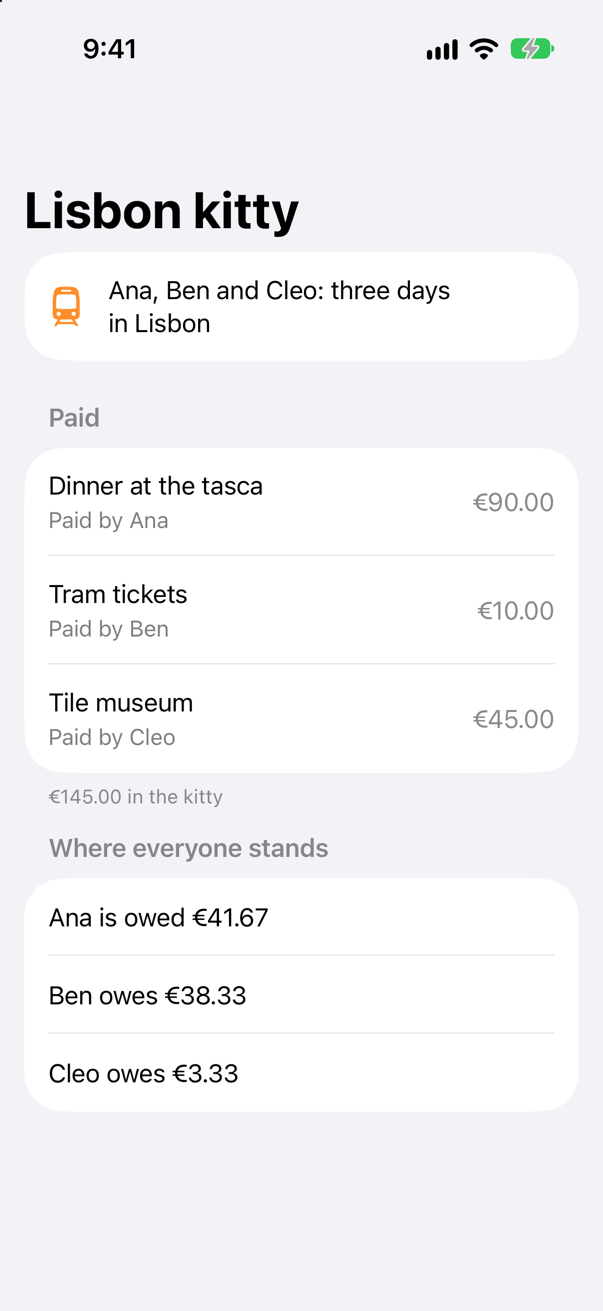
The starter: three friends in Lisbon, what each paid, and where each standsScreenshot · iPhone 17, iOS 27.0
Five files. KittyApp.swift is Xcode's. ContentView.swift is the screen: who went, what each of them paid with the total under it, and a line for each friend. BalanceLine.swift is that line, a small view that turns a number of cents into words. Kitty.swift is the model — the friends, the expenses, and each friend's balance: what they paid, less their share of the total. And Money.swift holds the arithmetic, where this lesson begins:
import Foundation

/// A total in cents, split among `count` friends: one share each.
func shares(of cents: Int, among count: Int) -> [Int] {
    let each = (Double(cents) / Double(count)).rounded()
    return Array(repeating: Int(each), count: count)
}

/// Cents as euros, the way the screen writes money: €45.00.
func money(_ cents: Int) -> String {
    (Decimal(cents) / 100).formatted(.currency(code: "EUR"))
}
Money is kept in whole cents, as an Int: €90.00 is 9000. Only money(_:) turns cents into the euros the screen shows. The starter is set up as every project since lesson 15 — Swift 6, Default Actor Isolation set to nonisolated, Approachable Concurrency off — so Kitty says @MainActor itself, because the screen reads it.
Look at the screen once more. Ana is owed €41.67, Ben owes €38.33 and Cleo owes €3.33. Every number looks right. Keep them in mind.
Where tests live, and what ⌘U does
Tests are not part of the app. They live in a target of their own, a test bundle, which is built beside the app and never ships with it. Xcode's template for one is the Unit Testing Bundle, and its Testing System can be Swift Testing — Apple's framework of @Test functions and #expect, which since Xcode 16 replaces XCTest for new tests. Lesson 1 chose it when it made Peek; here you add a test target to a project that has none, which is the more usual case.
In Xcode, choose File ▸ New ▸ Target….
In the Test section of the templates, choose Unit Testing Bundle, and click Next.
Set Testing System: to Swift Testing. Xcode fills in Product Name: with
KittyTestsand Target to be Tested: withKitty; leave them as they are. Click Finish.
Xcode adds a folder, KittyTests, beside Kitty, holding KittyTests.swift:
import Testing

struct KittyTests {

    @Test func example() async throws {
        // Write your test here and use APIs like `#expect(...)` to check expected conditions.
        // Swift Testing Documentation
        // https://developer.apple.com/documentation/testing
    }

}
A new target comes with Xcode's own settings, whatever the app's are: Swift 5, and Approachable Concurrency on. Give it Kitty's three, so that its code is checked as strictly as the code it tests — select the KittyTests target, open Build Settings, and set:
Build setting of KittyTests Swift Language Version: Swift 6 SWIFT_VERSION = 6.0
Build setting of KittyTests Default Actor Isolation: nonisolated SWIFT_DEFAULT_ACTOR_ISOLATION = nonisolated
Build setting of KittyTests Approachable Concurrency: No SWIFT_APPROACHABLE_CONCURRENCY = NO
Choose Product ▸ Test (⌘U). Xcode builds the app and the tests, and runs every test:
✓ KittyTests › example(): passed (0.000 s)One test, and it passed, having checked nothing. What did ⌘U do to get there? It built two products, Kitty.app and KittyTests.xctest. Then it started Kitty in the simulator, as ⌘R does, and loaded the test bundle into Kitty's own process. The tests ran there, inside the app. The template set that up when it chose Kitty as the target to be tested: Kitty is the tests' host, the app they run in.
Bundle.main. A UI test, in lesson 47, is the other way round: a process of its own that drives the app from outside, as a person would.That is how the tests can call the app's code at all. The bundle is linked against Kitty's own executable, the one it is loaded into — the template set the target's build settings TEST_HOST and BUNDLE_LOADER to it — and @testable import Kitty lets it see what is only internal, which in an app is nearly everything. It has a cost worth knowing, too. Whatever Kitty does as it starts — a network request in its first screen's .task, a write to its files — it does on every ⌘U, before the first test. An edge case below proves it.
You can see it from a test. Replace the template's test with one that looks around. In KittyTests.swift:
import Testingimport UIKit@testable import Kittystruct KittyTests { @Test func example() async throws { // Write your test here and use APIs like `#expect(...)` to check expected conditions. // Swift Testing Documentation // https://developer.apple.com/documentation/testing /// Unit tests run inside the app: by now Kitty has started, and its window is up. @MainActor @Test func theAppIsRunning() { #expect(Bundle.main.bundleIdentifier == "com.example.Kitty") #expect(UIApplication.shared.connectedScenes.count == 1) }import Testing
import UIKit
@testable import Kitty
struct KittyTests {
/// Unit tests run inside the app: by now Kitty has started, and its window is up.
@MainActor
@Test func theAppIsRunning() {
#expect(Bundle.main.bundleIdentifier == "com.example.Kitty")
#expect(UIApplication.shared.connectedScenes.count == 1)
}
}Run the tests (⌘U):
✓ KittyTests › theAppIsRunning(): passed (0.000 s)Bundle.main is Kitty's bundle, not the tests', and Kitty's window is up: one scene is connected. UIApplication belongs to the main actor, so the test says @MainActor; a test that says nothing belongs to no actor, as everything in this project does.
A first test, and the cent it finds
Now a real test, of the arithmetic. The cheapest tests check a function with no screen and no model behind it: numbers in, numbers out. The first thing to check about splitting a bill is that the shares add up to the bill. In the Project navigator, select the KittyTests folder, make a new Swift File named SplitTests, and replace everything in it:
import Testing
@testable import Kitty

/// The arithmetic of the kitty: numbers in, numbers out — no model, no screen.
struct SplitTests {
    @Test func sharesAddUpToTheTotal() {
        let split = shares(of: 14500, among: 3)
        #expect(split.reduce(0, +) == 14500)
    }
}
Run the tests:
✓ KittyTests › theAppIsRunning(): passed (0.000 s)
✗ SplitTests › sharesAddUpToTheTotal(): failed (0.002 s)
    Expectation failed: split.reduce(0, +) == 14500
    split.reduce(0, +) → 14499
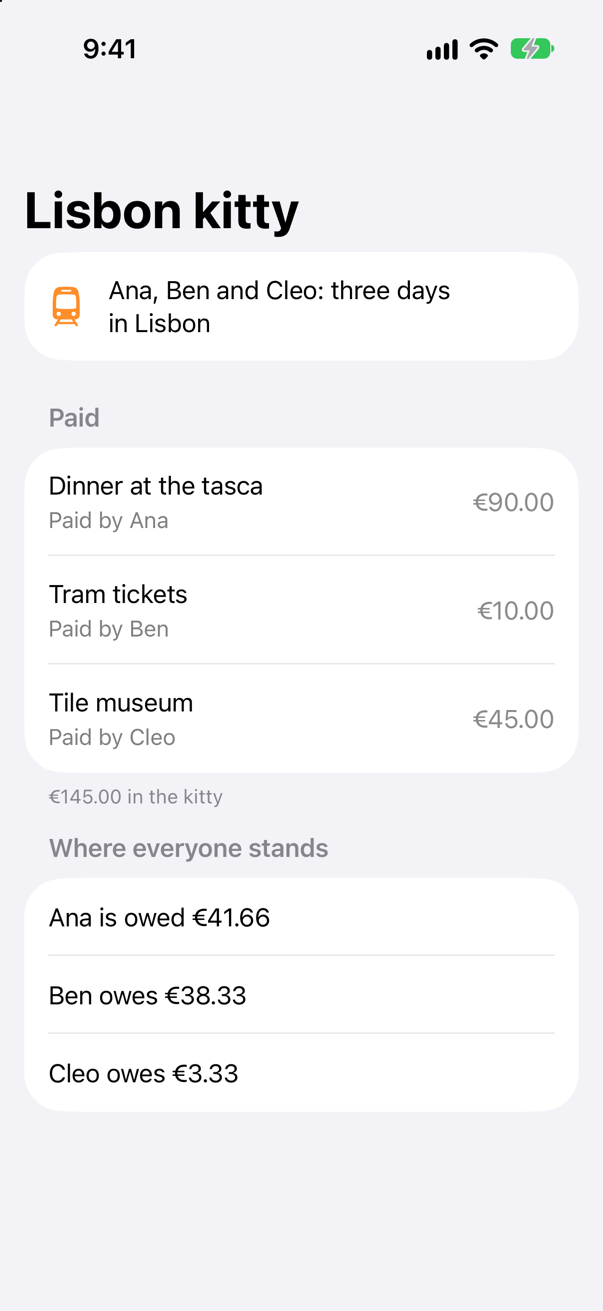
The shares come to €144.99, not €145.00. €145.00 among three is €48.333…; the starter rounds that to €48.33 for each friend, and the third of a cent each, three times over, is lost. The screen hid it, because every number on it is right to the cent on its own — only the sum is wrong. That is the kind of mistake a test is for.
Read what the failure says. #expect printed the expression as you wrote it, and under it the value of its left side: split.reduce(0, +) → 14499. You did not write a message, and nothing needed formatting by hand. Step 4 shows how #expect knows.
Fix the arithmetic: divide in whole cents, and give the cents that are left over, one each, to the first shares. In Money.swift:
/// A total in cents, split among `count` friends: one share each./// A total in cents, split among `count` friends: one share each. The cents that do not divide evenly go one each to/// the first shares, so that the shares always add up to the total.func shares(of cents: Int, among count: Int) -> [Int] { let each = (Double(cents) / Double(count)).rounded() return Array(repeating: Int(each), count: count) let each = cents / count let left = cents % count return (0..<count).map { $0 < left ? each + 1 : each }}/// A total in cents, split among `count` friends: one share each. The cents that do not divide evenly go one each to
/// the first shares, so that the shares always add up to the total.
func shares(of cents: Int, among count: Int) -> [Int] {
let each = cents / count
let left = cents % count
return (0..<count).map { $0 < left ? each + 1 : each }
}One total and one number of friends proves little. A test can take arguments: @Test(arguments:) runs it once for every argument, and with two collections, once for every combination of the two — here, every total with every size of group: nine cases. In SplitTests.swift, add a second test:
/// The arithmetic of the kitty: numbers in, numbers out — no model, no screen.struct SplitTests { @Test func sharesAddUpToTheTotal() { let split = shares(of: 14500, among: 3) #expect(split.reduce(0, +) == 14500) } @Test(arguments: [1, 1000, 14500], [2, 3, 4]) func sharesAddUpForAnyKitty(cents: Int, friends: Int) { #expect(shares(of: cents, among: friends).reduce(0, +) == cents) }}/// The arithmetic of the kitty: numbers in, numbers out — no model, no screen.
struct SplitTests {
@Test func sharesAddUpToTheTotal() {
let split = shares(of: 14500, among: 3)
#expect(split.reduce(0, +) == 14500)
}
@Test(arguments: [1, 1000, 14500], [2, 3, 4])
func sharesAddUpForAnyKitty(cents: Int, friends: Int) {
#expect(shares(of: cents, among: friends).reduce(0, +) == cents)
}
}Run the tests:
✓ KittyTests › theAppIsRunning(): passed (0.000 s)
✓ SplitTests › sharesAddUpToTheTotal(): passed (0.000 s)
✓ SplitTests › sharesAddUpForAnyKitty(cents:friends:): passed (0.001 s)
    ✓ 1, 2: passed
    ✓ 1, 3: passed
    ✓ 1, 4: passed
    ✓ 1000, 2: passed
    ✓ 1000, 3: passed
    ✓ 1000, 4: passed
    ✓ 14500, 2: passed
    ✓ 14500, 3: passed
    ✓ 14500, 4: passed
Each case is reported on its own, so a failure would name the total and the group that broke. The extra cent goes to Ana, who is first in the list. Run the app (⌘R) to see the change on the screen:
How a test is found, and how a failure knows
XCTest finds its tests at run time by asking the Objective-C runtime for every subclass of XCTestCase, and for each class's methods whose names begin with test. Swift Testing has no runtime to ask: a struct has no Objective-C metadata, and a test can be a global function. So the work is done when the test is compiled, by the macro. Here is what @Test wrote beside sharesAddUpToTheTotal(), from the compiler's own expansion:
struct SplitTests {
    @Test func sharesAddUpToTheTotal() {
        let split = shares(of: 14500, among: 3)
        #expect(split.reduce(0, +) == 14500)
    }

    // 1. A function that runs the test: it makes a new SplitTests, and calls the method on it.
    @Sendable private static func b8db9354bbb01c19() async throws -> Void {
      @Sendable func __local(_:isolated (any _Concurrency.Actor)?=Testing.__defaultSynchronousIsolationContext) async throws {
        let __local = unsafe try await Testing.__requiringUnsafe(Testing.__requiringTry(Testing.__requiringAwait(SplitTests())))
        _ = unsafe try await Testing.__requiringUnsafe(Testing.__requiringTry(Testing.__requiringAwait(__local.sharesAddUpToTheTotal())))
      }
      try await __local()
    }

    // 2. A function that describes it: its name, its suite, and the function above.
    @Sendable private static func generator() async -> Testing.Test {
      return .__function(
      named: "sharesAddUpToTheTotal()",
      in: SplitTests.self,
      // (and its traits, and where it is in the file)
      testFunction: b8db9354bbb01c19
    )
    }

    // 3. A record that points at that description, in a section of the app's binary set aside for tests.
    @section("__DATA_CONST,__swift5_tests")
    @used
    private nonisolated static let testContentRecord: Testing.__TestContentRecord = (
      0x74657374, /* 'test' */
      0,
      { outValue, type, _, _ in
        Testing.Test.__store(generator, into: outValue, asTypeAt: type)
      },
      0,
      0
    )

    // …and the same three for sharesAddUpForAnyKitty(cents:friends:)
}
Three things, and each answers a question an interviewer may ask.
What @Test wrote | What it means |
|---|---|
1. A function that makes a new SplitTests() and calls the method on it | Every test gets a new instance of its suite. Nothing one test stores in the suite is seen by another — which is why init is the place to set up, and why the tests can run at the same time. (The __requiring… wrappers are for the compiler: they let the macro write try await around any test, whether or not it can throw or wait, without a warning.) |
2. A function that returns a Test: its name, its suite, its traits, where it is in the file, and the function to run | The description of the test that Xcode lists — by name, under its suite. |
3. A testContentRecord, placed in the section __swift5_tests of the binary and marked @used | How the test is found. When the test run starts, Swift Testing reads that section of every image in the process, and each record leads it to a description. @used keeps the linker from throwing the record away, since no code ever refers to it. |
And #expect, which is also a macro. It does not receive true or false, as XCTAssert does. It receives the expression, and takes it apart:
@Test func sharesAddUpToTheTotal() {
    let split = shares(of: 14500, among: 3)
    Testing.__checkBinaryOperation(split.reduce(0, +),{ $0 == $1() },14500,
        expression: .__fromBinaryOperation(.__fromSyntaxNode("split.reduce(0, +)"),"==",.__fromSyntaxNode("14500")),
        comments: [],
        isRequired: false,
        sourceLocation: Testing.SourceLocation.__here()).__expected()
}
Both sides of the == are passed separately, with the operator between them as a closure, and with the text of each side as you wrote it. So when the check fails, Swift Testing has the expression, the value of each side and the line it is on — everything the failure in step 3 printed. isRequired: false and .__expected() at the end are what make #expect record a failure and carry on. try #require(count == 1) expands to the same call with isRequired: true and .__required(), which throws when the check fails — and the thrown error ends the test.
Testing what the screen shows: the model
A SwiftUI screen is drawn from its model, so a test of the model is a test of what the screen will say. Kitty holds the logic that matters: the total, and each friend's balance. Test it with no screen at all. In KittyTests.swift, add three tests for the model, and keep the one that looks around:
import Testingimport UIKit@testable import Kitty/// The model the screen reads, tested without the screen.struct KittyTests { let kitty = Kitty.lisbon // made again for every test @Test func payingRaisesYourBalance() { let before = kitty.balance(of: "Ben") kitty.add("Coffee", cents: 450, paidBy: "Ben") #expect(kitty.balance(of: "Ben") == before + 300) } @Test func totalIsEverythingPaid() { #expect(kitty.total == 14500) } @Test func balancesAddUpToZero() { let balances = kitty.people.map { kitty.balance(of: $0) } #expect(balances.reduce(0, +) == 0) } /// Unit tests run inside the app: by now Kitty has started, and its window is up. @MainActor @Test func theAppIsRunning() { #expect(Bundle.main.bundleIdentifier == "com.example.Kitty") #expect(UIApplication.shared.connectedScenes.count == 1) }}import Testing
import UIKit
@testable import Kitty
/// The model the screen reads, tested without the screen.
struct KittyTests {
let kitty = Kitty.lisbon // made again for every test
@Test func payingRaisesYourBalance() {
let before = kitty.balance(of: "Ben")
kitty.add("Coffee", cents: 450, paidBy: "Ben")
#expect(kitty.balance(of: "Ben") == before + 300)
}
@Test func totalIsEverythingPaid() {
#expect(kitty.total == 14500)
}
@Test func balancesAddUpToZero() {
let balances = kitty.people.map { kitty.balance(of: $0) }
#expect(balances.reduce(0, +) == 0)
}
/// Unit tests run inside the app: by now Kitty has started, and its window is up.
@MainActor
@Test func theAppIsRunning() {
#expect(Bundle.main.bundleIdentifier == "com.example.Kitty")
#expect(UIApplication.shared.connectedScenes.count == 1)
}
}Run the tests:
They do not compile. Xcode reports
main actor-isolated default value in a nonisolated contextOne error, at the first line that touches the model. Kitty.lisbon belongs to the main actor, as everything of Kitty's does, because the screen reads it. The suite belongs to no actor, because in this project nothing is on an actor unless it says so — the test target included. So the compiler refuses to make the property's default value there, exactly as it would in the app, and the calls in the tests would be refused for the same reason. Put the suite on the main actor, as the model is — and the one test that said @MainActor no longer needs to:
import Testingimport UIKit@testable import Kitty/// The model the screen reads, tested without the screen./// The model the screen reads, tested without the screen. It belongs to the main actor, so its tests do too.@MainActorstruct KittyTests { let kitty = Kitty.lisbon // made again for every test @Test func payingRaisesYourBalance() { let before = kitty.balance(of: "Ben") kitty.add("Coffee", cents: 450, paidBy: "Ben") #expect(kitty.balance(of: "Ben") == before + 300) } @Test func totalIsEverythingPaid() { #expect(kitty.total == 14500) } @Test func balancesAddUpToZero() { let balances = kitty.people.map { kitty.balance(of: $0) } #expect(balances.reduce(0, +) == 0) } /// Unit tests run inside the app: by now Kitty has started, and its window is up. @MainActor @Test func theAppIsRunning() { #expect(Bundle.main.bundleIdentifier == "com.example.Kitty") #expect(UIApplication.shared.connectedScenes.count == 1) }}import Testing
import UIKit
@testable import Kitty
/// The model the screen reads, tested without the screen. It belongs to the main actor, so its tests do too.
@MainActor
struct KittyTests {
let kitty = Kitty.lisbon // made again for every test
@Test func payingRaisesYourBalance() {
let before = kitty.balance(of: "Ben")
kitty.add("Coffee", cents: 450, paidBy: "Ben")
#expect(kitty.balance(of: "Ben") == before + 300)
}
@Test func totalIsEverythingPaid() {
#expect(kitty.total == 14500)
}
@Test func balancesAddUpToZero() {
let balances = kitty.people.map { kitty.balance(of: $0) }
#expect(balances.reduce(0, +) == 0)
}
/// Unit tests run inside the app: by now Kitty has started, and its window is up.
@Test func theAppIsRunning() {
#expect(Bundle.main.bundleIdentifier == "com.example.Kitty")
#expect(UIApplication.shared.connectedScenes.count == 1)
}
}Run the tests:
✓ KittyTests › payingRaisesYourBalance(): passed (0.000 s)
✓ KittyTests › totalIsEverythingPaid(): passed (0.000 s)
✓ KittyTests › balancesAddUpToZero(): passed (0.000 s)
✓ KittyTests › theAppIsRunning(): passed (0.000 s)
✓ SplitTests › sharesAddUpToTheTotal(): passed (0.000 s)
✓ SplitTests › sharesAddUpForAnyKitty(cents:friends:): passed (0.001 s)
    ✓ 1, 2: passed
    ✓ 1, 3: passed
    ✓ 1, 4: passed
    ✓ 1000, 2: passed
    ✓ 1000, 3: passed
    ✓ 1000, 4: passed
    ✓ 14500, 2: passed
    ✓ 14500, 3: passed
    ✓ 14500, 4: passed
Each test begins with a new Kitty.lisbon, because each test gets a new KittyTests and the property is made with it. The coffee that payingRaisesYourBalance() adds is never seen by totalIsEverythingPaid(), whichever runs first. That is the whole of set-up in Swift Testing: a stored property, or an init. A suite that is a class or an actor can also have a deinit, which runs after each test, for tearing down.
One more thing to know about running these. With Xcode's own settings, Swift Testing runs the tests of a suite at the same time, as tasks in the one process. A suite on the main actor still takes turns on the main actor, but a plain suite's tests really overlap. So tests must not share anything they change: a static property, a file, a UserDefaults key. Swift 6 refuses a global var that is not isolated, which catches the commonest case. When tests must share something that cannot be split up, mark their suite @Suite(.serialized), and its tests run one at a time. An edge case below shows both.
Testing a view, and what a test cannot see
A view is a struct, and a test can make one: BalanceLine(person: "Ana", cents: 4166). What the test can read is whatever the struct offers as plain Swift: its stored properties, and its computed ones. BalanceLine keeps the words it shows in words, so they can be checked without drawing anything. In the KittyTests folder, make a new Swift File named BalanceLineTests, and replace everything in it:
import Testing
@testable import Kitty

/// A view is a struct: a test can make one, and read what it says before anything is drawn.
@MainActor
struct BalanceLineTests {
    @Test func owedMoney() {
        #expect(BalanceLine(person: "Ana", cents: 4166).words == "Ana is owed €41.66")
    }

    @Test func owesMoney() {
        #expect(BalanceLine(person: "Ben", cents: -3833).words == "Ben owes €38.33")
    }

    @Test func square() {
        #expect(BalanceLine(person: "Cleo", cents: 0).words == "Cleo is square")
    }
}
Run the tests:
✓ BalanceLineTests › owedMoney(): passed (0.000 s)
✓ BalanceLineTests › owesMoney(): passed (0.000 s)
✓ BalanceLineTests › square(): passed (0.000 s)
✓ KittyTests › payingRaisesYourBalance(): passed (0.000 s)
✓ KittyTests › totalIsEverythingPaid(): passed (0.000 s)
✓ KittyTests › balancesAddUpToZero(): passed (0.000 s)
✓ KittyTests › theAppIsRunning(): passed (0.000 s)
✓ SplitTests › sharesAddUpToTheTotal(): passed (0.000 s)
✓ SplitTests › sharesAddUpForAnyKitty(cents:friends:): passed (0.001 s)
    ✓ 1, 2: passed
    ✓ 1, 3: passed
    ✓ 1, 4: passed
    ✓ 1000, 2: passed
    ✓ 1000, 3: passed
    ✓ 1000, 4: passed
    ✓ 14500, 2: passed
    ✓ 14500, 3: passed
    ✓ 14500, 4: passed
A View belongs to the main actor — the protocol says so — so these tests say @MainActor too. That is as far as a unit test goes into a view, and it is worth knowing exactly where it stops.
| A test can | A test cannot |
|---|---|
Make a view, and read its lets and its computed properties | Read what body draws. body returns some View: a description for SwiftUI to draw, with no API to read its words back or find its buttons |
Call body, and get that description | Use the view's @State. On a view that SwiftUI has not put on a screen, changing @State changes nothing (an edge case below) |
| Test the model the view is given, and the functions it calls | Read the view's @Environment. Outside a screen it reads the default, and SwiftUI logs a warning |
So the habit that makes SwiftUI testable is to keep views thin: decisions go into the model, into functions, and into plain properties like words, where a unit test can reach them in milliseconds. What is left in body is layout, and layout is checked in other ways — by eye in previews while you work, by a test that draws the view into a picture, and by a UI test that drives the running app. Lesson 47 does both of the last two, on Trips.
XCTest, beside it
XCTest is the framework every iOS test was written in until 2024, and most projects still have its tests. It runs in the same target as Swift Testing, and ⌘U runs both. Write the first test again in XCTest's way, to see the difference. In the KittyTests folder, make a new Swift File named SplitXCTests, and replace everything in it:
import XCTest
@testable import Kitty

/// The first test again, as XCTest writes it: a class, a method whose name begins with `test`, and an assertion function.
final class SplitXCTests: XCTestCase {
    func testSharesAddUpToTheTotal() {
        XCTAssertEqual(shares(of: 14500, among: 3).reduce(0, +), 14500)
    }
}
Run the tests:
✓ SplitXCTests › testSharesAddUpToTheTotal(): passed (0.003 s)
✓ BalanceLineTests › owedMoney(): passed (0.001 s)
✓ BalanceLineTests › owesMoney(): passed (0.000 s)
✓ BalanceLineTests › square(): passed (0.000 s)
✓ KittyTests › payingRaisesYourBalance(): passed (0.000 s)
✓ KittyTests › totalIsEverythingPaid(): passed (0.000 s)
✓ KittyTests › balancesAddUpToZero(): passed (0.000 s)
✓ KittyTests › theAppIsRunning(): passed (0.000 s)
✓ SplitTests › sharesAddUpToTheTotal(): passed (0.000 s)
✓ SplitTests › sharesAddUpForAnyKitty(cents:friends:): passed (0.001 s)
    ✓ 1, 2: passed
    ✓ 1, 3: passed
    ✓ 1, 4: passed
    ✓ 1000, 2: passed
    ✓ 1000, 3: passed
    ✓ 1000, 4: passed
    ✓ 14500, 2: passed
    ✓ 14500, 3: passed
    ✓ 14500, 4: passed
Both frameworks, one run. Side by side:
| XCTest | Swift Testing |
|---|---|
A subclass of XCTestCase | Any type — a struct, a class, an actor — or no type at all |
A method whose name begins with test, found through the Objective-C runtime | A function marked @Test, found through the record its macro wrote |
setUp() and tearDown() | init and deinit |
| One object per test method — and XCTest makes them all before the first test runs | One instance per test, made as the test starts |
XCTAssertEqual(a, b), XCTAssertTrue(x), and a dozen more like them | #expect(a == b), #expect(x) — one macro for every comparison |
try XCTUnwrap(x); XCTFail("…") | try #require(x); Issue.record("…") |
Expectations and await fulfillment(of:) | confirmation, and plain await (lesson 44) |
| Tests run one at a time in a process | Tests run at the same time, in one process; .serialized to opt out |
XCTest is still the only way to do two things: drive the running app from outside, with XCUIApplication, and measure performance, with measure(metrics:). So a project keeps both. New unit tests are written with @Test; UI tests stay in XCTest, in their own target. Since Swift 6.4 the two even report each other's failures: in a new project an XCTAssertEqual that fails inside a @Test fails it, and so does an #expect inside an XCTestCase — an edge case and a card below show each.
What you built
- A Unit Testing Bundle target for Kitty, with the project's strict settings, and what ⌘U does: Kitty starts, and the tests run inside it.
- A test of the arithmetic that found a lost cent, the fix, and a parameterized test of every total with every size of group.
@Testand#expectas the compiler expands them: a new suite for each test, a record that finds the test, and the two sides of a comparison passed apart.- Tests of the
@MainActormodel and of a view's words, and a map of what a unit test cannot see of a view. - The first test again in XCTest, beside Swift Testing in the same run.
Next, lesson 44: Trips gets a test target of its own, and its tests of async code stand in for the network.
The finished project
Stuck, or want to compare with your own? This is the project as it stands at the end of this lesson, built and run before it was put here.
- Kitty.zip — unzip it, then open
Kitty.xcodeprojin Xcode.
Flash cards
13 cards for this lesson, each labelled with its topic. 9 ask how you would write something; the other 4 are trick questions, written to catch a misunderstanding. Answer in your head first, then tap the card.
Syntax · Swift TestingGive a test a name that reads well in Xcode's list of results.
Pass a string to @Test: @Test("Shares add up to the total"). Xcode lists the test by that name instead of sharesAddUp(). A suite takes one too: @Suite("The kitty's arithmetic").
Syntax · suitesIn Swift Testing, set something up before every test of a suite.
In the suite's init — or as a stored property's default. Each test gets a new instance of the suite, so init runs before every test: it is XCTest's setUp().
Syntax · suitesIn Swift Testing, clean up after every test of a suite.
Make the suite a final class (or an actor) and give it a deinit: it runs after each test, as XCTest's tearDown() does. A struct has no deinit, so a suite that must clean up is a class. init may throw, and a throw fails the test.
Syntax · parallel testsMake the tests of one suite run one at a time.
The .serialized trait: @Suite(.serialized). Swift Testing otherwise runs a suite's tests at the same time. Use it for tests that share something they cannot each have a copy of — a file, a database — and fix the sharing where you can instead.
Syntax · #expectAdd a note to a check, for whoever reads the failure.
A string after the condition: #expect(total == 14500, "the kitty lost a cent"). It is added to the failure, after the values: "Expectation failed: total == 14500 — total → 14499: the kitty lost a cent"
Syntax · #expectFail a test from a branch it should never reach, saying why.
Issue.record("…") — Swift Testing's XCTFail. It fails the test with that message and carries on: "Issue recorded: expected the trip to be loaded, but it is .loading"
Syntax · testing a viewTest the words a view will show, without drawing it.
Make the view, and read a plain property it keeps its words in. A view is a struct, so a test can make one; it belongs to the main actor, so the test says @MainActor. What body draws, a unit test cannot read.
Syntax · parameterized testsRun one test over pairs of arguments: a total with the number of friends it is split among.
zip the two collections: @Test(arguments: zip(totals, friends)) runs three cases, one per pair. Two collections given separately run every combination instead — an edge case shows it.
Syntax · XCTestWrite #expect(a == b) as XCTest writes it.
XCTAssertEqual(a, b), in a method whose name begins with test, in a subclass of XCTestCase. XCTest has an assertion function for each kind of check; Swift Testing has #expect for all of them.
Trick question · XCTestAn XCTestCase subclass has two methods: testAddsUp() and checksTheTotal(). ⌘U runs how many tests?
One. XCTest runs only methods whose names begin with test, take no arguments and return nothing; checksTheTotal() is an ordinary method, and nothing says so — the run is green. In Swift Testing a test is marked, not named: no @Test, no test.
Trick question · XCTestAn #expect that fails inside an XCTestCase test method. Does the test fail?
Yes: "Expectation failed: total == 14500: total == 14500 → false — total → 14499" Swift Testing's checks report to XCTest when they run in an XCTest test, so tests can move from one framework to the other a check at a time.
Trick question · testing a viewA test makes a view that reads @Environment(\.locale), and reads the view's locale. The simulator is set to English (US). What does the test get?
Not the simulator's locale: "Expectation failed: PriceTag().locale.identifier == Locale.current.identifier — PriceTag().locale.identifier → "" — Locale.current.identifier → "en_US"" Outside a screen, an @Environment property reads the environment's default value, and SwiftUI logs, in Xcode's console: "Accessing Environment<Locale>'s value outside of being installed on a View. This will always read the default value and will not update." A view's environment exists only once SwiftUI has put it on a screen — pass the view what it needs instead, when a test must control it.
Trick question · access@testable import Kitty — can a test call a private method of one of the app's types?
No: "'round' is inaccessible due to 'private' protection level" @testable lifts internal to what a test can see, and no further: private and fileprivate stay hidden. Test what the private method is for, through the code that calls it — or, if it deserves tests of its own, make it internal (or a function of its own).
Edge cases and tricky questions
8 questions of the kind an interviewer uses to find out whether you really know this — the corners, the traps, and the things that changed recently. Each has its source. Wherever the answer is what some code does, that code was compiled and run, and what you see under “Show the answer” is what it really did. Say your answer aloud before you open it.
Kitty's first screen starts work in its .task — a network request, say. You press ⌘U to run unit tests that never touch that screen. Does the .task run?
Show the answer
Yes. The test found FirstScreen.taskRan set: the app's first screen appeared, and its .task ran, during a run of unit tests.
The run
✓ onlyArithmetic(): passed (0.000 s)A unit-test target is hosted: ⌘U starts the app — init, scene, window, first screen — and loads the test bundle into it. So whatever the app does as it starts, it does before every run of the tests, offline or not: a request goes out, a file is written, an analytics event is sent. Two answers. Keep start-up light, and give the work its dependencies as parameters, so that it can be handed a stand-in (lesson 44 does that for the network). Or, for a test target whose code needs no app at all — a package's, a framework's — test it without a host, and nothing starts.
Where this comes from: Build settings reference: Test Host · Apple Developer Forums: does running a single unit test start the app? — answered by Apple DTS — Built and run with Xcode 27 on the iOS 27 simulator, in a project with the course's strict settings.
Two tests in one suite each wait for the other to arrive, for up to two seconds. If the tests ran one after the other, the first would give up. Do both pass?
Show the answer
Yes — they met. Swift Testing ran the suite's two tests at the same time, in the one process, as tasks of a task group:
The run, with Xcode's own settings
✓ Together › first(): passed (0.021 s)
✓ Together › second(): passed (0.000 s)
Mark the suite @Suite(.serialized), and the same two tests take turns. The first waits its two seconds alone, and fails; the second finds it already there:
The same tests, serialized
The run
✗ OneByOne › first(): failed (2.013 s)
    Expectation failed: await meeting.arrive()
✓ OneByOne › second(): passed (0.000 s)
Parallel is the default because tests that do not share anything should not wait for each other — and it is the test that shares state, not the framework, that is wrong. Two catches. A suite on the main actor takes turns on the main actor (its tests overlap only where they await). And a scheme can turn parallel testing off for the whole run — so can xcodebuild -parallel-testing-enabled NO — and then .serialized has nothing left to do: a test that passes only one way is a test with a hidden dependency. XCTest is the other way round: its tests run one at a time, unless parallel testing splits its classes across copies of the simulator.
Where this comes from: Swift Testing: Running tests serially or in parallel · WWDC24: Go further with Swift Testing — Run with Xcode 27 on the iOS 27 simulator, with xcodebuild's own parallel setting, as for a new project's scheme.
An XCTestCase has two test methods and a stored property, let number = Made.one(), which counts the objects made. When the first test runs, how many objects have been made?
Show the answer
Two — both. XCTest makes one object per test method, and it makes every one of them before the first test runs. They are let go, usually, only when the whole run is over.
The run
✓ KittyXCTests › testFirst(): passed (0.003 s)
✓ KittyXCTests › testSecond(): passed (0.000 s)
That is why XCTest code puts set-up in setUp() and not in a property's default: a property is made when the object is, long before its test, and whatever it holds — a big fixture, an open file — is held for the whole run unless tearDown() lets it go. Swift Testing makes a suite's instance as each test starts, and drops it when the test ends, so there init and properties are the right place. (nonisolated(unsafe) is how a test may count with a static var under Swift 6: the compiler is told the count is safe, because XCTest makes these objects on one thread.)
Where this comes from: Apple Developer Forums: UITests memory allocation — answered by an Apple Developer Tools engineer · swift-corelibs-xctest: XCTestCaseSuite.swift (the open-source XCTest makes every test object as it builds the suite) · XCTest: Set up and tear down state in your tests · Swift Testing: Organizing test functions with suite types — Run with Xcode 27 on the iOS 27 simulator.
A test marked @Test checks with XCTAssertEqual(1, 2) — an XCTest assertion, left over from a test half moved to Swift Testing. Does the test fail?
Show the answer
Yes, now: "Issue recorded: XCTAssertEqual failed: ("1") is not equal to ("2") - an XCTest assertion in a Swift Testing test"
Until Swift 6.4, an XCTest assertion that failed outside an XCTest test had no test to report to, and the @Test passed — a check that was silently not a check. Since Swift 6.4 the two frameworks report each other's failures, and how strictly is a setting, the interoperability mode. A new Xcode 27 project uses the complete mode, in which this fails the test, as here; a test plan made before Xcode 27 keeps the limited mode, in which the same failure is only a warning. An #expect inside an XCTestCase method is reported to XCTest in the same way (a card shows it). Still, finish the move: XCTAssertEqual(a, b) is #expect(a == b), and only #expect shows the values of the two sides.
Where this comes from: ST-0021: Targeted interoperability between Swift Testing and XCTest · WWDC26: Migrate to Swift Testing · Swift Testing: Migrating a test from XCTest — Run with Xcode 27 on the iOS 27 simulator.
A view keeps a count in @State. A test makes the view, calls its method that adds one to the count, and checks the count. What does it find?
Show the answer
Nothing changed: "Expectation failed: counter.count == 1 — counter.count → 0"
@State is storage that SwiftUI keeps for a view while the view is on a screen — "the persistent storage associated with your view's identity", in Apple's words — and SwiftUI gives the property its value before each body. A view a test made is only a value: SwiftUI never put it anywhere, so there is no storage to change, and the count stays the initial one. No error says so. That is the strongest reason to keep state that matters in a model: an @Observable class is an ordinary object, and a test can change it and read it back, as the model tests of this lesson do.
Where this comes from: DynamicProperty · WWDC21: Demystify SwiftUI (2021 — still the reference on identity) · State — Run with Xcode 27 on the iOS 27 simulator.
shares(of:among:) calls precondition(count > 0). On iOS, can a Swift Testing test check that a split among nobody stops the program?
Show the answer
It does not compile. Xcode reports
'expect(processExitsWith:observing:_:sourceLocation:performing:)' is unavailable: Exit tests are not available on this platform.
'failure' is unavailable: Exit tests are not available on this platform.
No — not on iOS: "'expect(processExitsWith:observing:_:sourceLocation:performing:)' is unavailable: Exit tests are not available on this platform."
Swift 6.2 added exit tests: Swift Testing runs the closure in a new process, and checks how that process ended. Starting a process of your own is something iOS does not allow, so exit tests exist on macOS, Linux and Windows only. On iOS the choices are to test the condition before the precondition (the function that checks the count), to make the function throw instead of trapping, or to move the logic into a Swift package and test it on the Mac.
Where this comes from: ST-0008: Exit tests · Swift Testing: Exit testing — Built with Xcode 27 for the iOS 27 simulator.
The app target's Enable Testability build setting is No — as it is in every new project's Release configuration. Do tests that say @testable import still build?
Show the answer
It does not compile. Xcode reports
Unable to resolve Swift module dependency to a compatible module: 'Probe' (in target 'ProbeTests' from project 'Probe')No: "Unable to resolve Swift module dependency to a compatible module: 'Probe' (in target 'ProbeTests' from project 'Probe')"
The app's module was not compiled for testing. @testable reaches internal code only in a module compiled for it, and Enable Testability is the setting that compiles it so — on in the Debug configuration of a new project, and off in Release, where Apple has said since Xcode 7 that it does not belong. That is why tests run against a Debug build: a scheme whose Test action uses Release meets this error, unless the setting is turned on for Release too.
Where this comes from: Build settings reference: Enable Testability · Xcode 7 release notes (2015): Enable Testability, “only in your Debug configuration” · The Swift book: Access Control (see “Access Levels for Unit Test Targets”) — Built with Xcode 27 for the iOS 27 simulator; the app target's ENABLE_TESTABILITY set to NO. The Debug and Release values are those of a new Xcode 27 project.
@Test(arguments: [1000, 2000, 14500], [2, 3, 4]) — three totals, and the number of friends for each. How many cases run?
Show the answer
Nine, not three. Two collections are not paired: Swift Testing runs every total with every number of friends.
The run
✓ sharesAddUp(cents:friends:): passed (0.001 s)
    ✓ 1000, 2: passed
    ✓ 1000, 3: passed
    ✓ 1000, 4: passed
    ✓ 2000, 2: passed
    ✓ 2000, 3: passed
    ✓ 2000, 4: passed
    ✓ 14500, 2: passed
    ✓ 14500, 3: passed
    ✓ 14500, 4: passed
To pair them, zip them: @Test(arguments: zip([1000, 2000, 14500], [2, 3, 4])) runs three cases, one per pair (a card shows it). Every combination is right when each pairing is a case worth checking, as in this lesson's step 3; pairs are right when each input has its own expected result. Two collections is the most a test can take this way — a third needs zip or a collection of tuples.
Where this comes from: Swift Testing: Implementing parameterized tests — Run with Xcode 27 on the iOS 27 simulator.
Further reading
- Swift Testing
- Swift Testing: Defining test functions
- Swift Testing: Organizing test functions with suite types
- Swift Testing: Running tests serially or in parallel
- Swift Testing: Migrating a test from XCTest
- WWDC24: Meet Swift Testing
- WWDC24: Go further with Swift Testing
- WWDC26: Migrate to Swift Testing
- Swift Testing
- Swift Testing: Defining test functions
- Swift Testing: Expectations and confirmations (#expect, #require)
- Swift Testing: Organizing test functions with suite types
- Swift Testing: Running tests serially or in parallel
- Swift Testing: Migrating a test from XCTest
- XCTest
- Adding tests to your Xcode project
- Running tests and interpreting results
- swift-testing: Runtime-discoverable test content (how @Test's records are found)
- A New Direction for Testing in Swift (the vision behind Swift Testing)
- WWDC24: Meet Swift Testing
- WWDC24: Go further with Swift Testing
- WWDC26: Migrate to Swift Testing