Tests that do not wait for the clock
Controlling time in tests
You will buildThe planner's wait for typing to pause moved into a model that takes its clock; a test that waits on real time; a TestClock that moves only when a test says so; and tests of "nothing before 500 ms" and "a new letter cancels the wait" that run in milliseconds. Then Part 11's interview problem.
TimeAbout 60 minutes, then the interview problem
WhyThe last lesson's tests stood in for the network. Time is the other thing code depends on without saying so: a debounce, a timeout, a retry after a pause. A test that sleeps to wait for them is slow, and it fails at random on a busy machine. The cure is the same as for the network: what the code depends on is handed to it. Swift has a protocol for it — Clock — and the clock a test hands in can be one it moves by hand. Interviewers ask "how would you test a debounce?" to hear exactly this.
Open your project
Open your
Tripsproject as lesson 44 left it: double-clickTrips.xcodeprojin Finder, or use File ▸ Open… (⌘O) in Xcode.If you did not finish lesson 44, or would rather start from a known state, download Trips-lesson-44.zip instead. It is the project exactly as it stood at the end of lesson 44. Unzip it and open
Trips.xcodeproj.Run it (⌘R) to check that it builds. You should see where lesson 44 ended:
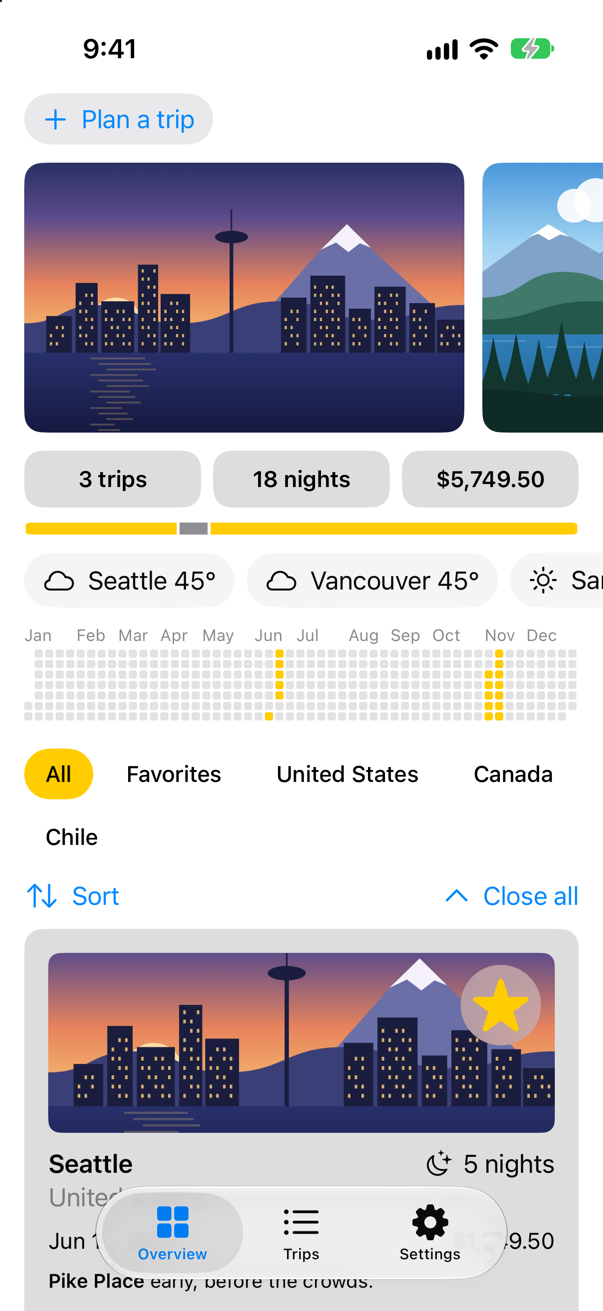
Trips, as it stood at the end of lesson 44Screenshot · iPhone 17, iOS 27.0
The wait moves into a model
Lesson 42's planner waits for typing to pause inside its .task(id:), in the view, where no test can reach it. The same steps move into a model that can be made in a test: wait, ask the cache, and keep the answer only if the task was not cancelled. It takes the cache, as the last lesson's model does, and a clock. any Clock<Duration> is any clock that counts in Durations; ContinuousClock(), the default, is real time — the clock Task.sleep(for:) uses — and clock.sleep(for:) waits on whichever one it was given. Make a new Swift File named PlannerWeather, and replace everything in it:
import Foundation

/// The weather for the city being typed into the planner: asked once typing has paused. `@MainActor`: the planner
/// reads it.
@MainActor
@Observable
final class PlannerWeather {
    private(set) var preview: Weather?
    private let cache: WeatherCache
    private let clock: any Clock<Duration>

    /// The cache every screen shares and the real clock, unless a test hands in its own.
    init(cache: WeatherCache = .shared, clock: any Clock<Duration> = ContinuousClock()) {
        self.cache = cache
        self.clock = clock
    }

    /// Waits for typing to pause, then asks. Call it from `.task(id:)`, which cancels it when the text changes.
    func update(for city: String) async {
        guard !city.isEmpty else {
            preview = nil
            return
        }
        do {
            try await clock.sleep(for: .milliseconds(500))
        } catch {
            // another letter came, or the planner closed
            return
        }
        let answer = try? await cache.weather(in: city)
        if !Task.isCancelled {
            preview = answer
        }
    }
}
The planner keeps the model in @State, and its .task(id:) now says only when: each change of the city starts update(for:) again, cancelling the run before. In TripPlanner.swift:
struct TripPlanner: View { @Environment(TripStore.self) private var store @State private var isOpen = false @State private var draft = TripDraft() @State private var preview: Weather? @State private var weather = PlannerWeather() @Environment(\.horizontalSizeClass) private var sizeClass var body: some View { VStack(spacing: 12) { VStack(alignment: .leading, spacing: 12) { Button(isOpen ? "Close the planner" : "Plan a trip", systemImage: isOpen ? "xmark" : "plus") { isOpen.toggle() } .buttonStyle(.bordered) if isOpen { IdeasRow { idea in draft.city = idea.city draft.country = idea.country draft.nights = idea.suggestedNights } let fields = sizeClass == .regular ? AnyLayout(HStackLayout()) : AnyLayout(VStackLayout(alignment: .leading)) fields { TextField("City", text: $draft.city) TextField("Country", text: $draft.country) } if let preview { if let preview = weather.preview { Label("\(preview.place): \(preview.temperature, format: .number.precision(.fractionLength(0)))°F, \(preview.sky.words)", systemImage: preview.sky.symbol) .font(.subheadline) } Stepper(value: $draft.nights, in: 1...60) { Text("^[\(draft.nights) night](inflect: true)") } Stepper(value: $draft.price, in: 0...20_000, step: 250) { Text(draft.price, format: .currency(code: "USD")) } HStack { PicturePicker(selection: $draft.imageName) Spacer() FavoriteButton(isFavorite: $draft.isFavorite) } Button("Add to my trips") { store.add(draft) draft = TripDraft() isOpen = false } .buttonStyle(.borderedProminent) .disabled(draft.city.isEmpty) } } .textFieldStyle(.roundedBorder) .frame(maxWidth: .infinity, alignment: .leading) .padding(.horizontal) .task(id: draft.city) { guard !draft.city.isEmpty else { preview = nil return } do { try await Task.sleep(for: .milliseconds(500)) // until typing pauses } catch { // another letter came, or the planner closed return } let answer = try? await WeatherCache.shared.weather(in: draft.city) if !Task.isCancelled { preview = answer } await weather.update(for: draft.city) } if isOpen { TripCard(trip: Binding( get: { draft.trip(id: 0) }, set: { draft.isFavorite = $0.isFavorite } )) } } }}struct TripPlanner: View {
@Environment(TripStore.self) private var store
@State private var isOpen = false
@State private var draft = TripDraft()
@State private var weather = PlannerWeather()
@Environment(\.horizontalSizeClass) private var sizeClass
var body: some View {
VStack(spacing: 12) {
VStack(alignment: .leading, spacing: 12) {
Button(isOpen ? "Close the planner" : "Plan a trip", systemImage: isOpen ? "xmark" : "plus") {
isOpen.toggle()
}
.buttonStyle(.bordered)
if isOpen {
IdeasRow { idea in
draft.city = idea.city
draft.country = idea.country
draft.nights = idea.suggestedNights
}
let fields = sizeClass == .regular ? AnyLayout(HStackLayout()) : AnyLayout(VStackLayout(alignment: .leading))
fields {
TextField("City", text: $draft.city)
TextField("Country", text: $draft.country)
}
if let preview = weather.preview {
Label("\(preview.place): \(preview.temperature, format: .number.precision(.fractionLength(0)))°F, \(preview.sky.words)",
systemImage: preview.sky.symbol)
.font(.subheadline)
}
Stepper(value: $draft.nights, in: 1...60) {
Text("^[\(draft.nights) night](inflect: true)")
}
Stepper(value: $draft.price, in: 0...20_000, step: 250) {
Text(draft.price, format: .currency(code: "USD"))
}
HStack {
PicturePicker(selection: $draft.imageName)
Spacer()
FavoriteButton(isFavorite: $draft.isFavorite)
}
Button("Add to my trips") {
store.add(draft)
draft = TripDraft()
isOpen = false
}
.buttonStyle(.borderedProminent)
.disabled(draft.city.isEmpty)
}
}
.textFieldStyle(.roundedBorder)
.frame(maxWidth: .infinity, alignment: .leading)
.padding(.horizontal)
.task(id: draft.city) {
await weather.update(for: draft.city)
}
if isOpen {
TripCard(trip: Binding(
get: { draft.trip(id: 0) },
set: { draft.isFavorite = $0.isFavorite }
))
}
}
}
}Run the app, tap Plan a trip, and type Bergen into City:
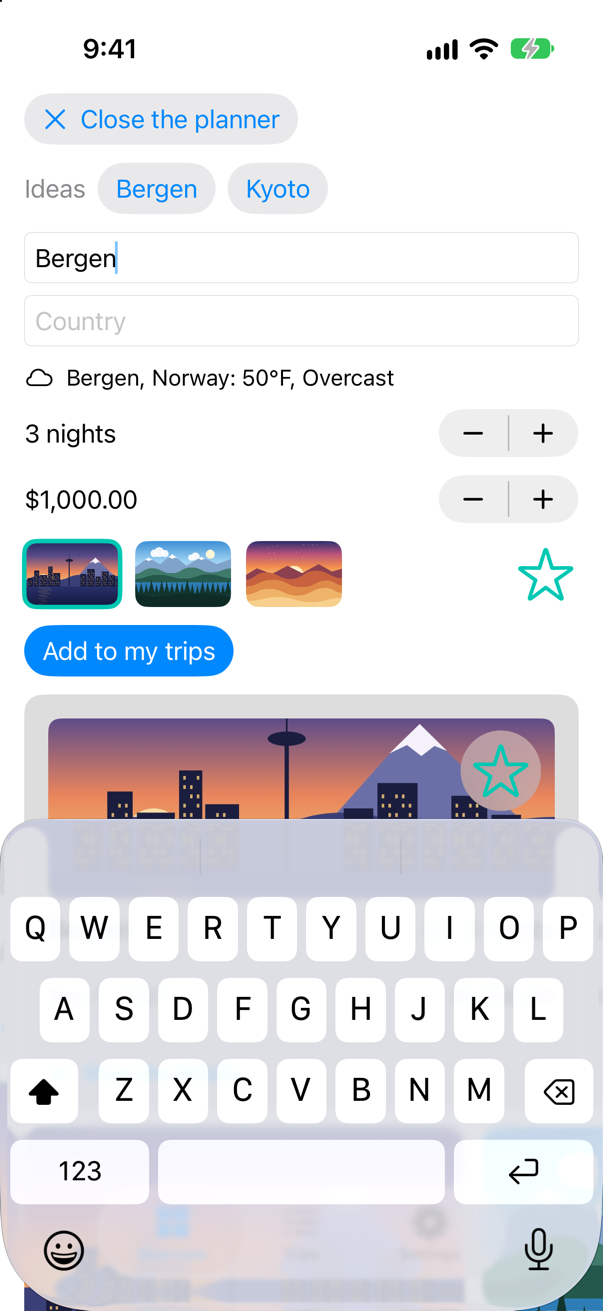
Asking Open-Meteo about Bergen
Saved Bergen to disk, on trips.weather
One request, as on lesson 42.
A test that waits
A first test with the real clock. It needs a stand-in for Open-Meteo that remembers what it was asked; an actor keeps that list safe from the tasks that add to it. In the TripsTests folder, make a new Swift File named PlannerWeatherTests, and replace everything in it:
import Testing
@testable import Trips

/// The cities a stand-in for Open-Meteo was asked about.
actor Requests {
    private(set) var cities: [String] = []

    func record(_ city: String) {
        cities.append(city)
    }
}

/// The planner's weather, with a stand-in for Open-Meteo.
@MainActor
struct PlannerWeatherTests {
    let requests = Requests()

    /// A cache whose `fetch` records the city it was asked about, and answers with a made-up Bergen.
    var cache: WeatherCache {
        let bergen = Weather(place: "Bergen, Testland", temperature: 52, code: 61)
        return WeatherCache(fetch: { [requests] city in
            await requests.record(city)
            return bergen
        })
    }

    @Test func asksOnceTypingPauses() async {
        let weather = PlannerWeather(cache: cache)
        await weather.update(for: "Bergen")
        #expect(await requests.cities == ["Bergen"])
    }
}
Run the tests (⌘U):
✓ PlannerWeatherTests › asksOnceTypingPauses(): passed (0.503 s)
✓ TripsTests › example(): passed (0.000 s)
✓ WeatherTests › showsTheWeatherItWasGiven(): passed (0.000 s)
✓ WeatherTests › saysWhatWentWrong(): passed (0.009 s)
✓ WeatherTests › asksOnceForTwoScreens(): passed (0.102 s)
It passes — and it took half a second, because it really waited. One such test is bearable; a suite of them is minutes, and on a busy build machine half a second is sometimes not quite enough. And it cannot ask the question that matters: did nothing happen before the wait was over?
A clock the test controls
A Clock has a now, a minimumResolution, and sleep(until:tolerance:); its Instant is a point in its own time. This one's time stands still until a test calls advance(by:). A sleeper's continuation waits in a list until time reaches its deadline — or until its task is cancelled, which withTaskCancellationHandler notices. A Mutex guards the list, because sleeping, waking and cancelling can happen on different threads. Task.yield() gives the tasks waiting to run a turn; advance gives them many, before time moves, so that a task about to sleep has registered, and after, so that the tasks it woke have run. The swift-clocks package has a fuller TestClock built the same way; this one is small enough to read. In the TripsTests folder, make a new Swift File named TestClock, and replace everything in it:
import Foundation
import Synchronization

/// A clock that moves only when a test tells it to. `Sendable`, as `Clock` requires: every task that sleeps on it
/// shares it, and its state is behind a `Mutex`.
final class TestClock: Clock {
    struct Instant: InstantProtocol {
        var offset: Duration = .zero

        func advanced(by duration: Duration) -> Instant {
            Instant(offset: offset + duration)
        }
        func duration(to other: Instant) -> Duration {
            other.offset - offset
        }
        static func < (a: Instant, b: Instant) -> Bool {
            a.offset < b.offset
        }
    }

    /// A task that is sleeping until a deadline.
    private struct Sleeper {
        let id: UUID
        let deadline: Instant
        let continuation: CheckedContinuation<Void, any Error>
    }

    private let state = Mutex<(now: Instant, sleepers: [Sleeper])>((Instant(), []))

    var now: Instant {
        state.withLock { $0.now }
    }
    var minimumResolution: Duration {
        .zero
    }

    func sleep(until deadline: Instant, tolerance: Duration? = nil) async throws {
        let id = UUID()
        try await withTaskCancellationHandler {
            try await withCheckedThrowingContinuation { (continuation: CheckedContinuation<Void, any Error>) in
                state.withLock {
                    if Task.isCancelled {
                        continuation.resume(throwing: CancellationError())
                    } else if deadline <= $0.now {
                        continuation.resume()
                    } else {
                        $0.sleepers.append(Sleeper(id: id, deadline: deadline, continuation: continuation))
                    }
                }
            }
        } onCancel: {
            let sleeper = state.withLock { s -> Sleeper? in
                guard let i = s.sleepers.firstIndex(where: { $0.id == id }) else { return nil }
                return s.sleepers.remove(at: i)
            }
            sleeper?.continuation.resume(throwing: CancellationError())
        }
    }

    /// Moves time on, waking every sleeper whose deadline it reaches. `nonisolated(nonsending)`: on the test's actor,
    /// so that its yields give that actor's other tasks their turns.
    nonisolated(nonsending) func advance(by duration: Duration) async {
        // let tasks that are about to sleep get to their sleep first
        await Task.megaYield()
        let due = state.withLock { s -> [Sleeper] in
            s.now = s.now.advanced(by: duration)
            let due = s.sleepers.filter { $0.deadline <= s.now }
            s.sleepers.removeAll { $0.deadline <= s.now }
            return due
        }
        for sleeper in due {
            sleeper.continuation.resume()
        }
        await Task.megaYield()                      // and let the ones woken run
    }
}

extension Task where Success == Never, Failure == Never {
    /// Gives other tasks many turns to run before carrying on — on the caller's actor, whose tasks they are.
    nonisolated(nonsending) static func megaYield(count: Int = 20) async {
        for _ in 0..<count {
            await Task.yield()
        }
    }
}
Now the tests that real time could not express: at 499 milliseconds nothing has been asked, at 500 it has; and a new letter after 300 cancels the first wait, so only the whole word is asked about. Each test starts update(for:) in a Task, as .task(id:) would, so that the test is free to move the clock while it waits. In PlannerWeatherTests.swift, add them to the struct:
/// The planner's weather, with a stand-in for Open-Meteo.@MainActorstruct PlannerWeatherTests { let requests = Requests() /// A cache whose `fetch` records the city it was asked about, and answers with a made-up Bergen. var cache: WeatherCache { let bergen = Weather(place: "Bergen, Testland", temperature: 52, code: 61) return WeatherCache(fetch: { [requests] city in await requests.record(city) return bergen }) } @Test func asksOnceTypingPauses() async { let weather = PlannerWeather(cache: cache) await weather.update(for: "Bergen") #expect(await requests.cities == ["Bergen"]) } @Test func nothingBeforeTheWaitIsOver() async { let clock = TestClock() let weather = PlannerWeather(cache: cache, clock: clock) let typing = Task { await weather.update(for: "Bergen") } await clock.advance(by: .milliseconds(499)) #expect(await requests.cities == []) await clock.advance(by: .milliseconds(1)) await typing.value #expect(await requests.cities == ["Bergen"]) #expect(weather.preview?.place == "Bergen, Testland") } @Test func aNewLetterCancelsTheWait() async { let clock = TestClock() let weather = PlannerWeather(cache: cache, clock: clock) let first = Task { await weather.update(for: "Berg") } await clock.advance(by: .milliseconds(300)) // what .task(id:) does when the text changes first.cancel() let second = Task { await weather.update(for: "Bergen") } await clock.advance(by: .milliseconds(500)) await first.value await second.value #expect(await requests.cities == ["Bergen"]) }}/// The planner's weather, with a stand-in for Open-Meteo.
@MainActor
struct PlannerWeatherTests {
let requests = Requests()
/// A cache whose `fetch` records the city it was asked about, and answers with a made-up Bergen.
var cache: WeatherCache {
let bergen = Weather(place: "Bergen, Testland", temperature: 52, code: 61)
return WeatherCache(fetch: { [requests] city in
await requests.record(city)
return bergen
})
}
@Test func asksOnceTypingPauses() async {
let weather = PlannerWeather(cache: cache)
await weather.update(for: "Bergen")
#expect(await requests.cities == ["Bergen"])
}
@Test func nothingBeforeTheWaitIsOver() async {
let clock = TestClock()
let weather = PlannerWeather(cache: cache, clock: clock)
let typing = Task { await weather.update(for: "Bergen") }
await clock.advance(by: .milliseconds(499))
#expect(await requests.cities == [])
await clock.advance(by: .milliseconds(1))
await typing.value
#expect(await requests.cities == ["Bergen"])
#expect(weather.preview?.place == "Bergen, Testland")
}
@Test func aNewLetterCancelsTheWait() async {
let clock = TestClock()
let weather = PlannerWeather(cache: cache, clock: clock)
let first = Task { await weather.update(for: "Berg") }
await clock.advance(by: .milliseconds(300))
// what .task(id:) does when the text changes
first.cancel()
let second = Task { await weather.update(for: "Bergen") }
await clock.advance(by: .milliseconds(500))
await first.value
await second.value
#expect(await requests.cities == ["Bergen"])
}
}Run the tests:
✓ PlannerWeatherTests › asksOnceTypingPauses(): passed (0.514 s)
✓ PlannerWeatherTests › nothingBeforeTheWaitIsOver(): passed (0.002 s)
✓ PlannerWeatherTests › aNewLetterCancelsTheWait(): passed (0.001 s)
✓ TripsTests › example(): passed (0.000 s)
✓ WeatherTests › showsTheWeatherItWasGiven(): passed (0.000 s)
✓ WeatherTests › saysWhatWentWrong(): passed (0.001 s)
✓ WeatherTests › asksOnceForTwoScreens(): passed (0.101 s)
The clock tests take milliseconds and ask exact questions: what has happened at 499, and at 500. The real-time test is still there, and still takes half a second; it would be the one to delete. That is Part 11 — concurrency, from async and await to testing code that waits.
What you built
PlannerWeather, a model that waits for typing to pause on a clock it is given — real time by default.- A test on real time, to see what it costs.
- A
TestClockthat moves only when told, and tests of "nothing before 500 ms" and "a new letter cancels the wait" that run in milliseconds.
That is Part 11. Below the cards and the edge cases is its interview problem. Next, Part 12 begins: architecture, starting with breaking a screen into small views.
The finished project
Stuck, or want to compare with your own? This is the project as it stands at the end of this lesson, built and run before it was put here.
- Trips-lesson-45.zip — unzip it, then open
Trips.xcodeprojin Xcode.
Flash cards
10 cards for this lesson, each labelled with its topic. 7 ask how you would write something; the other 3 are trick questions, written to catch a misunderstanding. Answer in your head first, then tap the card.
Syntax · ClockMeasure how long some async work takes.
clock.measure { … } runs the work and returns a Duration. ContinuousClock is real time, the clock Task.sleep(for:) uses. It printed true true: at least the 100 ms asked for.
Syntax · ClockLet a function wait on whatever clock it is given.
A parameter of type any Clock<Duration>, and clock.sleep(for:) instead of Task.sleep(for:). Production passes ContinuousClock(); a test passes a clock it controls.
Syntax · DurationAdd and compare lengths of time.
Duration: .seconds, .milliseconds, .microseconds, .nanoseconds; +, -, * by an integer, comparison — exact, with no TimeInterval rounding. It printed true true 1.0 seconds.
Syntax · ClockSleep until a moment, rather than for a length of time.
clock.now.advanced(by:) makes an Instant, and sleep(until:) waits for it — useful when several steps must finish by one deadline. It printed true.
Syntax · ClockA clock that never waits, for tests that do not care how long.
An immediate clock: sleep returns at once. Tests run fast — but they can no longer ask what happened before the time was up. (@unchecked Sendable because this little one has no lock; the swift-clocks package's ImmediateClock does.) "a ten-second sleep took less than a tenth: true".
Syntax · ClockTest a three-second timeout without waiting three seconds.
The model takes a clock; the test hands in a TestClock and moves it by hand — 2 999 ms: not yet; 1 ms more: now. The "answer" also sleeps on the test clock, so nothing in the test waits on real time.
Syntax · Swift TestingStop a test that hangs, instead of letting it hold up the whole run.
The .timeLimit(_:) trait: a test that runs longer fails instead of hanging the run. Its unit is the minute — it is a safety net for a test waiting on something that never comes, not a stopwatch.
Trick question · DurationIs Duration.seconds(1.1) equal to Duration.milliseconds(1100)?
No: it printed "false". .seconds(1.1) is (seconds: 1, attoseconds: 100000000000000096) — 96 attoseconds too many, because 1.1 has no exact binary Double and the Duration carries the error. 0.1 happens to come out exact ("true"), which makes the bug rarer, not absent. Integer constructors such as .milliseconds(1100) are exact: use them in code that compares.
Trick question · ClockTask.sleep(for: .milliseconds(-100)) — an error, a crash, or nothing?
Nothing: a deadline that has already passed ends the sleep at once — "returned after less than 50 ms: true". Worth knowing when the length of a wait is computed, and can come out negative.
Trick question · ClockCan an instant of ContinuousClock be compared with an instant of SuspendingClock?
No: "binary operator '<' cannot be applied to operands of type 'ContinuousClock.Instant' and 'SuspendingClock.Instant'" Each clock has its own Instant type, and the two clocks count differently: Apple — ContinuousClock "does not stop incrementing while the system is asleep", SuspendingClock "stops incrementing while the system is asleep". A Duration, though, means the same on both.
Edge cases and tricky questions
8 questions of the kind an interviewer uses to find out whether you really know this — the corners, the traps, and the things that changed recently. Each has its source. Wherever the answer is what some code does, that code was compiled and run, and what you see under “Show the answer” is what it really did. Say your answer aloud before you open it.
A test waits for a 500 ms debounce by sleeping. Version one sleeps 600 ms; version two, 450. What happens to each?
Show the answer
The run
✓ SleepingTests › waitsLongEnough(): passed (0.626 s)
✗ SleepingTests › waitsNotQuiteLongEnough(): failed (0.463 s)
    Expectation failed: await model.requests.cities == ["Bergen"]
The first passes — slowly; the second fails. The passing one took more than half a second to check one keystroke. And the margin is the whole problem: 600 ms passed here, but on a loaded build machine the debounce can finish late, and then it fails too. A test that sleeps is either slow or flaky, usually both. Hand the model a clock.
Where this comes from: Clock · swift-clocks: TestClock (package) — Run with Xcode 27 on the iOS 27 simulator; the durations are that run's.
The model calls Task.sleep(for:) directly. The test hands in a TestClock anyway, and advances it by 500 ms. Was the request made?
Show the answer
No: "Expectation failed: await model.requests.cities == ["Bergen"]"
Task.sleep(for:) sleeps on the real ContinuousClock; the test clock only governs code that sleeps on it. Every wait the code makes has to go through the clock it was given — one stray Task.sleep and the test is back to real time.
Where this comes from: Clock · Task.sleep(for:tolerance:clock:) — Run with Xcode 27 on the iOS 27 simulator.
A test starts the debounce in a Task and advances a clock straight away — but this clock's advance does not yield first. After 500 ms of test time, was the request made?
Show the answer
No: "Expectation failed: await model.requests.cities == ["Bergen"]"
The Task had not started when time moved: the test runs on the main actor, and so does the new task, which only gets its turn when the test awaits. It then went to sleep at 500 ms — until 1000. That is why the clock in this lesson's tutorial yields before it moves time. Test clocks are simple in idea and fiddly in detail, which is the argument for a well-tested one such as swift-clocks'.
Where this comes from: swift-clocks: TestClock (package) · Task.yield() — Run with Xcode 27 on the iOS 27 simulator.
With an ImmediateClock, whose sleeps end at once, can a test check that nothing is asked before the 500 ms are up?
Show the answer
No: "Expectation failed: await model.requests.cities == []" — the request was made before the test could look.
An immediate clock removes waiting, and with it the question "what happens before?". It suits tests that only care about the result — a retry that eventually succeeds — and not the ones about timing. For those, a clock that moves only when told.
Where this comes from: swift-clocks: TestClock (package) · Clock — Run with Xcode 27 on the iOS 27 simulator.
A loader retries once, two seconds after a failure. With a test clock, how many requests have been made at 1.999 s, and at 2 s?
Show the answer
The run
✓ retriesAfterTwoSeconds(): passed (0.002 s)One, then two — checked at the exact millisecond, in a test that finished in a fraction of a second although it covered two seconds of the loader's time. Retries, timeouts, polling and debounces are all the same shape: code that waits on a clock it was given, and a test that moves that clock.
Where this comes from: swift-clocks: TestClock (package) · Clock — Run with Xcode 27 on the iOS 27 simulator.
A cache keeps an answer for a minute, and checks its age with Date(). A test hands it a TestClock, saves an answer, advances 61 seconds, and expects the answer to be gone. Is it?
Show the answer
No: "Expectation failed: cache.answer == nil — cache.answer → "12°"" — after 61 seconds of test time, the answer was still there.
Date() reads the phone's own clock, which the test clock does not move: the cache was handed one clock and asked another. Every reading of time has to go through the clock it was given. Here that means keeping the clock's own instant — clock.now — and so the clock's real type, which is why the fixed cache is generic (the last edge case shows why any Clock will not do):
The same test, against it
✓ forgetsAfterAMinute(): passed (0.001 s)The same goes for Date.now, Calendar.current and anything else that asks the system what time it is: hidden clocks, which a test cannot move.
Where this comes from: Clock · swift-clocks: TestClock (package) — Run with Xcode 27 on the iOS 27 simulator.
firstAnswer races the work against a five-second timeout in a task group and returns whichever finishes first — and the work answers at once. A test lets its clock tick, a second at a time, and notes how much test time had passed when the answer came back. How much?
Show the answer
The whole timeout, at least, although the answer was ready at once: "Expectation failed: waited < .seconds(5) — waited → 5.0 seconds — .seconds(5) → 5.0 seconds: the answer came back after 5.0 seconds of test time"
A task group always waits for every one of its children before it returns. Apple: "A group always waits for all of its child tasks to complete before it returns." The timeout child was still asleep, so firstAnswer waited for it to wake. (Its TimedOut, thrown after the body had already returned, was simply dropped: the test got its "fine".) Cancel what is no longer needed:
The same test
✓ answersWithoutWaitingForTheTimeout(): passed (0.009 s)Cancelled, the sleeping child's sleep throws at once and the group can finish. In an app the first version is a bug that shows only as slowness — every fast answer arrives after the full timeout — and a test clock is what makes it visible in milliseconds.
Where this comes from: withTaskGroup(of:returning:isolation:body:) · TaskGroup · Clock — Run with Xcode 27 on the iOS 27 simulator.
A function takes any Clock<Duration>, keeps clock.now, sleeps, and works out how long it slept: start.duration(to: clock.now). Does it compile?
Show the answer
It does not compile. Xcode reports
member 'duration' cannot be used on value of type 'any InstantProtocol<Duration>'; consider using a generic constraint insteadNo: member 'duration' cannot be used on value of type 'any InstantProtocol<Duration>'; consider using a generic constraint instead
With any Clock<Duration>, the compiler knows that now is some instant — but not of which type, and duration(to:) wants another instant of exactly that type. Two ways out, both of which compiled and ran: let the clock do the measuring, with clock.measure { … }, or keep the clock's real type with a generic parameter — some Clock<Duration> on a function, <C: Clock<Duration>> on a type, as the fixed cache two questions ago does.
It printed
generic: true · measure: trueany Clock<Duration> is fine for code that only sleeps, like this lesson's models; reach for the generic one when the code has to do arithmetic with the clock's time.
Where this comes from: Clock · The Swift Programming Language: Opaque and Boxed Protocol Types · Swift compiler documentation: Using protocol members with references to Self (ExistentialMemberAccess) — Compiled with Xcode 27's Swift 6.4 compiler, with the strict settings Trips uses (Swift 6, no default actor isolation, Approachable Concurrency off).
Further reading
Two downloads for one image
“It is an actor, so it is thread-safe — and yet a scrolling list downloads the same avatar six times. Is that a data race? If not, what is it, and how do you fix it?”
Where this comes from: Apple iOS interview, as reported by candidates (Prepfully) · WWDC21: Protect mutable state with Swift actors (2021 — fundamentals unchanged) — Apple, as reported: “How would you handle race conditions when dealing with threads in an iOS application?”
Show the answer
It is not a data race. The actor guarantees that no two calls touch cache at the same instant. It is reentrancy: every time the actor reaches an await, it is free to start another call. Six callers each find the cache empty, each suspends on its own download, and each writes the same bytes back. Whatever you checked before an await may no longer be true after it.
Cache the work in progress, not only the result. Later callers wait for the first download instead of starting their own. Measured with six simultaneous callers, the original makes six requests and this version makes one.
What interviewers listen for: Precise vocabulary — a data race, a race condition, and reentrancy are three different things — and the habit of re-checking state after every await.