Rosette: the category is a key path
Key paths
You will buildRosette, the app a judge carries at a giant-pumpkin contest. The judge picks a category — heaviest, widest, longest name — and the app finds the winner, because a category is a key path: a property named as a value, handed to a function that reads through it. On the way: what \Pumpkin.weight is and what its type names, reading and writing through [keyPath:], three kinds of key path and the declarations that decide them, key paths where a function goes, what the object holds that the type does not, @dynamicMemberLookup, and the four places SwiftUI takes a key path on the judge's screen.
TimeAbout two hours
WhySwiftUI is written in key paths. ForEach(trips, id: \.self), @Environment(\.colorScheme), $trip.city, KeyPathComparator(\.nights), and every property @Observable watches: all of it leans on a feature Swift did not have in 2016, when a key path was a string for Objective-C. Interviewers ask about it from four sides — what \.city is, what its type says, what decides whether you can write through it, and what the object holds that the type does not — and the answers are small. In this lesson you get them by building something that needs them: a judging app in which the category the judge picks is a key path.
Open the starter
This lesson's project is Rosette, the app a judge carries at a county fair's giant-pumpkin contest. It begins as a download:
Download Rosette-starter.zip, this lesson's starting point. Double-click it in Finder to unzip it, then double-click
Rosette.xcodeprojto open it in Xcode.Run it before changing anything. In the toolbar, open the run destination menu and pick an iPhone simulator — iPhone 17, for example. Choose Product ▸ Run (⌘R). Device Hub opens with the app:
The starter: what run() printed, on the phoneScreenshot · iPhone 17, iOS 27.0
Hello from run()The starter is laid out like lesson 3's Widgets. Run.swift holds a function, run, that the app calls as it starts (look in RosetteApp.swift: its init calls it). Fair.swift is empty, for this lesson's types. And Screen.swift puts on the phone whatever the app prints, as well as in Xcode's console — it declares a print of its own, which Swift finds before the standard library's. The screen stays this way until the last step, when the judge gets a real one.
From here on: types go in Fair.swift, and the code that tries them out goes in the run function in Run.swift. Run the app (⌘R), and read what it printed — in Xcode's console, or on the phone.
A property as a value
Five pumpkins have come off the scale. Put the entry form and this year's entries in Fair.swift:
/// One entry in the giant-pumpkin contest.
struct Pumpkin {
    let grower: String
    var weight: Int        // in pounds
    var girth: Int         // around the middle, in inches
    var isJunior: Bool     // the junior division

    /// The judges add the two numbers for best in show.
    var points: Int {
        weight + girth
    }
}

/// This year's entries, in the order they came off the scale.
let entries = [
    Pumpkin(grower: "Bo", weight: 388, girth: 162, isJunior: true),
    Pumpkin(grower: "Esperanza", weight: 440, girth: 171, isJunior: false),
    Pumpkin(grower: "Ada", weight: 412, girth: 150, isJunior: false),
    Pumpkin(grower: "Dmitri", weight: 301, girth: 128, isJunior: true),
    Pumpkin(grower: "Cleo", weight: 455, girth: 141, isJunior: false),
]
A judge has three numbers to compare, and a contest is about one of them at a time. Writing pumpkin.weight reads the number out of one pumpkin. This lesson's feature is the property itself, as a value: a backslash, the type, the property — and nothing is read:
func run() { print("Hello from run()") let weight = \Pumpkin.weight print(type(of: weight)) print(entries[0][keyPath: weight], entries[4][keyPath: weight]) print(entries[1][keyPath: \Pumpkin.grower.count]) var mine = entries[0] mine[keyPath: weight] = 400 print(mine.weight)}func run() {
let weight = \Pumpkin.weight
print(type(of: weight))
print(entries[0][keyPath: weight], entries[4][keyPath: weight])
print(entries[1][keyPath: \Pumpkin.grower.count])
var mine = entries[0]
mine[keyPath: weight] = 400
print(mine.weight)
}Run the app (⌘R). Xcode’s console shows
WritableKeyPath<Pumpkin, Int>
388 455
9
400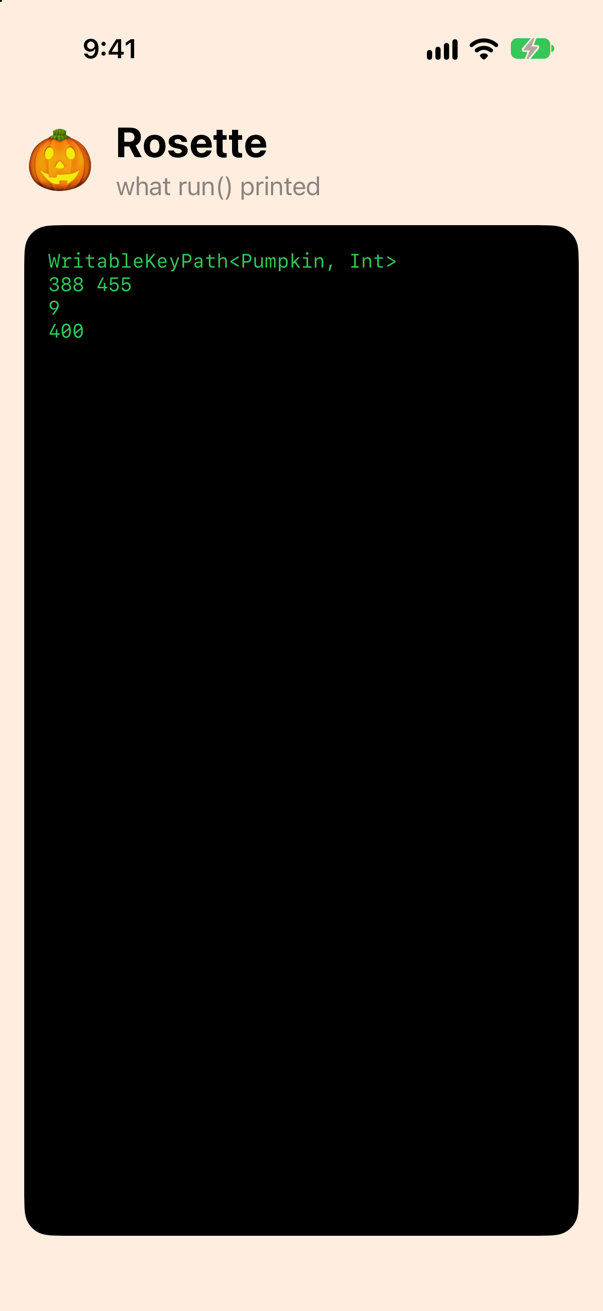
\Pumpkin.weight is a key path: directions from a Pumpkin to its weight, which work on any pumpkin. Its type names both ends — from a Pumpkin, to an Int — and a key path is used through a subscript that every type has without declaring it: entries[0][keyPath: weight] is entries[0].weight, and assigning to the subscript writes. A path can take more than one step. \Pumpkin.grower.count reads grower, then that string's count, and its type still names only the two ends. And where the root is already known — a key path handed to something that expects a path from a Pumpkin — you may leave it out and write \.weight. You will do that all day.
In 2016 the only key path was a string: #keyPath(Trip.city) (Swift 3), handed to Objective-C's key-value coding, which looked the name up while the program ran, worked only on @objc properties of NSObject subclasses, and gave back Any?. Swift 4 made a key path a value with a type of its own, and that is what \Pumpkin.weight is. The edge cases below try the old one.
Three kinds of key path, and what decides them
Look at the type again: WritableKeyPath. The compiler chose that class because the path leads through a var of a struct, so a value held in a var can be changed through it, as mine was. A key path's kind comes from what it leads through, and the declarations decide it. A let gives a path that can only read. So does a computed property with no setter — points, and count on a string. And a var of a class gives a third kind, which writes through the reference, so the object itself may be held in a let. Add the fair, an object everyone at it shares:
/// The fair itself: one object, shared by everyone at it.
final class Fair {
    let name = "Harvest Fair"
    var judge = "Mrs. Patel"
    var entries: [Pumpkin]

    init(entries: [Pumpkin]) {
        self.entries = entries
    }
}func run() { let weight = \Pumpkin.weight print(type(of: weight)) print(entries[0][keyPath: weight], entries[4][keyPath: weight]) print(entries[1][keyPath: \Pumpkin.grower.count]) print(type(of: \Pumpkin.grower)) print(type(of: \Pumpkin.points)) print(type(of: \Fair.judge)) print(type(of: \Fair.name)) var mine = entries[0] mine[keyPath: weight] = 400 print(mine.weight) let fair = Fair(entries: entries) fair[keyPath: \Fair.judge] = "Mr. Okafor" print(fair.judge)}func run() {
print(type(of: \Pumpkin.grower))
print(type(of: \Pumpkin.points))
print(type(of: \Fair.judge))
print(type(of: \Fair.name))
let fair = Fair(entries: entries)
fair[keyPath: \Fair.judge] = "Mr. Okafor"
print(fair.judge)
}Run the app (⌘R). Xcode’s console shows
KeyPath<Pumpkin, String>
KeyPath<Pumpkin, Int>
ReferenceWritableKeyPath<Fair, String>
KeyPath<Fair, String>
Mr. Okafor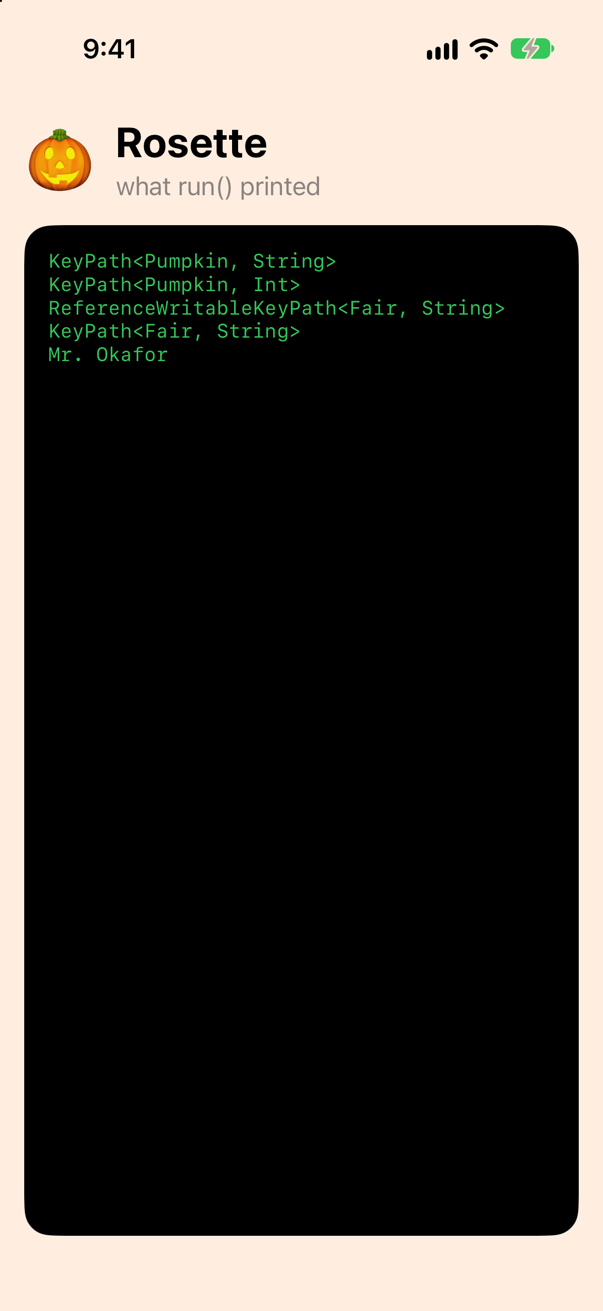
| The path leads through | Its type | Can it write? |
|---|---|---|
a var of a struct — \Pumpkin.weight | WritableKeyPath<Pumpkin, Int> | Yes, into a value held in a var |
a let — \Pumpkin.grower | KeyPath<Pumpkin, String> | No |
a computed property with no setter — \Pumpkin.points, \Pumpkin.grower.count | KeyPath<Pumpkin, Int> | No |
a var of a class — \Fair.judge | ReferenceWritableKeyPath<Fair, String> | Yes — even through a let, because it writes into the object |
a let of a class — \Fair.name | KeyPath<Fair, String> | No |
Through a path that cannot write, the compiler stops you — a real error while you type, not a crash while the app runs:
func run() { print(type(of: \Pumpkin.grower)) print(type(of: \Pumpkin.points)) print(type(of: \Fair.judge)) print(type(of: \Fair.name)) let fair = Fair(entries: entries) fair[keyPath: \Fair.judge] = "Mr. Okafor" print(fair.judge) var mine = entries[0] mine[keyPath: \Pumpkin.grower] = "Bo Lindqvist"}func run() {
var mine = entries[0]
mine[keyPath: \Pumpkin.grower] = "Bo Lindqvist"
}It does not compile. Xcode reports
cannot assign through subscript: key path is read-onlyUndo that (⌘Z), so that run() is back to the lines that ran. The five classes are in the standard library, one inside the other:
public class AnyKeyPath : _AppendKeyPath { … }
public class PartialKeyPath<Root> : AnyKeyPath { … }
public class KeyPath<Root, Value> : PartialKeyPath<Root> { … }
public class WritableKeyPath<Root, Value> : KeyPath<Root, Value> { … }
public class ReferenceWritableKeyPath<Root, Value> : WritableKeyPath<Root, Value> { … }
So a WritableKeyPath is a KeyPath — anything that only reads will accept one — and every key path is an AnyKeyPath. PartialKeyPath<Root> knows where a path starts but not what it gives you, which is how paths to different properties can share one array; the edge cases use it for the judge's sheet. Every kind, with what decides it, and every step a path can take — subscripts, optionals, tuples — are in the guide Key paths, in full.
A key path where a function goes
A judge's sheet is a list of one property of every entry — the growers' names, or the weights in order. In 2016 that was a closure: entries.map { $0.grower }. Since Swift 5.2 a key path literal goes wherever a function from the element is expected, and the compiler writes the closure for you:
func run() { print(type(of: \Pumpkin.grower)) print(type(of: \Pumpkin.points)) print(type(of: \Fair.judge)) print(type(of: \Fair.name)) let fair = Fair(entries: entries) fair[keyPath: \Fair.judge] = "Mr. Okafor" print(fair.judge) print(entries.map(\.grower)) print(entries.map(\.grower.count)) print(entries.filter(\.isJunior).map(\.grower)) print(entries.sorted(using: KeyPathComparator(\.weight, order: .reverse)).map(\.grower)) print(entries.sorted(using: KeyPathComparator(\.grower)).map(\.grower))}func run() {
print(entries.map(\.grower))
print(entries.map(\.grower.count))
print(entries.filter(\.isJunior).map(\.grower))
print(entries.sorted(using: KeyPathComparator(\.weight, order: .reverse)).map(\.grower))
print(entries.sorted(using: KeyPathComparator(\.grower)).map(\.grower))
}Run the app (⌘R). Xcode’s console shows
["Bo", "Esperanza", "Ada", "Dmitri", "Cleo"]
[2, 9, 3, 6, 4]
["Bo", "Dmitri"]
["Cleo", "Esperanza", "Ada", "Bo", "Dmitri"]
["Ada", "Bo", "Cleo", "Dmitri", "Esperanza"]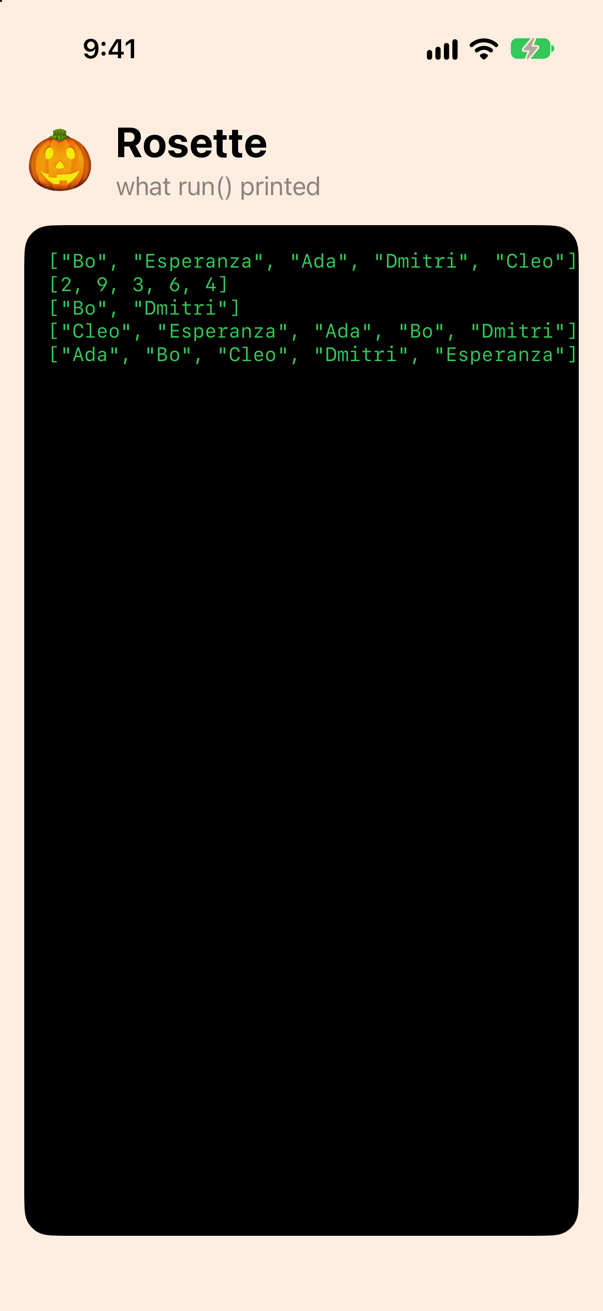
Four things in one run. map(\.grower) is map { $0.grower }. A path of two steps goes where a function goes too: map(\.grower.count). A path to a Bool works as a test, so filter(\.isJunior) keeps the junior division. And KeyPathComparator(\.weight, order: .reverse) is Foundation's way of saying "sort by this property, largest first"; sorted(using:) takes it, and in SwiftUI's tables it is the sort order a column header sets. Only a literal gets this treatment: a key path kept in a variable is an object, not a function, and map(weight) does not compile — one of the edge cases below has the message.
The judge chooses: a key path as a parameter
Now the app's own idea. A category — heaviest, widest — is a question about one Int property of every entry, and the judge chooses which. So the function that finds the winner takes the property as a parameter: a KeyPath<Entry, Int>, from any entry type to an Int. Add three functions to Fair.swift:
/// The entry with the largest value of the property the judge chose.
func winner<Entry>(of entries: [Entry], by category: KeyPath<Entry, Int>) -> Entry? {
    entries.max { $0[keyPath: category] < $1[keyPath: category] }
}

/// Any `Int` property of the entries, added up.
func total<Entry>(of entries: [Entry], _ path: KeyPath<Entry, Int>) -> Int {
    entries.reduce(0) { $0 + $1[keyPath: path] }
}

/// Sets any property of a pumpkin: the path says which, and its Value says the type.
func set<Value>(_ path: WritableKeyPath<Pumpkin, Value>, to value: Value, of pumpkin: inout Pumpkin) {
    pumpkin[keyPath: path] = value
}func run() { print(entries.map(\.grower)) print(entries.map(\.grower.count)) print(entries.filter(\.isJunior).map(\.grower)) print(entries.sorted(using: KeyPathComparator(\.weight, order: .reverse)).map(\.grower)) print(entries.sorted(using: KeyPathComparator(\.grower)).map(\.grower)) print(winner(of: entries, by: \.weight)?.grower ?? "nobody") print(winner(of: entries, by: \.girth)?.grower ?? "nobody") print(winner(of: entries, by: \.grower.count)?.grower ?? "nobody") print(winner(of: entries.filter(\.isJunior), by: \.weight)?.grower ?? "nobody") print(total(of: entries, \.weight), "pounds of pumpkin") var mine = entries[0] set(\.weight, to: 400, of: &mine) set(\.isJunior, to: false, of: &mine) print(mine)}func run() {
print(winner(of: entries, by: \.weight)?.grower ?? "nobody")
print(winner(of: entries, by: \.girth)?.grower ?? "nobody")
print(winner(of: entries, by: \.grower.count)?.grower ?? "nobody")
print(winner(of: entries.filter(\.isJunior), by: \.weight)?.grower ?? "nobody")
print(total(of: entries, \.weight), "pounds of pumpkin")
var mine = entries[0]
set(\.weight, to: 400, of: &mine)
set(\.isJunior, to: false, of: &mine)
print(mine)
}Run the app (⌘R). Xcode’s console shows
Cleo
Esperanza
Esperanza
Bo
1996 pounds of pumpkin
Pumpkin(grower: "Bo", weight: 400, girth: 162, isJunior: false)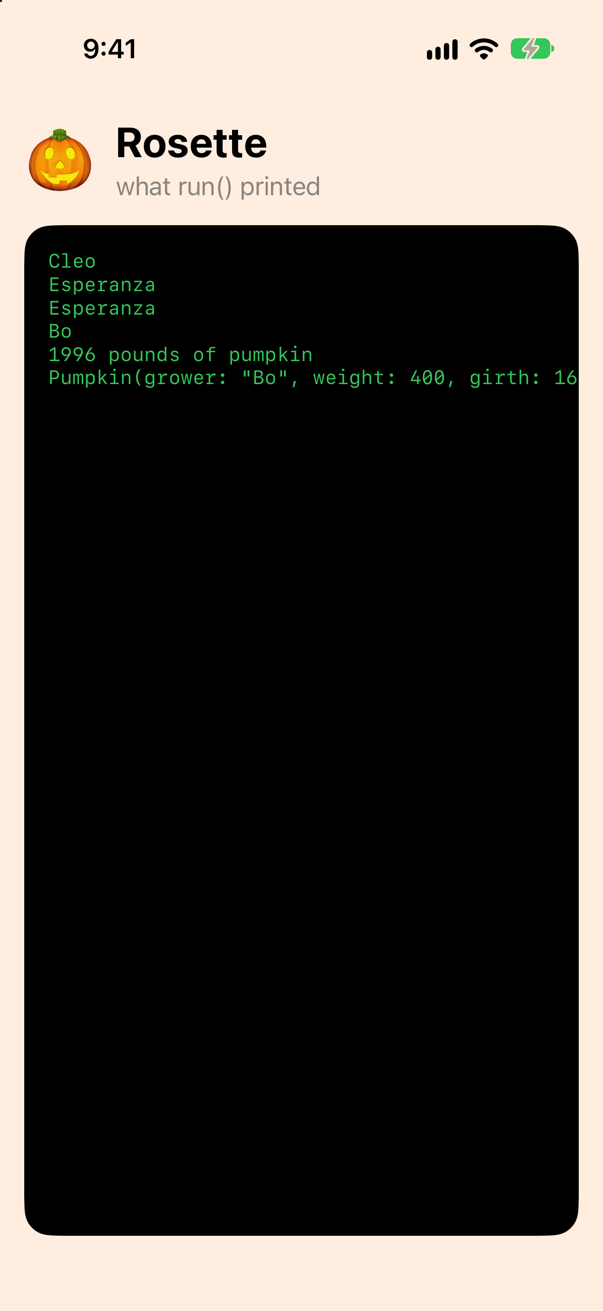
winner(of:by:) and total(of:_:) are generic over the root — they would serve a flower show tomorrow — and fixed to Int in the value, which is what makes < and + compile inside them. set(_:to:of:) is the other way round: fixed to Pumpkin, generic over the value, and the key path's Value decides what type the new value must be. Hand it a path to an Int and a string, and the compiler refuses:
func run() { print(winner(of: entries, by: \.weight)?.grower ?? "nobody") print(winner(of: entries, by: \.girth)?.grower ?? "nobody") print(winner(of: entries, by: \.grower.count)?.grower ?? "nobody") print(winner(of: entries.filter(\.isJunior), by: \.weight)?.grower ?? "nobody") print(total(of: entries, \.weight), "pounds of pumpkin") set(\.weight, to: 400, of: &mine) set(\.isJunior, to: false, of: &mine) print(mine) set(\.weight, to: "heavy", of: &mine)}func run() {
var mine = entries[0]
set(\.weight, to: "heavy", of: &mine)
}It does not compile. Xcode reports
cannot convert value of type 'String' to expected argument type 'Int'Undo that (⌘Z). The caller named the property, and the compiler checked everything else. That is what a key path gives you over a string — and over a closure, too: a closure can read a property, but it cannot be compared, hashed or looked inside, and a key path can. Which is the next step.
The three things a key path holds
Look at two of the paths from step 5 side by side. \Pumpkin.weight and \Pumpkin.girth have the same type, WritableKeyPath<Pumpkin, Int> — from a Pumpkin, to an Int — and winner told them apart all the same. So a key path carries three things: where it starts (Root), what it gives you (Value), and which property it reads. Its type holds only the first two. The third is in the object. Add a small function that reads the first step straight out of the object, in a new file — File ▸ New ▸ File from Template… (⌘N), Swift File, named Inside:
import Foundation

/// The first step a key path object holds, as a number. For looking, never for shipping: it reads the object as
/// iOS 27 lays it out — a 32-bit word 32 bytes in, after the object's header and the size of its buffer.
func firstStep(_ path: AnyKeyPath) -> String {
    let object = UnsafeRawPointer(Unmanaged.passUnretained(path).toOpaque())
    let step = object.load(fromByteOffset: 32, as: UInt32.self)
    let text = "0x" + String(step, radix: 16)
    if step & 0x7F_FFFF == 0x7F_FFFF {
        return text + " then " + String(object.load(fromByteOffset: 36, as: UInt32.self))
    }
    return text
}func run() { print(winner(of: entries, by: \.weight)?.grower ?? "nobody") print(winner(of: entries, by: \.girth)?.grower ?? "nobody") print(winner(of: entries, by: \.grower.count)?.grower ?? "nobody") print(winner(of: entries.filter(\.isJunior), by: \.weight)?.grower ?? "nobody") print(total(of: entries, \.weight), "pounds of pumpkin") var mine = entries[0] set(\.weight, to: 400, of: &mine) set(\.isJunior, to: false, of: &mine) print(mine) let weight = \Pumpkin.weight let girth = \Pumpkin.girth print(type(of: weight), type(of: girth)) print(MemoryLayout<Pumpkin>.offset(of: weight)!, MemoryLayout<Pumpkin>.offset(of: girth)!) print(firstStep(weight), firstStep(girth)) print(MemoryLayout<Pumpkin>.offset(of: \Pumpkin.points) as Any, firstStep(\Pumpkin.points)) print(type(of: \Pumpkin.self), MemoryLayout<Pumpkin>.offset(of: \Pumpkin.self) as Any) print(weight == girth, Set<PartialKeyPath<Pumpkin>>([weight, girth, \.weight]).count)}func run() {
let weight = \Pumpkin.weight
let girth = \Pumpkin.girth
print(type(of: weight), type(of: girth))
print(MemoryLayout<Pumpkin>.offset(of: weight)!, MemoryLayout<Pumpkin>.offset(of: girth)!)
print(firstStep(weight), firstStep(girth))
print(MemoryLayout<Pumpkin>.offset(of: \Pumpkin.points) as Any, firstStep(\Pumpkin.points))
print(type(of: \Pumpkin.self), MemoryLayout<Pumpkin>.offset(of: \Pumpkin.self) as Any)
print(weight == girth, Set<PartialKeyPath<Pumpkin>>([weight, girth, \.weight]).count)
}Run the app (⌘R). Xcode’s console shows
WritableKeyPath<Pumpkin, Int> WritableKeyPath<Pumpkin, Int>
16 24
0x1800010 0x1800018
nil 0x2000000
WritableKeyPath<Pumpkin, Pumpkin> Optional(0)
false 2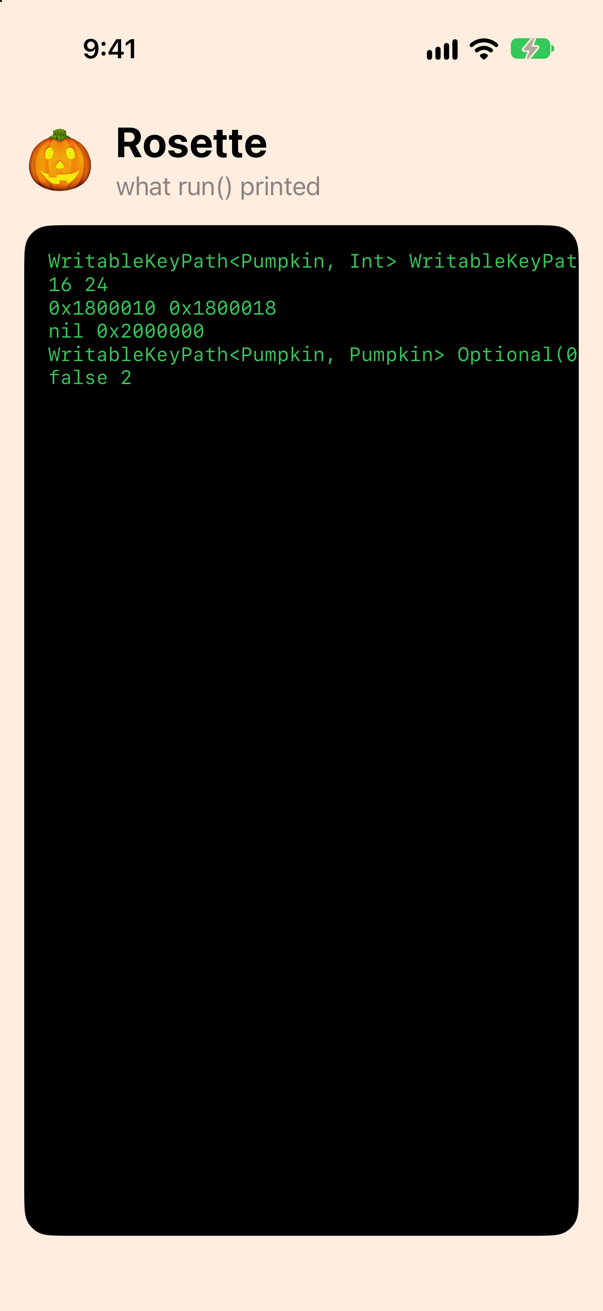
Two paths, one type, two objects. For a stored property the object holds an offset: how many bytes into a Pumpkin the property sits. weight is 16 bytes in, after the 16 bytes of the String, and girth is 24. MemoryLayout<Pumpkin>.offset(of:) reads the number out of the object, and firstStep shows the word it is read from: in 0x1800010 the top byte, 01, says a stored property of a struct; the 8, that it can be written; the rest, 0x10, is the offset, 16. The compiler worked those numbers out from Pumpkin's layout and wrote them into the program, so reading through \Pumpkin.girth is the pumpkin's address plus 24. The property's name plays no part while the program runs.
| What a key path needs | Where it is in \Pumpkin.girth |
|---|---|
Root: where it starts (Pumpkin) | its type, WritableKeyPath<Pumpkin, Int> |
Value: what it gives you (Int) | the same type |
| Which property | the object: the offset 24, which the compiler worked out from Pumpkin's layout |
points is computed, so there is no offset to hold: offset(of:) gives nil, and the first step begins with 02, a computed property, and holds the getter to call instead — which is also how two paths through the same computed property are known to be equal. \Pumpkin.self is the identity key path (Swift 5): no steps at all, from a value to itself, at offset 0; ForEach(names, id: \.self) is where you have seen it. And since a key path is a value with these three things in it, two can be compared, and a set holds \.weight once however often it is written — which is what lets @Observable file each change under the key path of the property that changed (lesson 16).
The compiler cannot always know the offset while compiling — in generic code, or for a type from another library — and then the object holds something that leads to it. The guide's Which property reads all three cases out of live objects, and Inside, part 1 shows the pattern the compiler writes for each kind of step, and the runtime call that turns it into the object.
@dynamicMemberLookup: a property that is not there
On lesson 2 you built Ref — a getter and a setter, passed together — and saw that SwiftUI's Binding has the same parts. There is one thing Binding does that Ref could not. Given $pumpkin, a binding to a whole pumpkin, $pumpkin.weight is a binding to just its weight — and yet Binding has no property called weight. The feature behind that is an attribute, @dynamicMemberLookup, and it runs on key paths. Make a new file, Ref.swift (File ▸ New ▸ File from Template…, Swift File), and put Ref in it with one addition:
import Foundation

/// Lesson 2's `Ref`: a getter and a setter, passed together. With one addition.
@dynamicMemberLookup
struct Ref<Value> {
    let get: () -> Value
    let set: (Value) -> Void

    var value: Value {
        get {
            get()
        }
        nonmutating set {
            set(newValue)
        }
    }

    subscript<Field>(dynamicMember path: WritableKeyPath<Value, Field>) -> Ref<Field> {
        Ref<Field>(
            get: { self.value[keyPath: path] },
            set: { self.value[keyPath: path] = $0 }
        )
    }
}func run() { let weight = \Pumpkin.weight let girth = \Pumpkin.girth print(type(of: weight), type(of: girth)) print(MemoryLayout<Pumpkin>.offset(of: weight)!, MemoryLayout<Pumpkin>.offset(of: girth)!) print(firstStep(weight), firstStep(girth)) print(MemoryLayout<Pumpkin>.offset(of: \Pumpkin.points) as Any, firstStep(\Pumpkin.points)) print(type(of: \Pumpkin.self), MemoryLayout<Pumpkin>.offset(of: \Pumpkin.self) as Any) print(weight == girth, Set<PartialKeyPath<Pumpkin>>([weight, girth, \.weight]).count) var judged = entries[4] let pick = Ref(get: { judged }, set: { judged = $0 }) let weight = pick.weight print(type(of: weight)) weight.value += 5 // the scale was reading low pick.girth.value = 143 print(judged.weight, judged.girth)}func run() {
var judged = entries[4]
let pick = Ref(get: { judged }, set: { judged = $0 })
let weight = pick.weight
print(type(of: weight))
weight.value += 5 // the scale was reading low
pick.girth.value = 143
print(judged.weight, judged.girth)
}Run the app (⌘R). Xcode’s console shows
Ref<Int>
460 143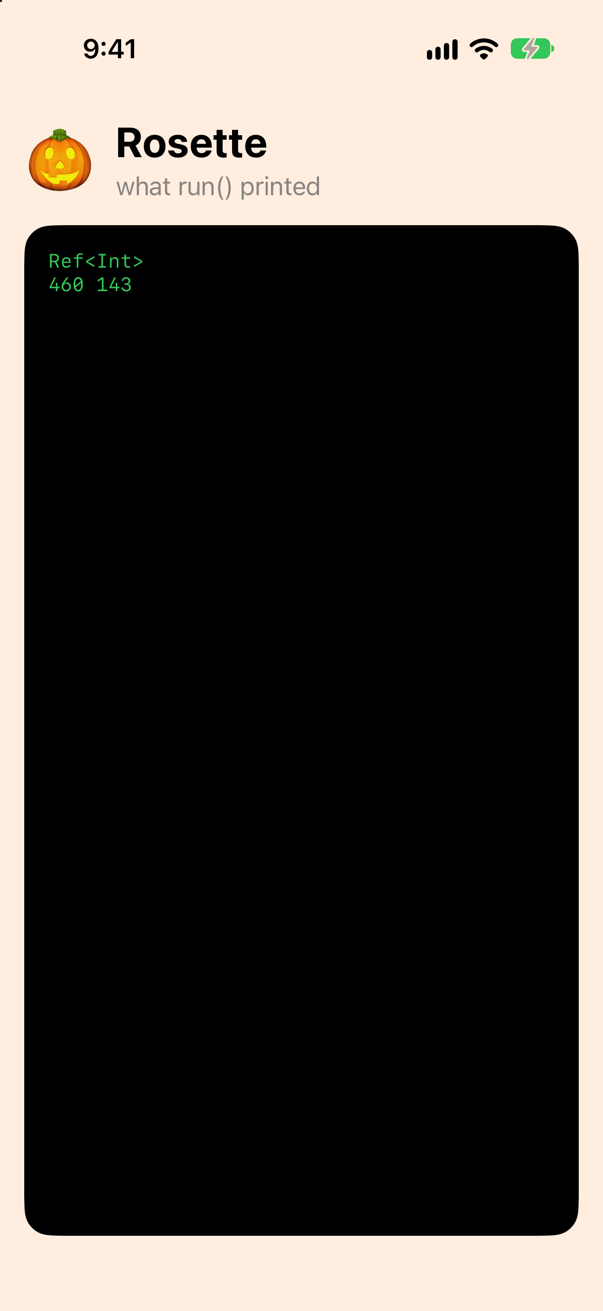
pick.weight asked Ref for a member it does not have. Because Ref is marked @dynamicMemberLookup, the compiler does not stop there: it looks for weight on the type the subscript's key path starts from — Pumpkin — finds it, and rewrites the expression as a call to the subscript with that key path. pick.weight is pick[dynamicMember: \Pumpkin.weight]. The subscript returns a new Ref whose getter and setter reach through the original with the key path, which is why weight.value += 5 reweighed Cleo's pumpkin. And the member is checked like any other code: a typo is an error at compile time, and so is a member the subscript's key path cannot reach. grower is a let, and the subscript takes a WritableKeyPath:
func run() { var judged = entries[4] let pick = Ref(get: { judged }, set: { judged = $0 }) let weight = pick.weight print(type(of: weight)) weight.value += 5 // the scale was reading low pick.girth.value = 143 print(judged.weight, judged.girth) pick.grower.value = "Cleo Chen"}func run() {
var judged = entries[4]
let pick = Ref(get: { judged }, set: { judged = $0 })
pick.grower.value = "Cleo Chen"
}It does not compile. Xcode reports
cannot assign to property: 'grower' is a 'let' constantUndo that (⌘Z). Now read SwiftUI's own declaration of Binding (shortened):
@frozen @propertyWrapper @dynamicMemberLookup public struct Binding<Value> {
  …
  public subscript<Subject>(dynamicMember keyPath: WritableKeyPath<Value, Subject>) -> Binding<Subject> {
    get
  }
}
It is your Ref: @dynamicMemberLookup, and a subscript that takes a WritableKeyPath from the bound value to one of its fields and returns a binding to that field. $pumpkin.weight is $pumpkin[dynamicMember: \Pumpkin.weight], and a binding to a let, or to a computed property with no setter, does not exist — for the reason you just saw. Observation does the same for objects: mark a model @Bindable and $fair.judge is a binding, through a subscript that takes the reference-writable kind, the one a var of a class gives you (lesson 18):
@dynamicMemberLookup @propertyWrapper public struct Bindable<Value> { … }

extension Bindable where Value : AnyObject {
  public subscript<Subject>(dynamicMember keyPath: ReferenceWritableKeyPath<Value, Subject>) -> Binding<Subject> {
    get
  }
}
@dynamicMemberLookup in full — the first version, which took strings; a second subscript for paths that only read; what happens when the type has the member after all — is in the guide's @dynamicMemberLookup, in full.
Where SwiftUI takes a key path
Now the judge's screen. SwiftUI takes key paths in four places you will use every week, and the screen uses all four. In ContentView.swift, replace the ContentView struct with these three types — the categories, the screen, and a row that writes a weight the way the locale in its environment writes it:
/// What the judge can award a rosette for: a title, and the property that decides it.enum Category: String, CaseIterable { case heaviest = "Heaviest" case widest = "Widest" case longestName = "Longest name" var path: KeyPath<Pumpkin, Int> { switch self { case .heaviest: \.weight case .widest: \.girth case .longestName: \.grower.count } }}struct ContentView: View { @State private var category = Category.heaviest /// The entries, best first — by whichever property the category names. private var ranked: [Pumpkin] { entries.sorted(using: KeyPathComparator(category.path, order: .reverse)) } var body: some View { VStack(alignment: .leading, spacing: 16) { HStack(spacing: 12) { Text("🎃") .font(.system(size: 44)) VStack(alignment: .leading) { Text("Rosette") .font(.title.bold()) Text("what run() printed") .foregroundStyle(.secondary) NavigationStack { List { Section { Picker("Category", selection: $category) { ForEach(Category.allCases, id: \.self) { category in Text(category.rawValue) } } .pickerStyle(.segmented) } Section("The judge's table") { ForEach(ranked, id: \.grower) { pumpkin in HStack { Text(pumpkin.grower == ranked.first?.grower ? "🏵️" : "🎃") Text(pumpkin.grower) Spacer() Text("\(pumpkin[keyPath: category.path])") .monospacedDigit() .foregroundStyle(.secondary) } } } Section("The winner, on the scale") { WeighIn(pumpkin: ranked[0]) WeighIn(pumpkin: ranked[0]) .environment(\.locale, Locale(identifier: "de_DE")) } } ScrollView([.vertical, .horizontal]) { Text(Printed.shared.lines.joined(separator: "\n")) .font(.system(size: 13, design: .monospaced)) .foregroundStyle(.green) .fixedSize() .padding() } .frame(maxWidth: .infinity, maxHeight: .infinity, alignment: .topLeading) .background(.black, in: .rect(cornerRadius: 18)) .navigationTitle("Rosette") } .padding() .background(Color.orange.opacity(0.15)) }}/// A pumpkin's weight, written the way the locale in the environment writes it.struct WeighIn: View { let pumpkin: Pumpkin @Environment(\.locale) private var locale var body: some View { HStack { Text(pumpkin.grower) Text(locale.identifier) .foregroundStyle(.secondary) Spacer() Text(Measurement(value: Double(pumpkin.weight), unit: UnitMass.pounds), format: .measurement(width: .abbreviated)) } }}/// What the judge can award a rosette for: a title, and the property that decides it.
enum Category: String, CaseIterable {
case heaviest = "Heaviest"
case widest = "Widest"
case longestName = "Longest name"
var path: KeyPath<Pumpkin, Int> {
switch self {
case .heaviest: \.weight
case .widest: \.girth
case .longestName: \.grower.count
}
}
}
struct ContentView: View {
@State private var category = Category.heaviest
/// The entries, best first — by whichever property the category names.
private var ranked: [Pumpkin] {
entries.sorted(using: KeyPathComparator(category.path, order: .reverse))
}
var body: some View {
NavigationStack {
List {
Section {
Picker("Category", selection: $category) {
ForEach(Category.allCases, id: \.self) { category in
Text(category.rawValue)
}
}
.pickerStyle(.segmented)
}
Section("The judge's table") {
ForEach(ranked, id: \.grower) { pumpkin in
HStack {
Text(pumpkin.grower == ranked.first?.grower ? "🏵️" : "🎃")
Text(pumpkin.grower)
Spacer()
Text("\(pumpkin[keyPath: category.path])")
.monospacedDigit()
.foregroundStyle(.secondary)
}
}
}
Section("The winner, on the scale") {
WeighIn(pumpkin: ranked[0])
WeighIn(pumpkin: ranked[0])
.environment(\.locale, Locale(identifier: "de_DE"))
}
}
.navigationTitle("Rosette")
}
}
}
/// A pumpkin's weight, written the way the locale in the environment writes it.
struct WeighIn: View {
let pumpkin: Pumpkin
@Environment(\.locale) private var locale
var body: some View {
HStack {
Text(pumpkin.grower)
Text(locale.identifier)
.foregroundStyle(.secondary)
Spacer()
Text(Measurement(value: Double(pumpkin.weight), unit: UnitMass.pounds), format: .measurement(width: .abbreviated))
}
}
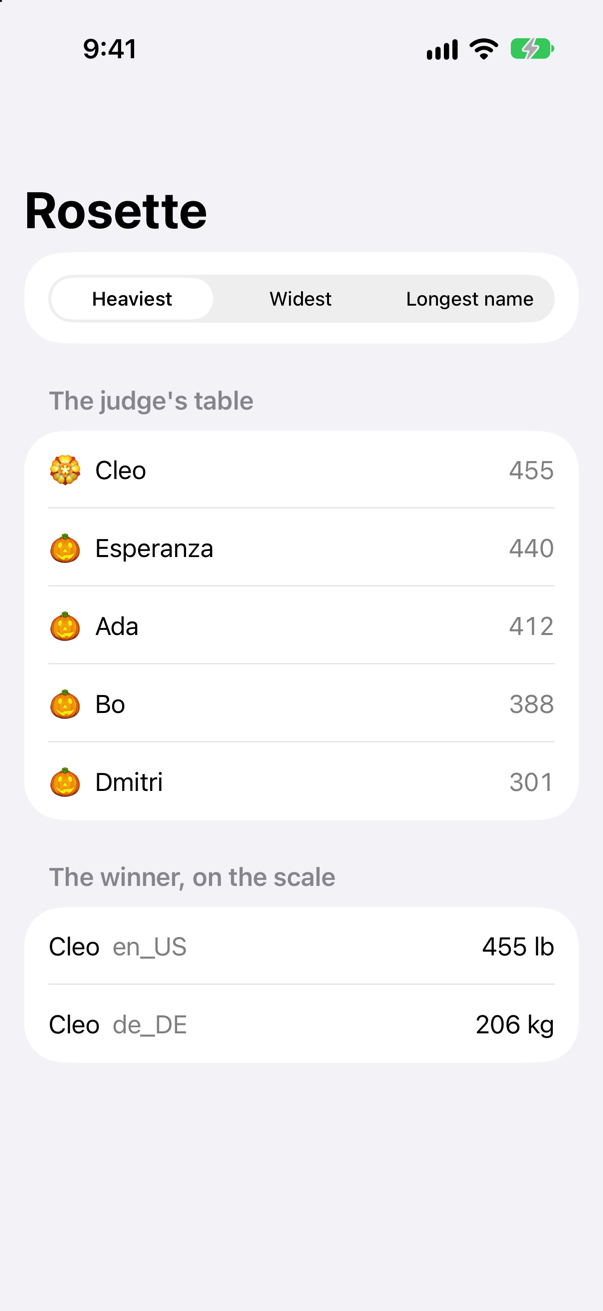
}Run it (⌘R). The simulator shows
Tap Widest, then Longest name:
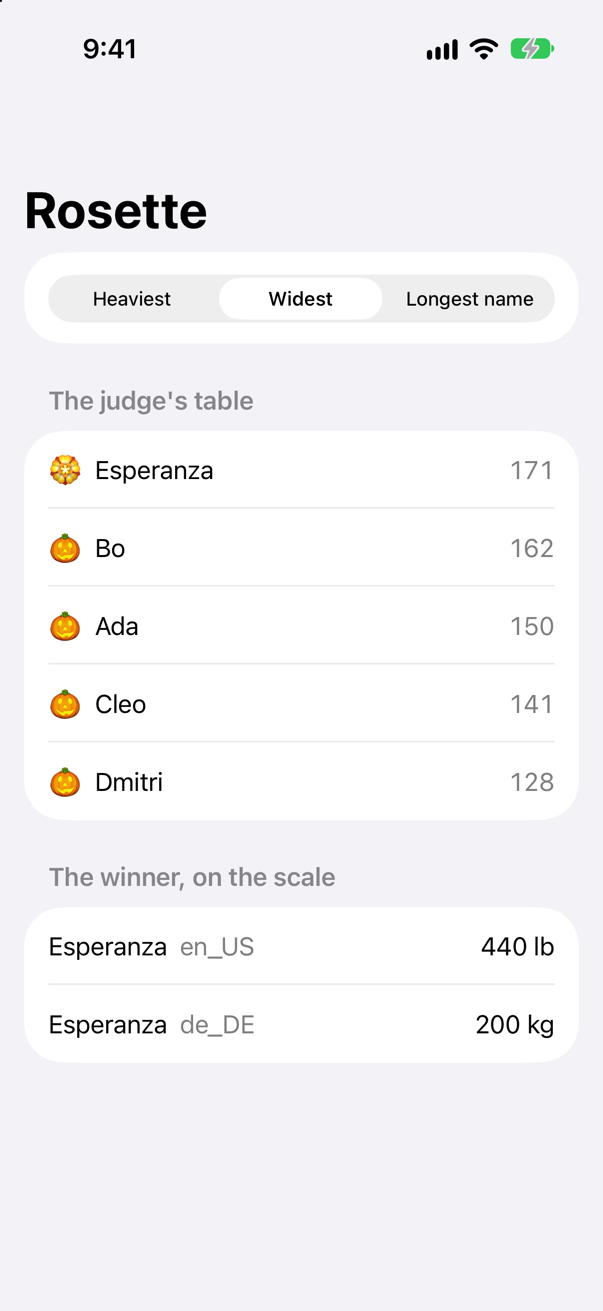
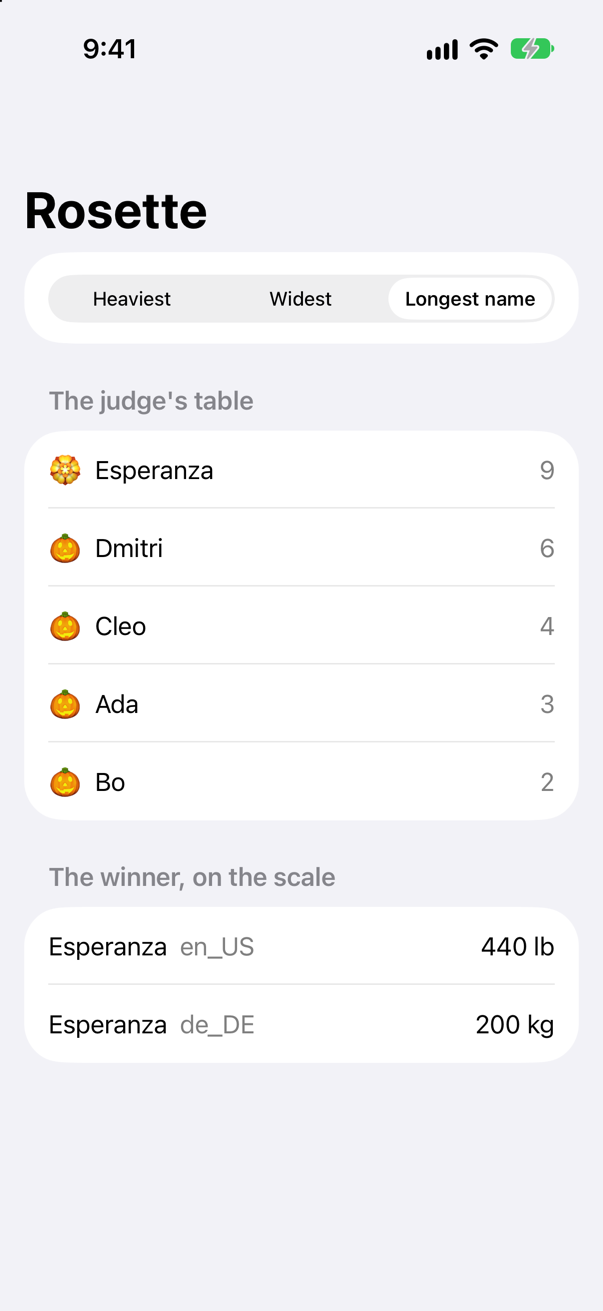
\.grower.count, the path of two steps, is a category like any otherScreenshot · iPhone 17, iOS 27.0One @State holds the category, and everything else reads through its key path: the sort, the number in every row, and the rosette on the first. Here is each place a key path went:
| You wrote | SwiftUI takes | What for |
|---|---|---|
ForEach(Category.allCases, id: \.self) | KeyPath<Element, ID> — the identity path: each category is its own identity | to tell the rows apart, so ID must be Hashable |
ForEach(ranked, id: \.grower) | the same, to a property | a row's identity, read from the pumpkin (lesson 20) |
KeyPathComparator(category.path, order: .reverse) | a key path value, the one the enum returns | the sort order — sorted(using:) reads through it twice per comparison |
@Environment(\.locale) | KeyPath<EnvironmentValues, Value> | reads one value of the environment (lesson 19) |
.environment(\.locale, Locale(identifier: "de_DE")) | WritableKeyPath<EnvironmentValues, V> | sets one, for the views inside: the second row writes the same weight in kilograms |
The environment is the clearest case, because its code is published in the SDK. The property wrapper keeps the key path; the modifier takes a writable one, because it writes:
@frozen @propertyWrapper public struct Environment<Value> : DynamicProperty {
  @inlinable public init(_ keyPath: KeyPath<EnvironmentValues, Value>) {
        content = .keyPath(keyPath)
    }
  …
}

extension View {
  @inlinable nonisolated public func environment<V>(_ keyPath: WritableKeyPath<EnvironmentValues, V>, _ value: V) -> some View {
        modifier(_EnvironmentKeyWritingModifier(keyPath: keyPath, value: value))
    }
}
The rule behind the table: KeyPath where SwiftUI only reads, WritableKeyPath where it writes into a value it keeps, ReferenceWritableKeyPath where the value lives in an object. The full list — Binding, Bindable, TableColumn, focus, keyframes — is the guide's Where SwiftUI takes a key path. One thing to carry to lesson 39. KeyPathComparator only takes a key path that is Sendable: safe to hand to another thread. A new Xcode project makes every type you declare main-actor, meaning its code may only run on the main thread unless you mark it nonisolated. In the Swift 6 language mode, a key path to a property of such a type is not Sendable. The edge cases below show the error and the fix.
That is Rosette. The judge's category is a key path; winner(of:by:), the picker, the sort and the number in each row all read through it; and the only thing that changed between the three pictures is which property the object holds.
What you built
- Rosette, a judge's app for a giant-pumpkin contest: the category is a key path,
winner(of:by:)reads through whichever one the judge chose, and a screen sorts by it. - Key paths as values — read and written through
[keyPath:], with two steps, inmap,filterandKeyPathComparator, and as parameters: a genericwinner,totalandset. - The three kinds and what decides them: a
letor a getter alone reads; avarof a struct writes; avarof a class writes through alet. - What the object holds that the type does not — which property, as an offset the compiler worked out, or a getter — read out of two objects of one type.
Refwith@dynamicMemberLookup, which is how$pumpkin.weightworks; and the four places SwiftUI took a key path on the screen.
Guide: Inside the Attribute Graph — SwiftUI's graph read out of a running app: a view's nodes, how a write reaches body, modifiers as nodes, and a debugger stopped at every step.
Guide: every kind of key path and what decides it, every step one can take, what the compiler and the runtime make of one, @dynamicMemberLookup in full, and where SwiftUI takes key paths — all run on the simulator — is in Key paths, in full.
Next, Codable: the code the compiler writes to turn a struct into JSON and back, and how to take over when the JSON does not match — in a small project of its own.
The finished project
Stuck, or want to compare with your own? This is the project as it stands at the end of this lesson, built and run before it was put here.
- Rosette.zip — unzip it, then open
Rosette.xcodeprojin Xcode.
Flash cards
21 cards for this lesson, each labelled with its topic. 10 ask how you would write something; the other 11 are trick questions, written to catch a misunderstanding. Answer in your head first, then tap the card.
Syntax · Key pathsRead a property through a key path, then write one through another.
value[keyPath: path], a subscript that every type has. Reading takes any key path; writing takes a WritableKeyPath, which a var of a struct gives you. It printed Cleo, then 460.
Syntax · Key pathsFrom the entries, get the growers' names — without writing a closure.
\.grower is a key path: the property, as a value. Since Swift 5.2 you can pass a key path literal wherever a function from the element to the value is expected: map(\.grower) is map { $0.grower }. It printed ["Bo", "Esperanza", "Ada", "Dmitri", "Cleo"].
Syntax · Key pathsGet the number of letters in each grower's name with a single key path.
A path can take several steps: \.grower.count reads grower, then that string's count. It printed [2, 9, 3, 6, 4]. The path is a plain KeyPath — it can only read — because count has a getter and no setter.
Syntax · Key pathsKeep the junior division, and ask whether any or all of the entries are juniors — naming the property with a key path each time.
A key path to a Bool works as a test: filter(\.isJunior) means filter { $0.isJunior }. It printed ["Bo", "Dmitri"], then true false — any function that takes one element and returns a Bool will take a key path instead.
Syntax · Key pathsSort the entries heaviest first, naming the property with a key path.
sorted(using:) with a KeyPathComparator (Foundation). Leave out order: for smallest first. It printed ["Cleo", "Esperanza", "Ada", "Bo", "Dmitri"]. The comparator keeps the key path as a value, and reads through it for every comparison.
Syntax · Key pathsWrite one function that adds up any Int property of a list of entries, chosen by the caller.
Take a KeyPath<Entry, Int> and read through it with entry[keyPath: path]. The caller picks the property: it printed 1996 24 — the pounds, then the letters in the names. Generic over the root, it works for any type; fixed to Int in the value, it can add.
Syntax · Key pathsWrite one function that can set any property of a pumpkin, whatever its type.
Make it generic over Value and take a WritableKeyPath<Pumpkin, Value>: the path says which property, and its Value says what type the new value must be. inout lets it change the caller's pumpkin. It printed 400 false.
Syntax · Key pathsA key path carries three things. What are they, and which of them does its type hold?
Where it starts (Root), what it gives you (Value), and which property it reads. Its type holds only the first two: \Pumpkin.weight and \Pumpkin.girth are both a KeyPath<Pumpkin, Int> here. The object holds the third. For a stored property that is its offset, which the compiler worked out from Pumpkin's layout: it printed \Pumpkin.weight Optional(16), then \Pumpkin.girth Optional(24). A computed property has no offset, so for it the object holds the getter.
Syntax · Dynamic member lookupLet a wrapper answer pick.weight — a property it does not have — by turning the name into a key path.
Mark the type @dynamicMemberLookup and give it a subscript(dynamicMember:) that takes a key path from the wrapped type. The compiler rewrites pick.weight as pick[dynamicMember: \Pumpkin.weight]. It printed Ref<Int>, then 460 143. SwiftUI's Binding is declared the same way.
Syntax · Key paths in SwiftUIRead one value of the environment with a key path, and set it for the views inside another.
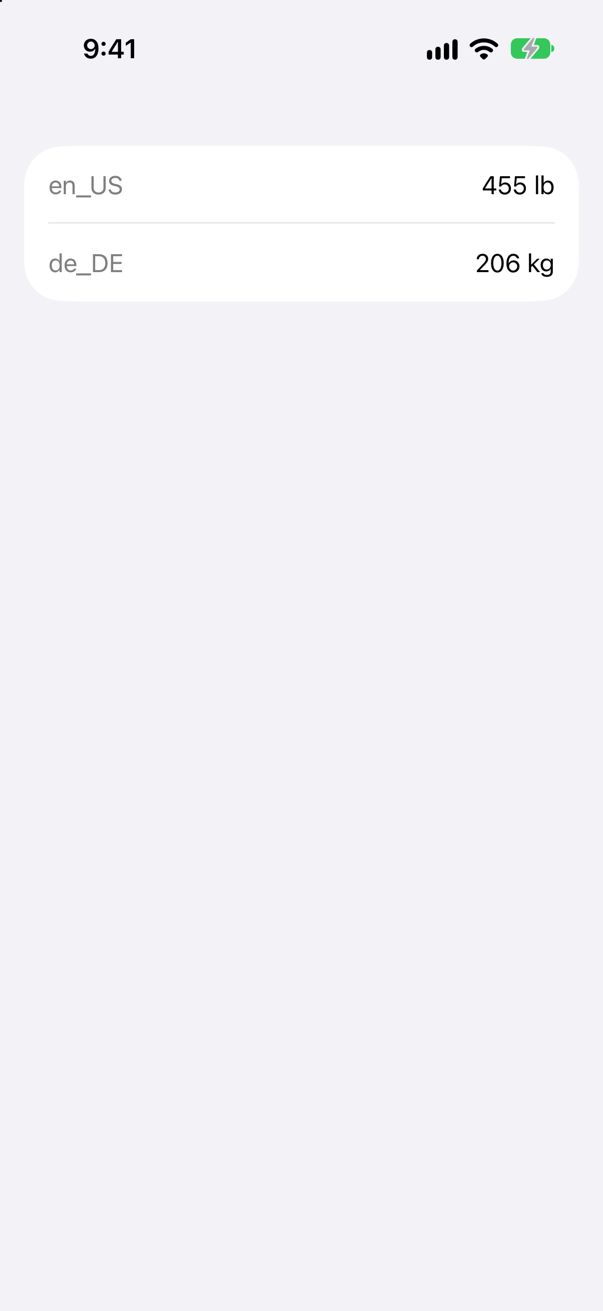
@Environment(\.locale) takes a KeyPath<EnvironmentValues, Value> and reads; .environment(\.locale, …) takes a WritableKeyPath and writes, for the views inside it. The second row read the locale it was given, and Text wrote the same weight in kilograms.
Trick question · Key pathsgrower is declared with let. Can you write through \Pumpkin.grower?
No. cannot assign through subscript: key path is read-only A let gives you a plain KeyPath, which can only read. So does a property with a getter and no setter — and so does any longer path that passes through one.
Trick question · Key pathsfair is a let holding an object. Can you write through \Fair.judge, a key path to one of its var properties?
Yes. It printed Mr. Okafor ReferenceWritableKeyPath<Fair, String>. A var of a class gives a ReferenceWritableKeyPath, which writes through the reference: the let fixes which object fair points to, not what is inside it.
Trick question · Key pathsMost Swift types you use are structs. Is a key path a struct?
No — an instance of a class. ===, which asks "the same object?", would not even compile for a struct. It printed true: the two paths are the same object, built by the Swift runtime from a pattern the compiler wrote, once, and handed back after that.
Trick question · Key pathslet path = \.weight — no type written anywhere. Does it compile?
No. cannot infer key path type from context; consider explicitly specifying a root type \.weight leaves its root to be inferred, and here nothing says what it is. Write \Pumpkin.weight, or give the constant a type: let path: KeyPath<Pumpkin, Int> = \.weight. In map, sorted(using:) or an argument whose type is a key path, the context supplies the root, which is why \.weight works there.
Trick question · Key pathsSwiftUI code writes ForEach(names, id: \.self). What does \.self lead to?
The whole value. \.self is the identity key path (SE-0227): no steps at all, from a value to itself. It printed WritableKeyPath<Pumpkin, Pumpkin>, then Bo. id: \.self tells ForEach that each element is its own identity, so the elements themselves must be Hashable.
Trick question · Key paths\Pumpkin.grower.count takes two steps. Does the key path hold an offset for each?
No — only for grower. It printed \Pumpkin.grower.count Optional(0) nil. grower is stored, so its step is an offset: 0, the first field. count is computed — stored nowhere — so its step holds the getter to call, and the getter's address doubles as the step's identity, which is how two paths through count are found equal. A path with a computed step has no single offset, so offset(of:) gives nil.
Trick question · Dynamic member lookupRef is @dynamicMemberLookup. You type pick.wieght. Does the app crash when that line runs?
It never runs — it does not compile. value of type 'Ref<Pumpkin>' has no dynamic member 'wieght' using key path from root type 'Pumpkin' The member becomes a key path, and a key path is checked against Pumpkin like any other code. (The first, string-based @dynamicMemberLookup took any name at all, and checked nothing.)
Trick question · Key pathsCan a key path lead to a method, as in \String.uppercased()?
No. key path cannot refer to instance method 'uppercased()' Key paths lead through properties and subscripts only. A proposal to let them name methods (SE-0479) was returned for revision.
Trick question · Dynamic member lookupfair is a SwiftUI Binding<Fair>. fair.judge is a Binding<String>. Is fair.judge.count a Binding<Int>?
No — it does not compile. cannot assign to property: 'count' is a get-only property Binding's dynamic-member subscript takes a WritableKeyPath, and count has no setter, so \String.count is only a KeyPath. A binding must be able to write, so it can only lead through properties that can.
Trick question · Key pathsisJunior is a Bool. Can KeyPathComparator(\.isJunior, order: .reverse) sort the junior division first?
No. initializer 'init(_:order:)' requires that 'Bool' conform to 'Comparable' A comparator needs a value it can order, and Bool is not Comparable in Swift. Sort with a closure instead — entries.sorted { $0.isJunior && !$1.isJunior } — or compare something that is, such as a number.
Trick question · Key pathslet path = \Pumpkin.weight is taken while Zed's pumpkin weighs 1 pound. Then it is reweighed at 999. What does pumpkin[keyPath: path] read?
999. A key path holds no value and refers to no particular pumpkin. It is directions — which property, from a Pumpkin — applied to whatever value you give it, when you give it.
Edge cases and tricky questions
8 questions of the kind an interviewer uses to find out whether you really know this — the corners, the traps, and the things that changed recently. Each has its source. Wherever the answer is what some code does, that code was compiled and run, and what you see under “Show the answer” is what it really did. Say your answer aloud before you open it.
print(\Pumpkin.weight) prints \Pumpkin.weight. The object holds an offset and no name — so where does the name come from?
Show the answer
Run it. The console shows
\Pumpkin.weight \Pumpkin.points \Pumpkin.self
KeyPath<Pumpkin, String> \Pumpkin.grower true
\Pumpkin.<offset 20 (Int)>
From the type's own list of its fields, searched by the offset — while the program runs. The standard library's debugDescription (KeyPath.swift) walks the steps; for a stored step it asks the root type for its fields, finds the one whose offset matches, and prints that field's name. The name is found from the number, not the other way round.
The second line shows it from the other side. _createOffsetBasedKeyPath — public, but underscored: the runtime's own tool, not yours — builds a key path from nothing but a root type, a value type and a number of bytes, no property named anywhere. From a 0 and a String it prints \Pumpkin.grower, and it is equal to the literal: KeyPath<Pumpkin, String> \Pumpkin.grower true. Give it an offset that is no field's, 20, and the search finds nothing: \Pumpkin.<offset 20 (Int)>.
A computed step has no offset, and gets its name another way: the getter's address is looked up among the program's symbols — keyPath_copySymbolName in the same function — and demangled to points. So "a key path is like a string naming the property" has it backwards for a stored property: the string is a convenience for printing, worked out from the offset. The offset is what the key path is.
Where this comes from: The standard library's key paths: stdlib/public/core/KeyPath.swift · SE-0210: Add an offset(of:) method to MemoryLayout (Swift 4.2) · SE-0161: Smart KeyPaths — Better Key-Value Coding for Swift (Swift 4) — KeyPath.swift, AnyKeyPath.debugDescription: for a .struct(offset) or .class(offset) step it searches the type's fields for the one at that offset (_getChildOffset(valueType, index: i) == offset) and appends its name, writing <offset N (Type)> when there is none; for a computed step it calls dynamicLibraryAddress, which looks the getter up by address.
Rosette builds in the Swift 5 language mode, which a new project uses. Switch the target to Swift 6 — as Trips does on lesson 39 — and the sort stops compiling. Why, and what is the fix?
Show the answer
It does not compile. Xcode reports
type 'KeyPath<Pumpkin, Int>' does not conform to the 'Sendable' protocoltype 'KeyPath<Pumpkin, Int>' does not conform to the 'Sendable' protocol Two settings of a new project meet here. Foundation declares KeyPathComparator's initializer as taking any KeyPath<Compared, Value> & Sendable — a key path that may be handed to any thread, since a sort may run on one. And in an app project every type you declare belongs to the main actor unless you say otherwise (lesson 1's Default Actor Isolation), Pumpkin included. A key path to a property of a main-actor type would read a main-actor property wherever it was sent, so it is not Sendable (SE-0418). In Swift 5 mode that mismatch is let through; in Swift 6 mode it is an error.
The fix is to say that the struct needs no actor — it is plain data: nonisolated struct Pumpkin, which is what Trips does for Trip on lesson 32. Then a key path literal to one of its properties is Sendable, and the sort compiles:
In Swift 6 mode, with nonisolated struct Pumpkin
["Cleo", "Esperanza", "Ada", "Bo", "Dmitri"]A key path kept in a variable is a second question. Its type, KeyPath<Pumpkin, Int>, says nothing about Sendable — the key path classes themselves are not — so a comparator will not take it even now: type 'KeyPath<Pumpkin, Int>' does not conform to the 'Sendable' protocol Declare the variable (or Category.path in Rosette) as any KeyPath<Pumpkin, Int> & Sendable, and a literal stored in it keeps its Sendable:
A stored path, typed & Sendable
["Esperanza", "Bo", "Ada", "Cleo", "Dmitri"]Say both halves in an interview: what compiles today in Swift 5 mode, and what Swift 6 mode will ask of the same line.
Where this comes from: SE-0418: Inferring Sendable for methods and key path literals (Swift 6) · SE-0466: Default actor isolation · KeyPathComparator — Foundation's sort order by a key path — SE-0418: "a key path that references age, which is a global actor isolated property, is non-Sendable", and "the key path hierarchy of types is non-Sendable" — a literal is inferred & Sendable only when it captures nothing non-Sendable and refers to no isolated property. SE-0466 makes every declaration in an app project main-actor-isolated by default.
Two ways to name the property without the backslash. Which of them compiles — and what did #keyPath give you in 2016?
Show the answer
It does not compile. Xcode reports
instance member 'weight' cannot be used on type 'Pumpkin'; did you mean to use a value of this type instead?Neither. Pumpkin.weight without the backslash is an unapplied instance member, and the compiler says what is missing: instance member 'weight' cannot be used on type 'Pumpkin'; did you mean to use a value of this type instead? A stored property has no meaning apart from a value. The backslash is what turns the name into a value — a key-path expression.
#keyPath is the 2016 way, and it refuses Pumpkin too: argument of '#keyPath' refers to non-'@objc' property 'weight' It makes a string for Objective-C's key-value coding, which can only reach @objc properties of classes that inherit from NSObject. On such a class it still works today:
The 2016 key path
name String
Optional(Harvest Fair)
The string is all it is. value(forKeyPath:) looks the name up while the program runs and hands back Any?, the property's type lost on the way; \Pumpkin.weight keeps the type at both ends and compiles to an offset. Both are called key paths, which is why an interviewer may mean either — ask which.
Where this comes from: SE-0062: Referencing Objective-C key-paths (#keyPath, Swift 3) · SE-0161: Smart KeyPaths — Better Key-Value Coding for Swift (Swift 4) · The Swift book: Expressions — Key-Path Expression — SE-0062 (Swift 3) added #keyPath, "Referencing Objective-C key-paths"; SE-0161 (Swift 4), "Smart KeyPaths", added the backslash form with a type at each end.
The number of entries the fair has ever had is kept on the type, as a static property. Can a key path lead to it?
Show the answer
Run it. The console shows
ReferenceWritableKeyPath<Pumpkin.Type, Int>
5
Since Swift 6.1, yes. The root is the metatype: \Pumpkin.Type.everEntered leads from Pumpkin.Type — the type, as a value — to the property, and it printed ReferenceWritableKeyPath<Pumpkin.Type, Int>. Static storage lives outside any value, so writing through the path changes nothing in the root; it is reference-writable, and Pumpkin.self[keyPath: count] = 5 wrote the 5 that 5 reads back.
Before SE-0438 (Swift 6.1, Xcode 16.3) a key path expression could not reference a static member at all, and most answers online still say that key paths reach instance members only. Say what changed, and when.
Where this comes from: SE-0438: Metatype Keypaths (Swift 6.1) — SE-0438, “Metatype Keypaths”: it "expands key path expression access to include static properties of a type", and "keypaths to mutable static properties will always conform to ReferenceWritableKeyPath because metatypes are reference types".
The judge's sheet has four columns of different types. Can one array hold a key path to each — and what does reading through one give you?
Show the answer
Run it. The console shows
Grower: Bo, Weight: 388, Girth: 162, Junior: true
Grower: Esperanza, Weight: 440, Girth: 171, Junior: false
Optional(388) nil
Yes — as PartialKeyPath<Pumpkin>. It knows the root and not the value, so paths to a String, two Ints and a Bool share one array, and reading through one gives Any: the first two lines. The compiler cannot know the type, so you cast what comes back.
AnyKeyPath knows neither end. Reading through it gives Any? — and nil when the root is the wrong type: Optional(388) nil. The object still knows both ends and checks them when it is used; only the type stopped promising. Prefer KeyPath<Root, Value> wherever the code can know the value's type — winner(of:by:) could add numbers only because its parameter said Int. The partial kinds are for table-shaped code: a judge's sheet, a form, an inspector — one list, every column.
Where this comes from: SE-0161: Smart KeyPaths — Better Key-Value Coding for Swift (Swift 4) · KeyPath — SE-0161: "AnyKeyPath is fully type-erased, referring to 'any route' through an object/value graph for 'any root'"; PartialKeyPath<Root> "refers to an 'any route' from a known root".
ForEach(Category.allCases, id: \.self) worked for the categories. Does id: \.self work for the pumpkins?
Show the answer
It does not compile. Xcode reports
generic struct 'ForEach' requires that 'Pumpkin' conform to 'Hashable'No. generic struct 'ForEach' requires that 'Pumpkin' conform to 'Hashable' id: \.self says that each element is its own identity, and an identity must be Hashable: SwiftUI keeps it, compares it between two drawings, and hashes it to find the row. Category is an enum without payloads, which is Hashable for free. Pumpkin is a struct of four properties, and the compiler writes Hashable for it only when you ask.
Two fixes, and they mean different things. Add : Hashable to Pumpkin, and two pumpkins with the same four values are the same row. Or hand ForEach a key path to a property that identifies the entry — id: \.grower — which is what Rosette does:
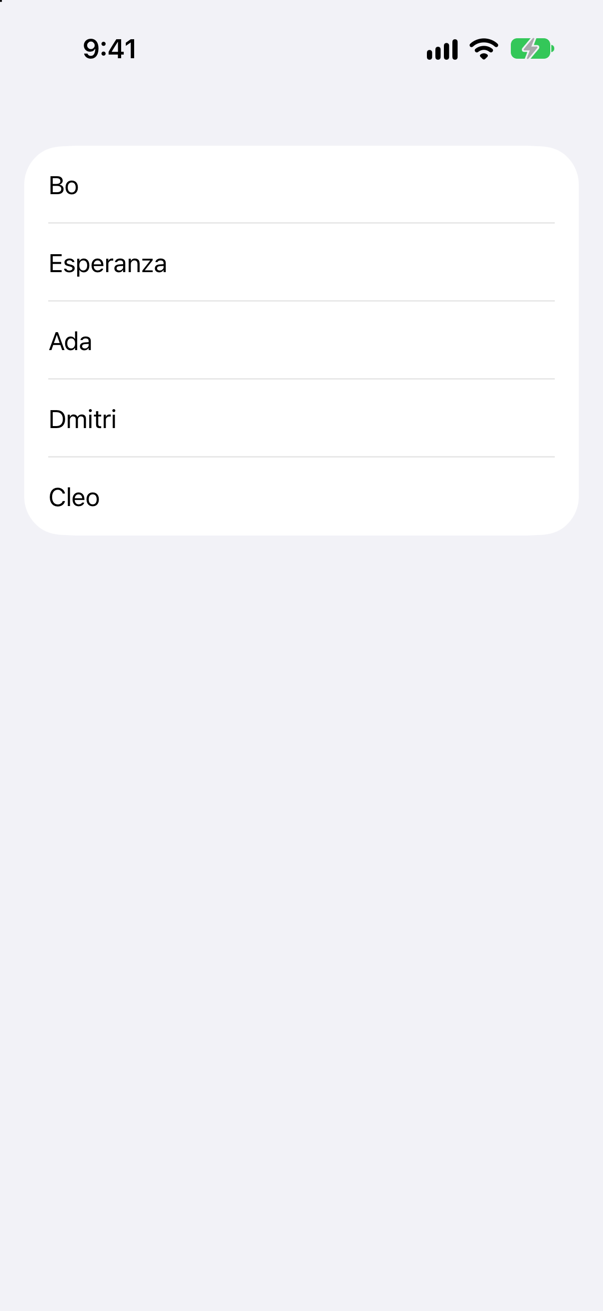
A key path to a String will do because a String is Hashable. What ForEach does with the identity, and what goes wrong when two rows share one, is lesson 20 — and ForEach, in full.
Where this comes from: ForEach init(_:id:content:) — any collection, with a key path to each element's identity · SE-0227: Identity key path — \.self (Swift 5) · WWDC21: Demystify SwiftUI (2021 — still the reference on identity) — The initializer the SDK declares: init(_ data: Data, id: KeyPath<Data.Element, ID>, content:) with ID : Hashable; SE-0227 defines \.self as the identity key path.
weight is a var, so \Pumpkin.weight is a WritableKeyPath. best is a let. Does the assignment compile?
Show the answer
It does not compile. Xcode reports
cannot assign through subscript: 'best' is a 'let' constantNo. cannot assign through subscript: 'best' is a 'let' constant A WritableKeyPath can write — into a variable. Writing through it changes the struct it is applied to, exactly as best.weight = 460 would, and a let struct cannot change. The path's kind says what the path allows; the root has to allow it too.
Put the same pumpkin inside the fair, an object, and the path through it is reference-writable: it changes the object, not the let that holds the reference, so the constant is no obstacle:
Through the object
460 ReferenceWritableKeyPath<Fair, Int>That is the whole difference between the two writable kinds: WritableKeyPath needs a var at the root, ReferenceWritableKeyPath does not. SwiftUI's Binding must be able to write, which is why @Bindable asks for the reference-writable kind (lesson 18).
Where this comes from: SE-0161: Smart KeyPaths — Better Key-Value Coding for Swift (Swift 4) · Hacking with Swift interview question: How would you explain key paths to a new Swift developer? · The Swift book: Expressions — Key-Path Expression — SE-0161: a WritableKeyPath "supports reading from and writing to the resulting value", and its write "requires a mutable base" — a ReferenceWritableKeyPath "can be used with an immutable base".
{ $0.weight } reads the same property as \.weight. What can the key path do that the closure cannot?
Show the answer
Run it. The console shows
2
Girth true
Be compared, be hashed, and be looked into. Two key paths are equal when they take the same steps, so a set holds \.weight once and a dictionary can be keyed by a key path: 2, then Girth true. Try the same with closures and it does not compile: type '(Pumpkin) -> Int' does not conform to protocol 'Hashable' Two closures can never be compared — the compiler cannot look inside one.
That is why the places that need to remember which property was meant take a key path and not a closure: KeyPathComparator; @Observable, which files each read and each change under the property's key path (lesson 16); #Predicate, which turns $0.nights >= 3 into a tree holding \.nights so that SwiftData can translate it (lesson 35); and ForEach's id:. A closure is for doing; a key path is for saying which — and it can also do, since a literal is turned into a closure wherever one is expected.
Where this comes from: SE-0161: Smart KeyPaths — Better Key-Value Coding for Swift (Swift 4) · SE-0249: Key Path Expressions as Functions · Hacking with Swift interview question: How would you explain key paths to a new Swift developer? — SE-0161 declares every key path class Hashable; SE-0249 adds the other direction, a key path literal where a function is expected.
Further reading
- SE-0161: Smart KeyPaths — Better Key-Value Coding for Swift (Swift 4)
- KeyPath
- The Swift book: Expressions — Key-Path Expression
- SE-0249: Key Path Expressions as Functions
- SE-0195: Introduce user-defined "Dynamic Member Lookup" types (Swift 4.2)
- Hacking with Swift interview question: How would you explain key paths to a new Swift developer?
- SE-0252: Key Path Member Lookup (Swift 5.1)
- SE-0227: Identity key path — \.self (Swift 5)
- SE-0210: Add an offset(of:) method to MemoryLayout (Swift 4.2)
- SE-0418: Inferring Sendable for methods and key path literals (Swift 6)
- KeyPathComparator — Foundation's sort order by a key path
- ForEach init(_:id:content:) — any collection, with a key path to each element's identity
- Environment
- Binding
- The standard library's key paths: stdlib/public/core/KeyPath.swift