ForEach, in full
What it keeps, when it makes its rows, and how it tells them apart — the loop SwiftUI has instead of a for
A SwiftUI body cannot hold a for loop: its builder has no buildArray (lesson 4, step 8, and the guide Result builders, in full). The loop is a view instead, ForEach, and Apple's documentation describes it in one sentence: "A structure that computes views on demand from an underlying collection of identified data." This guide takes that sentence apart — what ForEach keeps, the three ways to make one, what on demand and identified mean in practice — and runs each part on the iOS 27 simulator. Lesson 4's LoopEach is TinyUI's copy of it.
- What
ForEachkeeps · lesson 4 - Three ways to make one · lesson 4
- On demand: the container makes only the rows it needs · lesson 4
- Identified: which row is which, after a change · lesson 20
- One type for every row · lesson 4
List(data)is aForEach· lesson 21
What ForEach keeps
Here is ForEach as the iOS 27 SDK declares it — the type, and what makes it a view:
public struct ForEach<Data, ID, Content> where Data : RandomAccessCollection, ID : Hashable {
    public var data: Data
    public var content: (Data.Element) -> Content
}

extension ForEach : View where Content : View {
    public typealias Body = Never
    public static func _makeView(view: _GraphValue<ForEach<Data, ID, Content>>, inputs: _ViewInputs) -> _ViewOutputs
    public static func _makeViewList(view: _GraphValue<ForEach<Data, ID, Content>>, inputs: _ViewListInputs) -> _ViewListOutputs
}
Two stored properties: the collection, and a closure that makes the content for one element. Nothing is made when a ForEach is created — the closure is kept, and called later. Lesson 4's LoopEach has the same two, plus the key path it uses for identity, and one of lesson 4's trick cards shows LoopEach doing the same: its closure runs when the rows are drawn, not before.
ForEach is a view only when its content is (where Content : View); SwiftUI also uses it for table rows, tabs and map content. And its Body is Never: it has no body of its own. It is one of SwiftUI's primitives, handed to the framework through the two underscored methods, whose code is not published.
Three ways to make one
Each initializer lives in an extension whose where clause says what kind of data it takes:
extension ForEach where ID == Data.Element.ID, Data.Element : Identifiable {
    public init(_ data: Data, @ContentBuilder content: @escaping (Data.Element) -> Content)
}

extension ForEach {
    public init(_ data: Data, id: KeyPath<Data.Element, ID>, @ContentBuilder content: @escaping (Data.Element) -> Content)
}

extension ForEach where Data == Range<Int>, ID == Int {
    @_semantics("swiftui.requires_constant_range")
    public init(_ data: Range<Int>, @ContentBuilder content: @escaping (Int) -> Content)
}
With Identifiable elements, their own id is the identity. With anything else, you pass id: — a key path to the property that tells two elements apart, or \.self when each value identifies itself. There is no initializer without an identity: give an array of strings and no id:, and the compiler finds only the Identifiable one.
import SwiftUI

struct Names: View {
    let names = ["Seattle", "Victoria"]

    var body: some View {
        VStack {
            ForEach(names) { name in
                Text(name)
            }
        }
    }
}
It does not compile
referencing initializer 'init(_:content:)' on 'ForEach' requires that 'String' conform to 'Identifiable'
note: where 'Data.Element' = 'String'
With id: \.self it compiles. It is the same error TinyUI's LoopEach gives (lesson 4's cards), because its initializers are declared the same way.
The third initializer, over a range of numbers, is the odd one. Apple's documentation says it "only reads the initial value" of the range and "doesn't need to identify views across updates": the range is meant to be constant. The @_semantics attribute lets the compiler check that, and a range that can change gets a warning:
import SwiftUI

struct Rows: View {
    var count = 3

    var body: some View {
        VStack {
            ForEach(0..<count) { n in
                Text("Row \(n)")
            }
        }
    }
}
It compiles, with a warning
warning: non-constant range: argument must be an integer literalApple's fix is the second initializer: ForEach(0..<count, id: \.self) compiles without the warning, because now each number is an identity that SwiftUI tracks.
On demand: the container makes only the rows it needs
Because ForEach keeps a closure rather than finished rows, a container can decide which rows to make. Apple's documentation names List and LazyVStack as containers that query a ForEach lazily. Here is a List of a thousand numbers that counts the rows it asked for:
import SwiftUI

/// Every row number this screen has asked for.
var made: Set<Int> = []

struct ContentView: View {
    var body: some View {
        List {
            ForEach(0..<1000, id: \.self) { n in
                row(n)
            }
        }
        .task {
            try? await Task.sleep(for: .seconds(1))
            print("rows made: \(made.count) of 1000")
        }
    }

    func row(_ n: Int) -> some View {
        made.insert(n)
        return Text("Row \(n)")
    }
}
A second after it appeared, it printed
rows made: 16 of 1000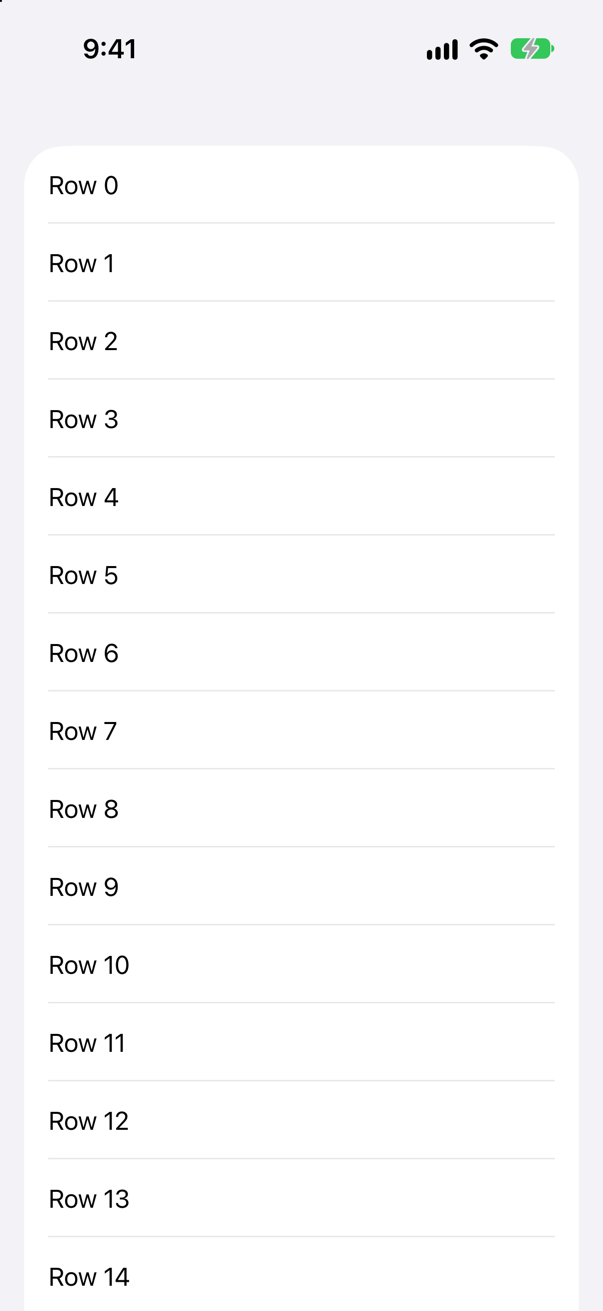
List on the screen of an iPhone 17Screenshot · iPhone 17, iOS 27.0The same ForEach in a plain VStack inside a ScrollView:
import SwiftUI

/// Every row number this screen has asked for.
var made: Set<Int> = []

struct ContentView: View {
    var body: some View {
        ScrollView {
            VStack {
                ForEach(0..<1000, id: \.self) { n in
                    row(n)
                }
            }
        }
        .task {
            try? await Task.sleep(for: .seconds(1))
            print("rows made: \(made.count) of 1000")
        }
    }

    func row(_ n: Int) -> some View {
        made.insert(n)
        return Text("Row \(n)")
    }
}
It printed
rows made: 1000 of 1000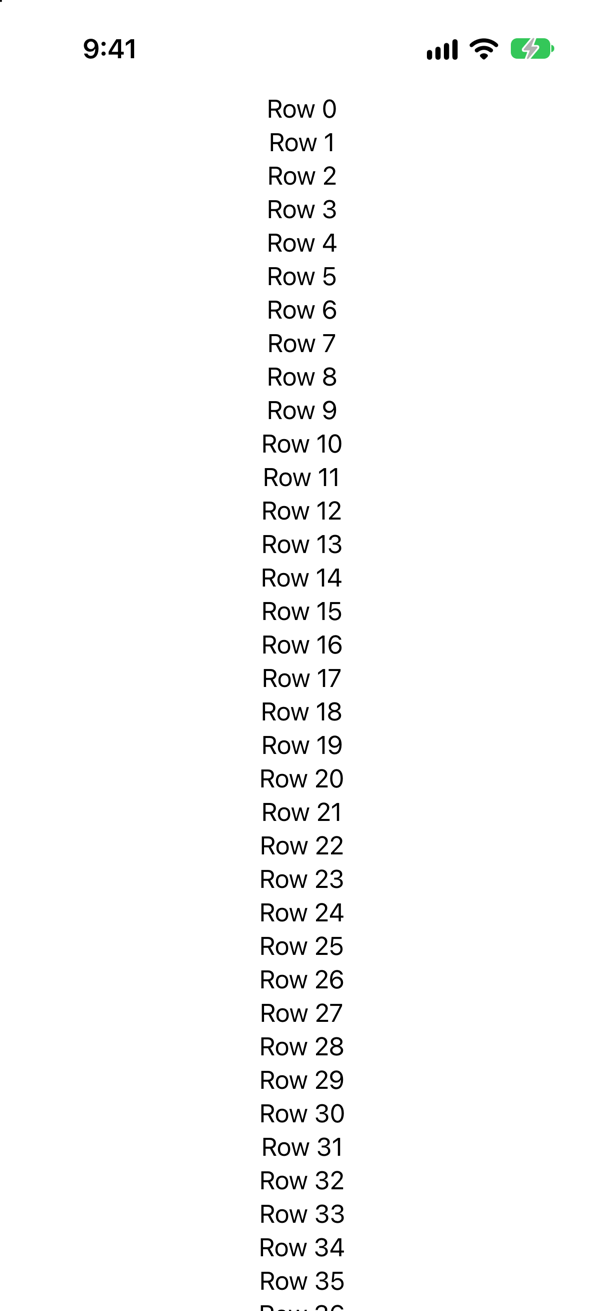
A VStack lays out everything it holds, so it makes everything. Laziness belongs to the container — and ForEach is what makes it possible. A loop through a builder's buildArray would hand the container a thousand finished rows: buildArray is only called after the loop is over (the trace in Result builders, in full). A closure can be called later; a finished array cannot be unmade.
Identified: which row is which, after a change
SwiftUI runs body again whenever something it reads changes, and matches each new row to an old one. The identity decides what SwiftUI believes happened — which row moved, which is new, which keeps its state. Apple's documentation of the initializers puts the stakes plainly: if an element's id changes, its view "loses any current state and animations".
A loop made by buildArray would carry nothing but the rows, so the only identity it could have is position — row 0, row 1, row 2. Here is a list identified exactly that way, with a button that inserts a city at the top. Each row prints when it appears:
import SwiftUI

struct ContentView: View {
    @State private var cities = ["Seattle", "Victoria"]

    var body: some View {
        VStack(spacing: 16) {
            Button("Add Vancouver at the top") {
                cities.insert("Vancouver", at: 0)
            }
            ForEach(cities.indices, id: \.self) { i in
                Row(city: cities[i])
            }
        }
    }
}

struct Row: View {
    let city: String

    var body: some View {
        Text(city)
            .onAppear {
                print("a row appeared: \(city)")
            }
    }
}
At launch it printed
a row appeared: Victoria
a row appeared: Seattle
After the tap
a row appeared: Victoria
Vancouver went in at the top, but the row SwiftUI thinks is new is the last one, Victoria. The first two positions already existed, so as far as SwiftUI is concerned those two rows simply changed their text. Now the same list, identified by the city:
import SwiftUI

struct ContentView: View {
    @State private var cities = ["Seattle", "Victoria"]

    var body: some View {
        VStack(spacing: 16) {
            Button("Add Vancouver at the top") {
                cities.insert("Vancouver", at: 0)
            }
            ForEach(cities, id: \.self) { city in
                Row(city: city)
            }
        }
    }
}

struct Row: View {
    let city: String

    var body: some View {
        Text(city)
            .onAppear {
                print("a row appeared: \(city)")
            }
    }
}
After the tap
a row appeared: Vancouver
The screens are identical; what differs is SwiftUI's idea of what happened. Identified by name, the new row is Vancouver, and the rows for Seattle and Victoria are the same rows as before — any state inside them stays with them, and an insertion animation would play on the right row. That is why ForEach will not start without an identity, and why the identity should belong to the element, not to its place. Lesson 20 is about identity in full.
One type for every row
ForEach's closure is a builder block of its own — the parameter is marked @ContentBuilder — so a row can contain an if, and different rows can take different branches. This is lesson 4's last edge case:
let names = ["Seattle", "Victoria", "Vancouver"]
let rows = ForEach(names, id: \.self) { name in
    if name.count > 8 {
        Text(name)
    } else {
        Image(systemName: "star")
    }
}
print(type(of: rows))
It prints
ForEach<Array<String>, String, _ConditionalContent<Text, Image>>The type covers both branches at once. Every row has that one type; the data decides which branch each row takes.
Apple adds one piece of advice. An if without an else means a row makes one view or none, and lazy containers are fastest when every row makes the same number. Wrap the if in a VStack (or an HStack or ZStack), and the launch argument -LogForEachSlowPath YES makes SwiftUI log the rows that do not.
List(data) is a ForEach
You will often loop without writing ForEach at all: List(trips) { trip in … }. That initializer is published with its body, so you can see what it does:
extension List where SelectionValue == Never {
    public init<Data, RowContent>(_ data: Data, @ContentBuilder rowContent: @escaping (Data.Element) -> RowContent)
        where Content == ForEach<Data, Data.Element.ID, RowContent>, Data : RandomAccessCollection,
              RowContent : View, Data.Element : Identifiable {
        self.init {
            ForEach(data) { item in
                rowContent(item)
            }
        }
    }
}
It makes a ForEach and puts it in a plain List. The where clause says so in the type: the List's content is ForEach<Data, Data.Element.ID, RowContent>. Everything above — the identity, the rows made on demand — applies to it unchanged.
Flash cards
4 cards, for this guide only: they are not in the lessons' decks. Answer in your head first, then tap the card.
Trick question · ForEachnames is a [String]. Does ForEach(names) { name in Text(name) } compile?
No. referencing initializer 'init(_:content:)' on 'ForEach' requires that 'String' conform to 'Identifiable' The initializer without id: is declared only for Identifiable elements. Write ForEach(names, id: \.self), and it compiles.
Trick question · ForEachForEach(0..<count) { … }, where count is a property. What does the compiler say?
It warns: non-constant range: argument must be an integer literal That initializer reads the range once and does not track its numbers as identities: it is for a constant range. For one that can change, give it an identity — ForEach(0..<count, id: \.self) compiles cleanly.
Trick question · ForEachA List holds a ForEach over a thousand numbers. How many of its rows does it make?
Only the rows it needs — a screenful, not a thousand. It printed: rows made: 16 of 1000. ForEach keeps a closure, so a lazy container such as List or LazyVStack asks for each row only when it is about to show it. The same ForEach in a plain VStack makes all thousand.
Trick question · ForEachRows identified by position — ForEach(cities.indices, id: \.self). You insert Vancouver at the top. Which row does SwiftUI think is new?
The last one — Victoria. Positions 0 and 1 already existed, so their rows just changed their text; position 2 is new. Identified by the city instead, SwiftUI sees Vancouver arrive. Whatever a row holds — its state, its animations — follows that identity.